Cargando el producto…

Precio desde
$ 220.476
+ flete y aranceles — se calculan al cotizar
Versión
Compra protegida
Puerta a puerta
Aduana incluida
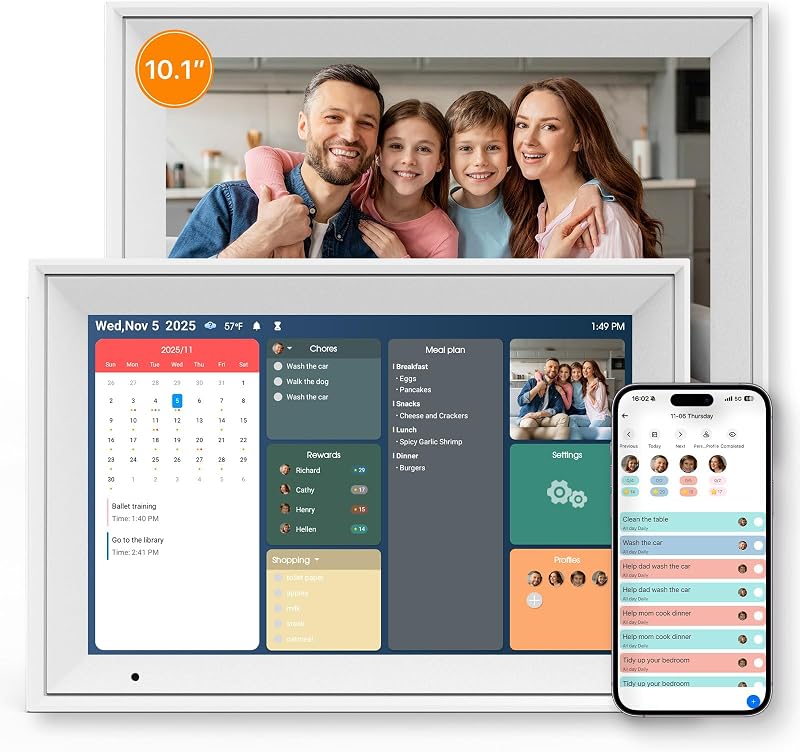
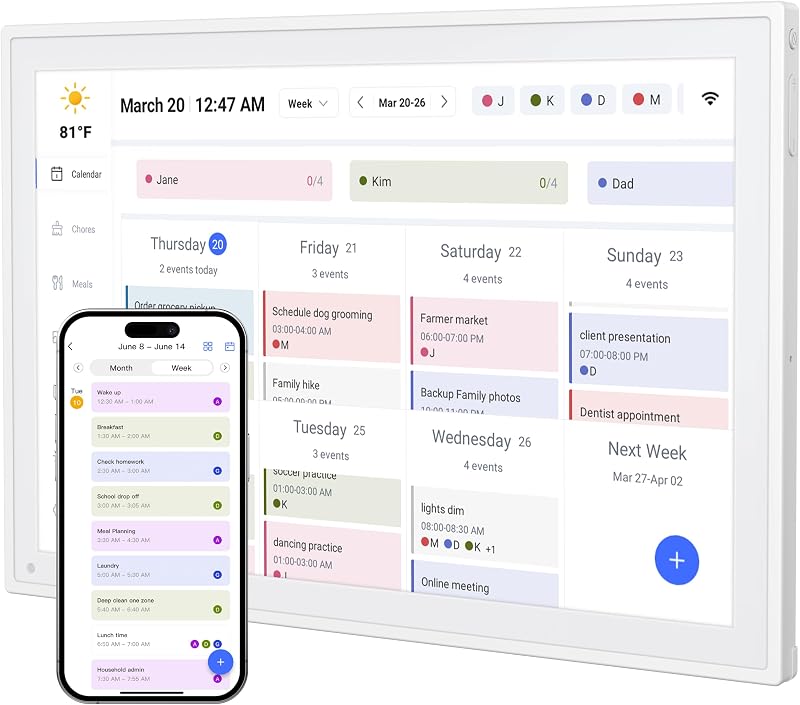
Product description The video showcases the product in use.The video guides you through product setup.The video compares multiple products.The video shows the product being unpacked. KEVZEZY Digital Calendar Previous page Next page Previous page Next page Previous page Office Assistant Next page Previous page Next page How to Manage Family Schedules with the Calendar Keep your entire family’s schedule organized with the MWE Digital Calendar. In this video, we’ll show you how to create a new event, assign it to a family member, set the time and reminder, and view everyone’s plans at a glance. The video showcases the product in use.The video guides you through product setup.The video compares multiple products.The video shows the product being unpacked. How to Manage Family Schedules with the Calendar Setting Up Tasks & Point Rewards for Kids Turn daily responsibilities into positive habits with the Tasks feature. Learn how to create a task in the MWE Calendar mobile app, assign it to a family member, add an emoji and point reward, and sync it instantly with your digital calendar. Make progress fun and motivating with personalized rewards. This video shows you how to create a custom reward in the mobile app, set the required points, assign it to a family member, enable repeat redemption. The video showcases the product in use.The video guides you through product setup.The video compares multiple products.The video shows the product being unpacked. Setting Up Tasks & Rewards for Kids Organizing Your To-Dos & Checklists Stay on top of household routines with flexible, easy-to-use lists. Learn how to create a color-coded checklist, add items and sections, organize related tasks, and check off completed items—all from your MWE Digital Calendar. The video showcases the product in use.The video guides you through product setup.The video compares multiple products.The video shows the product being unpacked. Organizing Your To-Dos & Checklists Building Your Digital Cookbook: Recipe Management Keep all your favorite recipes organized and ready whenever inspiration strikes. In this video, you’ll learn how to browse recipe categories and save a new recipe with its ingredients, cooking instructions, and meal type. The video showcases the product in use.The video guides you through product setup.The video compares multiple products.The video shows the product being unpacked. Building Your Digital Cookbook: Recipe Management Smart Meal Planning and Grocery List Sync Plan your family’s meals ahead of time with the Meals feature. Discover how to assign saved recipes to different days, add multiple dishes, and send recipe ingredients directly to your grocery list for easier shopping and meal preparation. The video showcases the product in use.The video guides you through product setup.The video compares multiple products.The video shows the product being unpacked. Smart Meal Planning and Grocery List Sync Displaying Memories: Photo & Screensaver Guide Turn your Kevzezy Digital Calendar into a beautiful electronic photo album. Learn how to upload photos from your phone, create and organize custom albums, sync them with the calendar, and select an album to display as your personalized screensaver. The video showcases the product in use.The video guides you through product setup.The video compares multiple products.The video shows the product being unpacked. Displaying Memories: Photo & Screensaver Guide Which calendar platforms can this digital calendar sync with? It supports synchronization with Google Calendar, Apple Calendar/iCloud, and Outlook, allowing your family’s schedules to appear together on one easy-to-read display. Can family members add or update events from their phones? Yes. Family members can add or update events from their connected mobile devices, and the changes will sync to the digital calendar through Wi-Fi. How does the chore chart help organize the family? You can assign chores to different family members, track completed tasks, and use rewards to make responsibilities more engaging for children. Does it include meal-planning and shopping-list features? Yes. You can organize weekly meals, display recipes and ingredients, and create grocery or household shopping lists from one central screen. Is this only a digital calendar? No. It combines a touchscreen family calendar, chore chart, task manager, reminders, meal planner, lists, and digital photo frame in one space-saving desktop device.
Agregás al carrito
Sumás este y otros productos que querés traer.
Cotizás el envío
Calculamos flete aéreo y aranceles a Argentina.
Confirmás y pagás
Un asesor te contacta con el link de pago.
Lo recibís en casa
Tracking en tiempo real. Aduana incluida.
Los mejor puntuados del mismo tipo de producto