Cargando el producto…
Precio desde
$ 49.130
+ flete y aranceles — se calculan al cotizar
Color
Compra protegida
Puerta a puerta
Aduana incluida
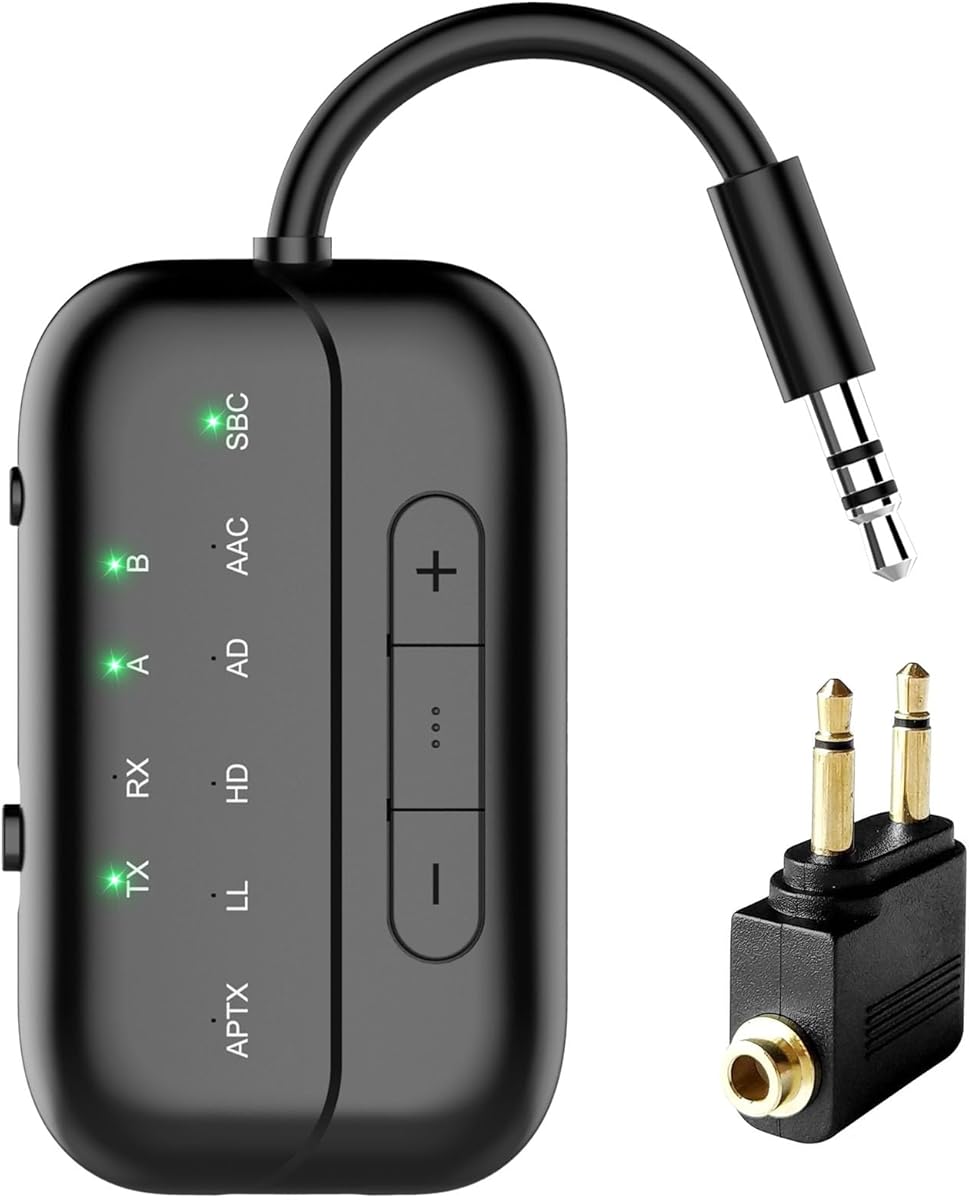
Product description The video showcases the product in use.The video guides you through product setup.The video compares multiple products.The video shows the product being unpacked.Video Player is loading.Click to play videoPlayMuteCurrent Time 0:00/Duration 0:46Loaded: 6.53%0:00Stream Type LIVESeek to live, currently behind liveLIVERemaining Time -0:46 1xPlayback RateChaptersChaptersDescriptionsdescriptions off, selectedCaptionsCaptions off, selectedAudio Trackdefault, selectedFullscreenThis is a modal window. aplus content video Before You Buy, Please Note: B101 Pro Bluetooth Transmitter is not suitable for live music, musical instruments, or karaoke. We do not recommend using it for electronic pianos or guitars that require 2.4G transmission for audio synchronization. Previous page Next page Previous page Next page 1 TX Mode - Airplane 2 TX-Pair 2 Headphones 3 TX Mode---Connect TV 4 TX Mode-Gaming 5 RX Mode - Car Audio About sound delay. If your headphones do not support aptX-LL/Adaptive technology, audio latency may occur. Not suitable for live music. Do not recommand use the B101 on music instrument like electronic piano or guitars, audio latency may occur. AirPods Series Apple earbuds (such asAirPods) support the SBC encoding format when connecting to devices Dual Link Mode Audio Format In Dual Link mode (connecting with 2 headphones simultaneously), the audio format will be limited to SBC only, and you cannot change it to other formats. How to reset the B101? When the device is powered on, press and hold the "P/R" key for 8 seconds. All LED lights will illuminate simultaneously, indicating a successful reset. How to connet to you TV? 1.Open your Bluetooth headphones or speaker and set it to Bluetooth pairing mode 2.Set the B101 to "TX" mode, double-click the "P/R" button to enter pairing mode; the "TX" indicator light will flash rapidly. When the "TX" and "A" indicator lights are on simultaneously, pairing is successful. 3.Insert the 3.5mm audio cable from the device into the TV's audio output jack. If your TV lacks an audio output jack, use the RCA audio cable from the packaging, inserting it into the TV's audio output jack No sound from TV? Please ensure that the aux cable is securely plugged into the "AUDIO OUT" or headphone jack on your TV, and confirm that both devices are successfully paired. Then, adjust the TV's sound settings from "TV speaker" to "Audio out." Does it fit AirPods 3 &Pro 2? Certainly! You can use these, as well as all other versions of AirPods, with Bluetooth transmitters. Ensure your AirPods are updated to the latest firmware version. If you encounter difficulties connecting one or both earpieces, try resetting both the AirPods and the B101 transmitter, then pair them again. To reset the B101, power on and press the "P/R" button for 8 seconds until all lights illuminate, indicating a successful reset. How to pair AirPods with B101? 1, Place the AirPods in the charging case. Open the lid. Press and hold the button on the back of the charging case until the case's light flashes white. 2,Set the B101 to "TX" mode,Double-click the "P/R" button to enter pairing mode, the TX indicator light will flash rapidly. When both the "TX"and "A" indicator lights are on simultaneously, pairing is successful. aptX low latency in TX mode? The airplane Bluetooth adapter features support for aptX-LL low-latency decoding technology (<40ms) in TX mode,if you encounter significant delays, please first check the audio source and ensure that your device also supports aptX-LL. Haven't been able to connect? If there are a lot of Bluetooth signals around you, please clear the pairing and then reconnect your own device. Suddenly stopped working? Please check if there are any other Bluetooth devices nearby, such as your phone's Bluetooth? Sometimes, the headphones might be occupied by the phone's Bluetooth, causing it to turn off unexpectedly. Please try turning off the Bluetooth on your phone. We've encountered this issue ourselves while using Bluetooth devices; it's a common occurrence with Bluetooth devices. Only one ear works? Please turn off the transmitter and then turn it back on. This may be because the earbuds are not paired correctly. I suggest placing both earbuds back into the charging case to ensure they are fully charged. Then, wait for them to pair with each other. You should see a confirmation light or hear a sound indicating successful pairing. Once the left and right earbuds are successfully paired, you can proceed to pair them with the wireless audio receiver/transmitter. What's in the box? 1 x Bluetooth Transmitter Receiver; 1 x Audio connector for aircraft;1 x USB charging cable (21.5 inches); 1 x 3.5mm Audio Female Plug; 1 x RCA Audio Cable (9 inches); 1 x User Manual; 1 x Lanyard. Beeitzie Bluetooth Adapter Transmitter/Receiver Add to Cart Transmitter/Receiver Add to Cart Transmitter/Receiver Add to Cart Transmitter/Receiver Add to Cart Transmitter Add to Cart Transmitter Add to Car
Agregás al carrito
Sumás este y otros productos que querés traer.
Cotizás el envío
Calculamos flete aéreo y aranceles a Argentina.
Confirmás y pagás
Un asesor te contacta con el link de pago.
Lo recibís en casa
Tracking en tiempo real. Aduana incluida.
Lo que suele llevarse para tu celular · un solo envío para todo
Los mejor puntuados del mismo tipo de producto

![AINOPE Type C Cable [2-Pack, 6.6ft] 3.1A Type C Charger Fast Charging Right Angle, Resistant Nylon Braided S9 Charger Compatible with Galaxy S10 S9 Plus S21, Note 10 9 LG, USB C Cable](https://m.media-amazon.com/images/I/81OQft0vzkL._AC_SL800_.jpg)

![Syncwire Cell Phone Ring Holder Stand [2 Pack], 360 Degree Rotation Finger Ring Kickstand with Polished Metal Phone Grip for Magnetic Car Mount Compatible with iPhone, Samsung, LG, Sony, HTC | 360° Rotation, Mini Size, All Metal, Strong Adhesive, Finger Ring Kickstand , for Smartphones](https://m.media-amazon.com/images/I/61rzsM-OVbL._AC_SL800_.jpg)