Cargando el producto…

Precio de origen
$ 240.317
$ 252.967
+ flete y aranceles — se calculan al cotizar
Compra protegida
Puerta a puerta
Aduana incluida
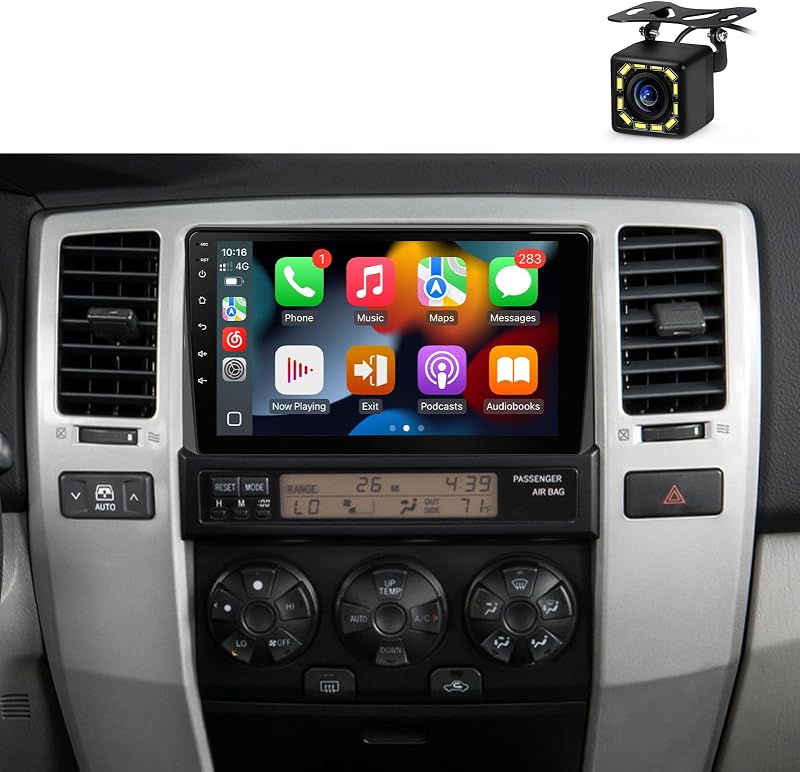
Product description 7" Wireless Carplay Android Auto Car Stereo for Toyota 4Runner 2003-2009, Tundra 2003-2006, Sequoia 2005-2007, Highlander 2001-2007, RAV4 2001-2005 For Toyota Radio Stereo: 4runner 2003 2004 2005 2006 2007 2008 2009; RAV4 2001 2002 2003 2004 2005;Tundra 2003 2004 2005 2006;Sequoia 2005 2006 2007;Highlander 2001 2002 2003 2004 2005 2006 2007;Camry 2002 2003 2004 2005 2006;MR2 2000 2001 2002 2003 2004 2005;FJ Cruiser 2007 2008 2009 2010 2011 2012 2013 2014;Echo 2000 2001 2002 2003 2004 2005;Celica 1994 1995 1996 1997 1998 1999 2000 2001 2002 2003 2004 2005; Android 13.0 with 2GB RAM + 32GB Storage: Experience smooth performance with Android 13, 2GB RAM, and 32GB storage for quick app switching and lag-free use.CarPlay & Android Auto (Wireless/Wired): Easily connect your phone for hands-free calls, navigation, and music via wireless or wired CarPlay/Android Auto.Integrated GPS Navigation: Stay on track with free, offline maps that work both online and offline.5G WiFi Connectivity: Browse, stream, and download faster with reliable 5G WiFi support.Bluetooth Connectivity: Make hands-free calls and stream music wirelessly with Bluetooth.High-Resolution Rearview Camera: Reverse safely with a wide-angle, high-res rearview camera.7 Inch HD Split Screen Display: View maps and music side by side on a sharp 7-inch HD display.FM Radio + RDS Features: Tune into FM (87.5–108 MHz) stations with live track and traffic updates.Built-in USB Ports: Charge devices and play media with built-in USB ports.Advanced Sound with DSP: Customize sound with DSP and EQ for richer audio.Steering Wheel Control Integration: Control music, volume, and calls from the steering wheel for safer driving.Easy Plug & Play Setup: Install easily with a plug-and-play setup, no wiring modifications needed. Wireless/Wired CarPlay & Android Auto Easily sync your Toyota 4Runner head unit stereo to access Google Maps, Spotify, and more. Enjoy hands-free calls, smooth navigation, and music streaming for a safer and more enjoyable drive. High-Speed 5G WiFi Hotspot With built-in 5G WiFi, enjoy fast streaming, real-time map updates, and reliable internet access—perfect for long trips or daily commutes in your Toyota 4Runner 2003 car radio. Bluetooth Connectivity Pair your phone with your Toyota 4Runner 2009 car radio for easy, hands-free calls and crystal-clear music streaming. Stay focused on the road with the convenience of wireless connectivity. Built-in GPS Navigation Navigate with ease using the built-in GPS system. Whether you're exploring the city or hitting the trails, offline maps keep you on track—ideal for your Toyota 4Runner stereo. EQ/DSP & HD Display Customize your sound with DSP noise reduction and EQ tuning for clear, full audio. The Toyota Sequoia & Highlander radio system features an HD touchscreen, offering smooth control and vibrant visuals. FM Radio & Split-Screen Mode Tune into FM radio for live updates on news, music, and traffic. Use the split-screen feature to view navigation and entertainment at the same time on your double-DIN car stereo. Steering Wheel Control Compatibility Control your music, navigation, and calls directly from the steering wheel with the Toyota 4Runner stereo—keeping your hands on the wheel and your focus on the road. HD Rearview Camera The Bluetooth car stereo comes with an HD rearview camera, giving you a clear, wide-angle view when reversing, making parking and backing up easier and safer. Easy Plug & Play Installation Upgrade your Toyota 4Runner stereo accessories hassle-free. No tools required—simply connect it to your vehicle's existing connectors for a smooth, straightforward setup. Regarding some issues of installation and use, we have summarized the following questions and answers (QA) for your reference: 1. Why Bluetooth cannot connect? Why are the Bluetooth and WiFi signals poor? Connect the reversing cable to the Bluetooth and Wi-Fi signal enhancer.Go into the Bluetooth settings, and then use the car radio to search for your phone's Bluetooth.Go to "Car-BT", enter the password "0000" to connect. If needed, delete previous connection records and try again. 2. How do I connect and disconnect CarPlay? Connect to Bluetooth, and Zlink will automatically connect to CarPlay.Close the Background connection and then will not automatically connect.Go to iPhone Settings > General > CarPlay > Zlink to enable or disable CarPlay. 3. Wireless Mirroring. iOS: Zlink5 - Wireless Mirroring - IPhone enable hotspot - Car radio Connect Wifi - select zj-airplay.Android: Zlink5 - Wireless Mirroring-install Zlink app - Connect Bluetooth & Turn on Personal Hotspot. 4. Why is the WiFi not working? When CarPlay is working, the Wi-Fi connection will be disconnected. Please Close the background connection and then will not automatically connect Carplay. 5. No signal for Rear Camera? Ensure the reverse parking sensor wires are properly connected.Select the correct camera format: Car Setting-Factory Setting(password
Agregás al carrito
Sumás este y otros productos que querés traer.
Cotizás el envío
Calculamos flete aéreo y aranceles a Argentina.
Confirmás y pagás
Un asesor te contacta con el link de pago.
Lo recibís en casa
Tracking en tiempo real. Aduana incluida.
Lo que suele llevarse para tu cámara · un solo envío para todo
Los mejor puntuados del mismo tipo de producto
Mismo tipo de producto y precio parecido

![[Older Version] SanDisk 256GB Ultra microSDXC UHS-I Memory Card with Adapter - 100MB/s, C10, U1, Full HD, A1, Micro SD Card - SDSQUAR-256G-GN6MA](https://m.media-amazon.com/images/I/61mDTjSOe8L._AC_SL800_.jpg)

![PEHAEL for iPhone 17 Privacy Screen Protector+Camera Lens Protector | 3+3 Pack, Installation Frame, Cleaning kits, Anti-Spy Private, Anti-Scratch, 9H Tempered Glass, Case Friendly, [6.3 inch]](https://m.media-amazon.com/images/I/61UXu7cBl7L._AC_SL800_.jpg)



![[8Core 64GB] Estéreo de auto Android para Toyota Tacoma JBL 2005-2015 | Radio Tacoma con pantalla táctil de 9 pulgadas con Carplay Android Auto Bluetooth WiFi GPS AM FM - Cámara incluida](https://m.media-amazon.com/images/I/718DJ1etZvL._AC_SL800_.jpg)

![[4+64G] para Toyota Camry 2006-2011 (con JBL) Android 15 estéreo de auto, pantalla táctil Incell de 9 pulgadas Radio CarPlay/Android Auto GPS WiFi Bluetooth FM/RDS+ AHD cámara de respaldo](https://m.media-amazon.com/images/I/718GFyJJ5ML._AC_SL800_.jpg)






![SIXTOP [Canbus incluido] 2+64G Android estéreo de auto para Mitsubishi Lancer 2008-2017 inalámbrico CarPlay Android Auto 10.1 pulgadas pantalla táctil Bluetooth navegación GPS WiFi/FM/RDS SWC AHD cámara trasera](https://m.media-amazon.com/images/I/71TSQryEAwL._AC_SL800_.jpg)