Cargando el producto…

Precio desde
$ 32.723
+ flete y aranceles — se calculan al cotizar
Color
Compra protegida
Puerta a puerta
Aduana incluida
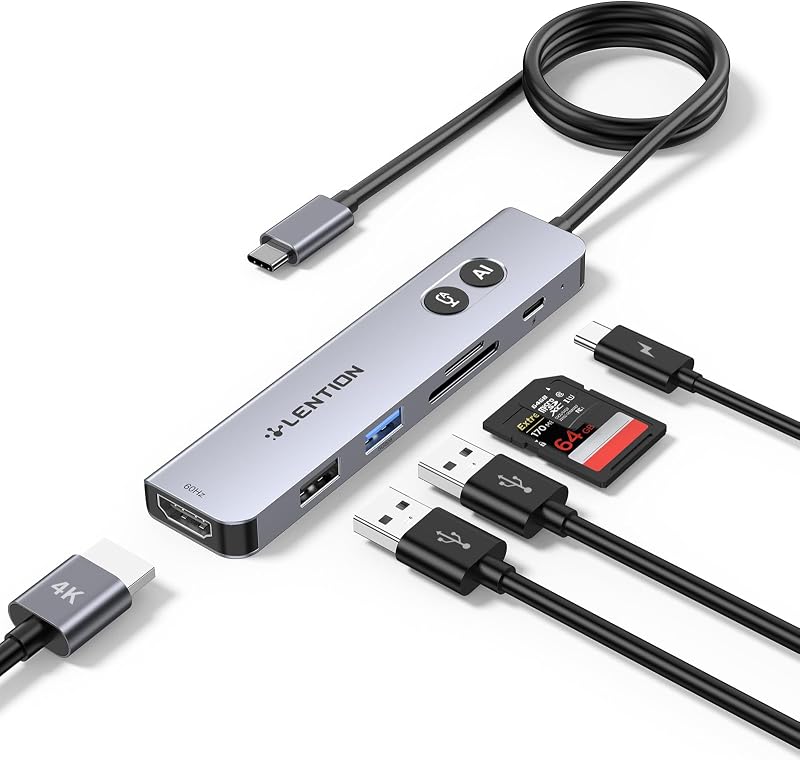
Product description Previous page Next page 1 Crystal-Clear 4K HDMI 2 Mirror&Extend Mode 3 5Gbps Fast Transfer Data 4 100W PD Fast Charging 5 SD&TF Card Reader Previous page Next page 1 Wide Compatibility 2 Wide Compatibility 3 Check Your USB-C Port Previous page Next page 1 Big Screen Gaming 2 Entertainment essentials 3 Maximize Home Office 4 Productivity on the Go Please Read Carefully Before Purchasing ✔️Check Before Buy Your device’s USB-C port must support 𝐯𝐢𝐝𝐞𝐨 𝐨𝐮𝐭𝐩𝐮𝐭 (𝐃𝐢𝐬𝐩𝐥𝐚𝐲𝐏𝐨𝐫𝐭 𝐀𝐥𝐭 𝐌𝐨𝐝𝐞). USB-C ports that only support charging or data transfer will NOT output video via HDMI. ✔️HDMI Display Behavior HDMI display recognition may take a few seconds on first connection. If your monitor has multiple input sources, please manually select the correct HDMI input. ✔️Full Charging Performance. Supports up to 𝟏𝟎𝟎𝐖 𝐏𝐃 𝐢𝐧𝐩𝐮𝐭 (𝐮𝐩 𝐭𝐨 𝟗𝟎𝐖 𝐨𝐮𝐭𝐩𝐮𝐭 𝐭𝐨 𝐭𝐡𝐞 𝐡𝐨𝐬𝐭 𝐝𝐞𝐯𝐢𝐜𝐞). Your device, charger, and charging cable must all support the Power Delivery (PD) protocol. Charger and cable are not included. ✔️About Audio Output (𝟏)If the sound is not transmitted to the TV or Monitor, please try to choose your TV or Monitor as the audio output device. (𝟐)For Mac: Settings → System Preferences → Sound → Output → Select your TV or Monitor. ✔️Not Compatible Devices Not compatible with Lightning devices or gaming consoles, including iPhone/iPad (Lightning), Xbox, PS5/PS4, or similar devices. Note To fully utilize the display capabilities of the iPad Pro (M1), please connect a USB 3.0 drive to the 5Gbps USB-A port, and then connect the hub to the iPad Pro to display the image. Note For the most stable HDMI connection, we recommend connecting the PD power adapter before plugging in HDMI cables or other peripherals. Note Brief HDMI reconnection may occur when plugging or unplugging the PD charger as the hub reallocates power. This is normal and does not affect performance or lifespan. Q1 Why is there no image or blinking on HDMI? A2 1. Make sure your device’s USB-C port supports DP Alt Mode 2. Ensure the hub and HDMI cable are firmly connected 3. Adjust your device’s display resolution 4. Use a high-quality 4K@60Hz HDMI cable 5. Select the correct monitor input source manually Q2 Why isn’t my laptop charging through the PD port? A2 1. Connect the power adapter to the hub before connecting your laptop 2. Confirm your laptop USB-C port supports PD charging 3. Use a 100W or higher power adapter for best performance 4. Reconnect the hub if charging does not start immediately Acer USB Hub Acer 7 in 1 USB Hub Buying Options Acer 4 in 1 USB C Hub Buying Options Acer 7 in 1 USB C Hub Buying Options Acer 8 in 1 USB Hub Buying Options Acer 11 in 1 USB C HUB Buying Options Acer 9 in 1 USB C HUB Buying Options Acer USBC to HDMI Adapter Buying Options Customer Reviews 4.6 out of 5 stars 6,482 4.2 out of 5 stars 230 4.6 out of 5 stars 94 4.5 out of 5 stars 401 4.2 out of 5 stars 302 4.5 out of 5 stars 1,384 4.6 out of 5 stars 969 Number of Ports 7 4 7 8 11 9 1 Input USB-C USB-C USB-C USB-C USB-C USB-C USB-C USB-A Data Port 2 x 5Gbps ✘ 2 x 5Gbps 2 x 5Gbps 2 x 5Gbps+1 x 480Mbps 3 x 5Gbps ✘ USB-C Data Port 1 x 5Gbps 2 x 10Gbps 1 x 5Gbps 2 x 10Gbps 2 x 10Gbps ✘ ✘ USB-C PD Input 100W 100W 100W 100W 100W 100W ✘ Ethernet Port ✘ ✘ ✘ ✘ 1000Mbps 1000Mbps ✘ HDMI Port 1 x HDMI 4K@30Hz 1 x 4K@60Hz Video Output 1 x HDMI 4K@60Hz 1 x HMDI 4K@60Hz 1 x HDMI 4K@60Hz 1 x HDMI 4K@30Hz 1 x 4K@60Hz SD/TF 1*SD+1*TF ✘ 1*SD+1*TF 1*SD+1*TF 1*SD+1*TF 1*SD+1*TF ✘ More Ways to Connect Previous page Acer 9-in-1 USB-C Hub Hyper-speed 1000Mbps Ethernet keeps you connected without lag. Seamlessly streams 4K@30Hz video directly to high-definition TVs, monitors, and projectors. Explore Acer 8-in-1 USB-C Hub Unlock stunning 4K@60Hz visuals and deliver crystal-clear clarity for immersive entertainment. Enhance your efficiency with blazing-fast 10Gbps data transfer. Explore Acer 11-in-1 USB-C Hub Hyper-speed 1000Mbps Ethernet keeps you connected without lag. Experience cinematic 4K@60Hz output on an external display, transfer data at 10Gbps across 2 USB-C ports. Explore Next page
Agregás al carrito
Sumás este y otros productos que querés traer.
Cotizás el envío
Calculamos flete aéreo y aranceles a Argentina.
Confirmás y pagás
Un asesor te contacta con el link de pago.
Lo recibís en casa
Tracking en tiempo real. Aduana incluida.
De la misma marca, empezando por lo más reseñado
Los mejor puntuados del mismo tipo de producto
Mismo tipo de producto y precio parecido


![Anker Hub USB de 4 puertos con transferencia de datos de 5 Gbps, concentrador USB 3.0 múltiple, divisor USB para computadora portátil, extensor para un puerto portátil, PC, computadora de escritorio y más [carga no compatible] (USB-A de 0,7 pies) (paquete de 2)](https://m.media-amazon.com/images/I/51gQWHVLMGL._AC_SL800_.jpg)