Cargando el producto…

Precio de origen
$ 267.404
+ flete y aranceles — se calculan al cotizar
Compra protegida
Puerta a puerta
Aduana incluida
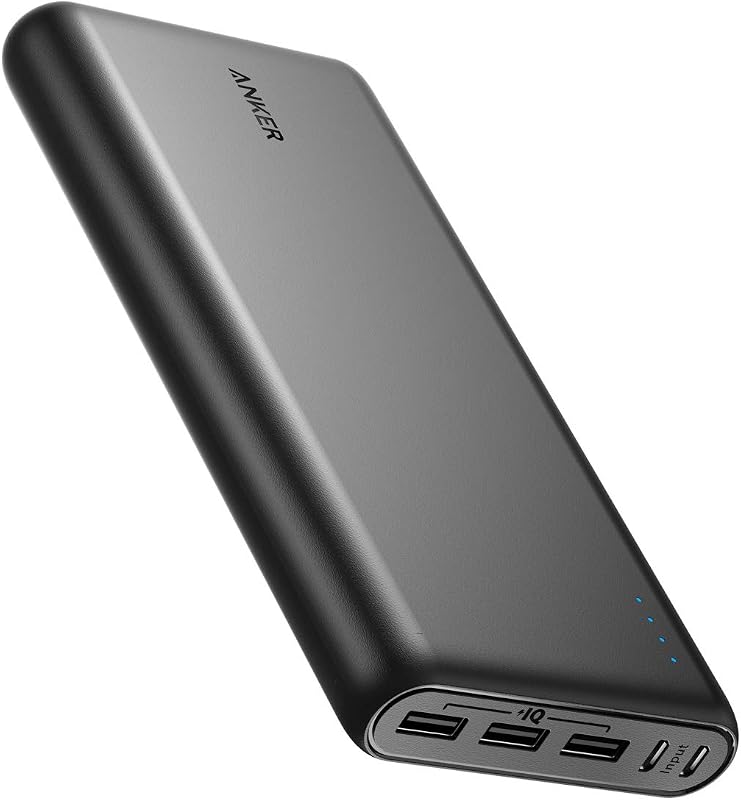
Product description Previous page Anker Reserve Power Bank Light the Way, Power All Day Anker Reserve Power Bank Light the Way, Power All Day Anker Reserve Power Bank Light the Way, Power All Day Next page 1 Outdoors 2 In Car 3 Home Backup Model Number: A1294 Colossal Capacity to Power Multiple Devices With a massive 60,000mAh capacity or 192Wh, Anker 548 Power Bank enables you to charge your devices multiple times, giving you total peace of mind during blackouts or when you're off-grid. Illuminate Your Space During Outages The retractable emergency light provides auto lighting to help you locate the charger quickly. Adjust the light to use two comfortable levels of brightness or use an SOS mode for emergencies. Durable and Long-Lasting The power bank boasts a lifespan that is 10× longer than other models. It retains an impressive 85% of its charge even after one year without recharging, ensuring it is always ready whenever you need it. Smart Display for Easy Monitoring A smart display shows important information such as battery level, input and output power, remaining charge time, charging modes, and more. Note 1 When in auto mode, the power bank must be connected to a power source via the USB-C 1 port to activate emergency lighting. Note 2 The power bank is compatible with a solar charger featuring an XT-60 connector, ranging from 10-24V. Note 3 When using a single port, the maximum output is 60W for USB-C and 18W for USB-A. When multiple ports are used simultaneously, the total output varies between 20W (minimum) and 87W (maximum). Note 4 Using multiple ports will result in varied output power. Please refer to the detailed input / output specifications on the bottom of the product Note 5 Power loss occurs because the power bank remains inactive during transportation and storage. Generally, it will lose 20% of its charge over three months. Note 6 To test functionality, please charge the power bank from 0% to 100% and then discharge it from 100% to 0%. If the battery percentage drops quickly from 70% to 30% after this cycle, you can return it. Anker 60K Power BankPower Add to Cart Anker 26250mAh Power Bank Add to Cart Anker 20100mAh Power Bank Add to Cart Anker 2.4K Power Bank Add to Cart Anker 25K Power Bank Add to Cart Anker Prime Power Bank Add to Cart Anker 20K Power Bank Add to Cart Customer Reviews 4.5 out of 5 stars 2,048 4.6 out of 5 stars 1,446 4.7 out of 5 stars 575 4.4 out of 5 stars 17,411 4.5 out of 5 stars 10,916 4.3 out of 5 stars 3,386 4.6 out of 5 stars 8,832 Price $146.90$146.90 $179.98$179.98 $149.99$149.99 $79.99$79.99 $119.99$119.99 $149.99$149.99 $59.98$59.98 Series Reserve Premium Premium Premium Premium Premium Basic Main Feature 60,000mAh, Foldable LED Lamp 300W,TurboBoost,AppControl 220W,TurboBoost,AppControl PD 3.1, Max 140W Built-In C Cable*2 Anker Prime 27K 250W 87W Max Fast Charging Output Ports USB-C*2, USB-A*2 2 USB-C+1 USB-A 2 USB-C+1 USB-A 2 USB-C, 1 USB-A Built-in C Cable*2 + 1C1A 2 USB-C + 1 USB-A Built-In C Cable + 1C1A Recharging Time ~ 4 Hours (60W) ~1.06 Hours(134W) ~1.43 Hours(100W) ~1 Hour (140W) ~2 Hours(100W) ~0.72 Hours (140W) ~1.5 Hours Size 4.59 x 4.59 x 8.17 inches 6.29×1.49×2.47 in 5.78 x 1.75 x 1.96 in 6.13*2.15*1.95 in 6.18 * 1.93 * 2.12 in 6.37 * 2.24 * 1.96 in 6.2 x 2.89 x 1.02 in Weight 5.1 lb 1.32lb 1.24lb 630g/1.39lb 595g/21oz/1.31lb 667g/24oz/1.47lb 0.97lb Why does the charging pause for a few seconds when I plug in another device? The power bank reallocates power internally, which takes a few seconds to complete. This is a normal process, so there is no need to worry. Why does the device show that it's charging, but the displayed power remains at 0W? The power bank has a 0.1W resolution. For devices like headphones or smartwatches with high battery levels, the charging power may fall below 0.1W. Rest assured, the power bank continues to charge the device even if the displayed power shows 0W. Why does the laptop's battery level decrease when connected to a power bank for charging? The power bank's USB-C port supports bidirectional charging. Ensure your laptop is charging by checking after connecting the cable and disconnecting once fully charged. How do I enable the "light" feature during power outages? 1. Press the "light" button to turn on the screen. 2. Long press the "light" button to activate. "Auto" indicates it's on. 3. Connect to a power source via USB-C 1. 4. Place where light is unobstructed. 5. Light auto-activates during power outages. How can I adjust the screen timeout settings? 1. When idle with a battery level circle, press the SOS button twice to enter the settings page. 2. Press and hold for 2 seconds to switch between different screen timeout settings. 3. Press the SOS button twice to exit the settings page. See More
Agregás al carrito
Sumás este y otros productos que querés traer.
Cotizás el envío
Calculamos flete aéreo y aranceles a Argentina.
Confirmás y pagás
Un asesor te contacta con el link de pago.
Lo recibís en casa
Tracking en tiempo real. Aduana incluida.
De la misma marca, empezando por lo más reseñado
Los mejor puntuados del mismo tipo de producto
Mismo tipo de producto y precio parecido
![Anker Hub USB de 4 puertos con transferencia de datos de 5 Gbps, concentrador USB 3.0 múltiple, divisor USB para computadora portátil, extensor para un puerto portátil, PC, computadora de escritorio y más [carga no compatible] (USB-A de 0,7 pies) (paquete de 2)](https://m.media-amazon.com/images/I/51gQWHVLMGL._AC_SL800_.jpg)




![Cable USB C Anker [paquete de 2, 6 pies], cable de carga rápida tipo C biotrenzado de 240 W para iPhone 17 Series, MacBook Pro 2020, iPad Pro y más (USB 2.0, negro)](https://m.media-amazon.com/images/I/81B9265yaXL._AC_SL800_.jpg)