Cargando el producto…

Precio de origen
$ 94.620
+ flete y aranceles — se calculan al cotizar
Compra protegida
Puerta a puerta
Aduana incluida
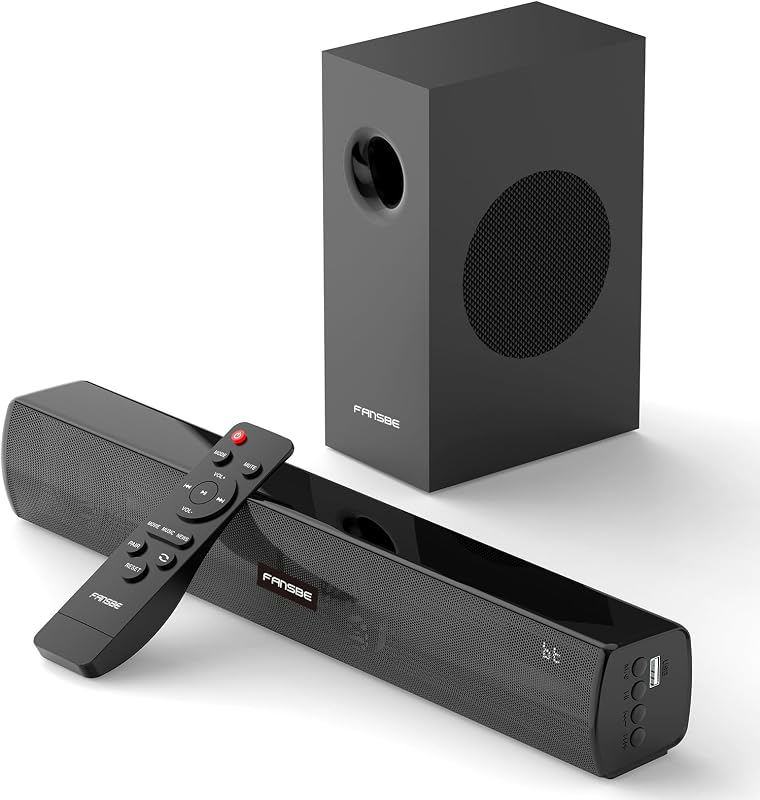
Product description The video showcases the product in use.The video guides you through product setup.The video compares multiple products.The video shows the product being unpacked.Video Player is loading.Click to play videoPlayMuteCurrent Time 0:00/Duration 0:49Loaded: 6.13%0:00Stream Type LIVESeek to live, currently behind liveLIVERemaining Time -0:49 1xPlayback RateChaptersChaptersDescriptionsdescriptions off, selectedCaptionsCaptions off, selectedAudio Trackdefault, selectedFullscreenThis is a modal window. 2.2ch Sound Bar for Smart TV Previous page Next page 1 Immersive Sound 2 3 EQ Modes 3 Bluetooth 5.3 Previous page Next page 1 Powerful Bass 2 Assembly Steps 3 ARC Connection 4 Cable Interface Methods for Bluetooth connection and LED light status display 1. Upon powering on, pairing will automatically begin when switching to Bluetooth. The LED will display the Bluetooth "bt" symbol flashing slowly, indicating successful Bluetooth pairing. 2. The LED will display the Bluetooth "bt" symbol solid, indicating a successful connection between the phone and the device. 3. Press and hold the "SOURCE" button on the device for 3 seconds, or press and hold the "BT" button on the remote control for 3 seconds, or turn off Bluetooth on the device. The LED will display the Bluetooth "bt" symbol flashing slowly, indicating a Bluetooth disconnection. 4. After the Soundbar is powered off and then restarted, the LED will display the Bluetooth "bt" symbol flashing slowly and then solid, indicating automatic Bluetooth reconnection to the phone. 5. Disconnecting Bluetooth at a distance and returning to a distance of 3 meters will display the Bluetooth "bt" symbol flashing slowly and then solid, indicating a successful Bluetooth reconnection. 6. After disconnecting Bluetooth, the LED will display the Bluetooth "bt" symbol flashing slowly, indicating entry into pairing mode. Troubleshooting: 1. If the connection fails, repeat the above steps. 2. If there is no sound after connecting, delete the Bluetooth device name on your phone and repeat the above steps.
Agregás al carrito
Sumás este y otros productos que querés traer.
Cotizás el envío
Calculamos flete aéreo y aranceles a Argentina.
Confirmás y pagás
Un asesor te contacta con el link de pago.
Lo recibís en casa
Tracking en tiempo real. Aduana incluida.
Lo que suele llevarse para tu pantalla · un solo envío para todo
Los mejor puntuados del mismo tipo de producto
Mismo tipo de producto y precio parecido