Cargando el producto…

Precio desde
$ 81.896
+ flete y aranceles — se calculan al cotizar
Color
Compra protegida
Puerta a puerta
Aduana incluida
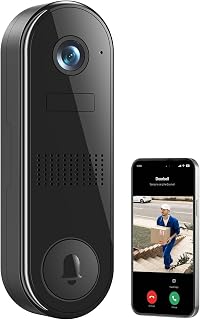
Product description The video showcases the product in use.The video guides you through product setup.The video compares multiple products.The video shows the product being unpacked.Video Player is loading.Click to play videoPlayMuteCurrent Time 0:00/Duration 0:42Loaded: 7.15%0:00Stream Type LIVESeek to live, currently behind liveLIVERemaining Time -0:42 1xPlayback RateChaptersChaptersDescriptionsdescriptions off, selectedCaptionsCaptions off, selectedEnglish (Automated)Audio Trackdefault, selectedFullscreenThis is a modal window. ieGeek Video Doorbell Camera No Subscription Previous page Next page Previous page Use male voices to warn people you don't accept, or use clown voices to make friends/children laugh. Send common phrases with one click Adjust detection sensitivity and area through APP, reduce useless alarms and avoid frequent disturb. Stand-alone and placeable chimes let you know visitors are coming no matter where you are at home. Ask Alexa to show you a live feed of your home security cameras outdoor through voice commands. Next page 1 Voice Changer 2 Voice Message 3 Custom Detection Plan 4 Wireless Indoor Chime 5 Work with Alexa Previous page Next page Previous page Why choose ieGeek Storage Service? Our Core Technology: Smarter, Not Harder.Dual Storage for Ultimate Security: We protect your data twice. Seamless Smart Home Integration: ieGeek doorbells, indoor or outdoor cameras, or baby monitors. IP66 Waterproof No more worrying about your doorbell being damaged due to bad weather. ieGeek Home Security System Manage your security camera device by same APP. (ieGeek Cam or CloudEdge) Home security is in your palm. Not Support 5G hz Wifi ieGeek Bell J9 Only work with 2.4G hz Wifi. Next page 3 Mintues to Complete Installation & Setting Install your micro memory card Please refer to the following steps: Insert pin into the hole at the bottom of the doorbellTake apart doorbell from bracketThe card slot is on the left side of doorbell The video showcases the product in use.The video guides you through product setup.The video compares multiple products.The video shows the product being unpacked.Video Player is loading.Click to play videoPlayMuteCurrent Time 0:00/Duration 0:20Loaded: 15.02%0:00Stream Type LIVESeek to live, currently behind liveLIVERemaining Time -0:20 1xPlayback RateChaptersChaptersDescriptionsdescriptions off, selectedCaptionsCaptions off, selectedEnglish (Automated)Audio Trackdefault, selectedFullscreenThis is a modal window. ieGeek Doorbell Camera Only Support 2.4G WI-FI Connection ieGeek Bell J9 doorbell only supports 2.4Ghz WIFI (Not support 5Ghz WIFI).Please ensure that the WiFi signal strength is above 80%. The first connection can be completed near the router.Please avoid using WiFi passwords with special characters. The video showcases the product in use.The video guides you through product setup.The video compares multiple products.The video shows the product being unpacked.Video Player is loading.Click to play videoPlayMuteCurrent Time 0:00/Duration 1:06Loaded: 4.55%0:00Stream Type LIVESeek to live, currently behind liveLIVERemaining Time -1:06 1xPlayback RateChaptersChaptersDescriptionsdescriptions off, selectedCaptionsCaptions off, selectedAudio Trackdefault, selectedFullscreenThis is a modal window. ieGeek Doorbell Camera Install doorbell to door/wall It is recommended that the doorbell be installed at a height of 4 feet (120 cm).Please avoid obstructions or reflective objects in front of the doorbell. The video showcases the product in use.The video guides you through product setup.The video compares multiple products.The video shows the product being unpacked.Video Player is loading.Click to play videoPlayMuteCurrent Time 0:00/Duration 0:25Loaded: 12.01%0:00Stream Type LIVESeek to live, currently behind liveLIVERemaining Time -0:25 1xPlayback RateChaptersChaptersDescriptionsdescriptions off, selectedCaptionsCaptions off, selectedEnglish (Automated)Audio Trackdefault, selectedFullscreenThis is a modal window. ieGeek Doorbell Camera Paring chime to doorbell Chime and the doorbell are paired by default. If you find that the connection is disconnected, you can refer to the video steps to pair them manually.One doorbell can be paired with multiple chimes. The video showcases the product in use.The video guides you through product setup.The video compares multiple products.The video shows the product being unpacked.Video Player is loading.Click to play videoPlayMuteCurrent Time 0:00/Duration 0:19Loaded: 15.81%0:00Stream Type LIVESeek to live, currently behind liveLIVERemaining Time -0:19 1xPlayback RateChaptersChaptersDescriptionsdescriptions off, selectedCaptionsCaptions off, selectedEnglish (Automated)Audio Trackdefault, selectedFullscreenThis is a modal window. ieGeek Doorbell Camera Why can't I connect my doorbell to WiFi? 1.ieGeek doorbell works with 2.4Ghz wifi(NOT SUPPORT 5Ghz WiFi). 2.Wifi signal is not good. It is recommended to use it in a location where the WiFi st
Agregás al carrito
Sumás este y otros productos que querés traer.
Cotizás el envío
Calculamos flete aéreo y aranceles a Argentina.
Confirmás y pagás
Un asesor te contacta con el link de pago.
Lo recibís en casa
Tracking en tiempo real. Aduana incluida.
Lo que suele llevarse para tu cámara · un solo envío para todo
De la misma marca, empezando por lo más reseñado
Los mejor puntuados del mismo tipo de producto
Mismo tipo de producto y precio parecido


![PEHAEL for iPhone 17 Privacy Screen Protector+Camera Lens Protector | 3+3 Pack, Installation Frame, Cleaning kits, Anti-Spy Private, Anti-Scratch, 9H Tempered Glass, Case Friendly, [6.3 inch]](https://m.media-amazon.com/images/I/61UXu7cBl7L._AC_SL800_.jpg)