Cargando el producto…
Precio desde
$ 123.781
+ flete y aranceles — se calculan al cotizar
Color
Compra protegida
Puerta a puerta
Aduana incluida
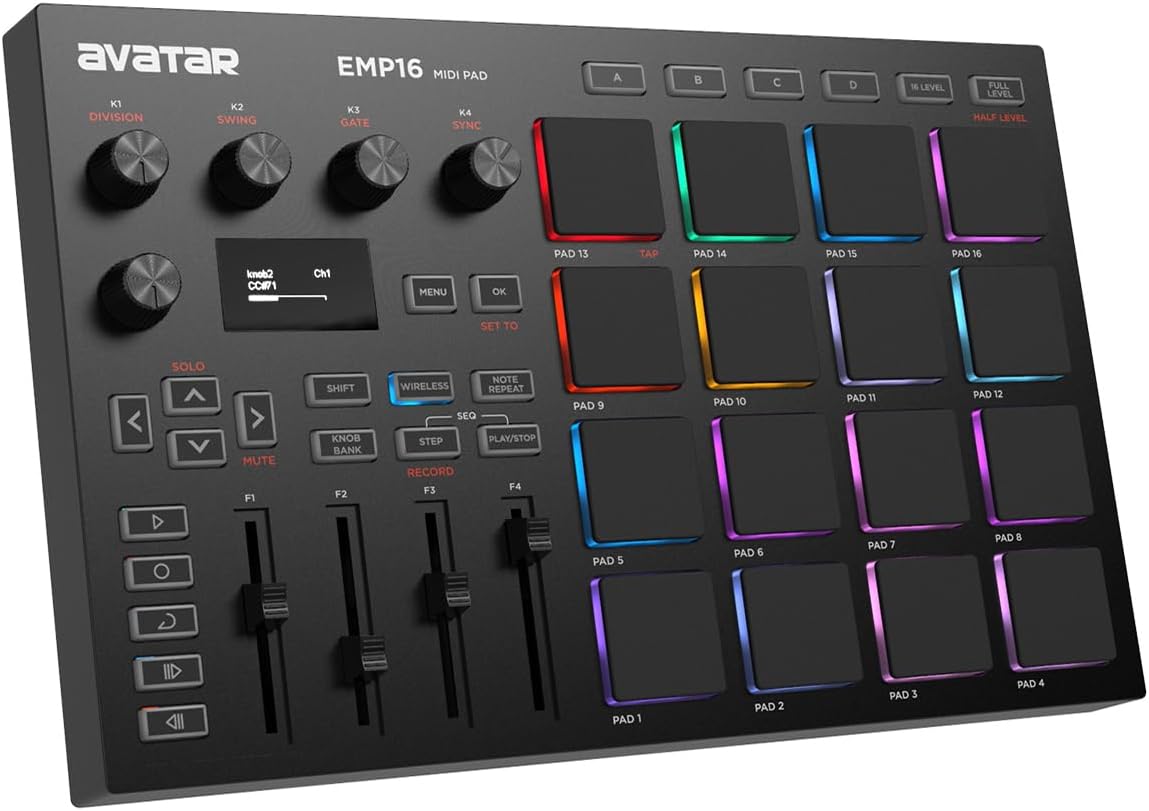
Product description Your Music Takes Control EMP16 MIDI PAD The Ultimate Beat Production Studio Controller Whether you’re a beginner looking to get into the exciting world of beat production or looking for the ultimate backup controller for your studio equipment, EMP16 is the perfect solution for playing and controlling both audio hardware and software. Communicate with other audio instruments like digital keyboard, synthesizer etc,. Also works with all popular apps including GarageBand, Logic, Studio One, Cubase, Ableton Live, FL Studio, Koala Sampler and more. At the heart of EMP16 is 16 velocity sensitive beat pads plus 4 banks, ideal for triggering drums, melodic samples, basslines and more. Equipped with 4 assignable faders, 5 assignable buttons and 4 assignable endless rotary knobs with a total of 12 assignable controls accessible via 3 banks. Previous page No Driver No Wire Nor OTG Wireless iOS Connection Insert AA batteries, press WIRELESS button, easily get wireless connection to DAW on iOS device/MAC Next page 1 Bluetooth 5.0 2 Plug and Play 3 What's In The Box How MIDI controller works MIDI controller communicates with other instruments and software by sending and receiving MIDI messages. This is not an audio signal, but rather a set of instructions that triggers another source to produce a sound or perform an action. Can EMP16 control several devices at the same time Yes, you sure can. Control the software on pc via USB cable. Control the software on iPad/iPhone/Mac via bluetooth. Control audio instrument via MIDI cable. Guide to connect EMP16 to DAW on iPhone/iPad wirelessly Step 1: Insert 2 AA batteries. Step 2: Power on the MIDI Pad, press WIRELESS button. Step 3: Enable the iPhone/iPad Bluetooth Setting. Step 4: Turn the Bluetooth Setting on DAW software. Step 5: Find the*MIDI PAD-01*, and toggle it to Connect. Guide to connect EMP16 to MAC wirelessly Step 1: Insert 2 AA batteries. Step 2: Power on the MIDI Pad, press WIRELESS button. Step 3: Enable Audio MIDI Setup, clik 'Window' and 'Show MIDI Studio'. Step 4: Light up Bluetooth symbol. Step 5: Find the*MIDI PAD-01*, and toggle it to Connect. How to deal with the mistriggering(like double triggering, phantom triggering etc,.)? Please refer the User Manual to edit the curves and set the minimum threshold to avoid mistriggering. DAW Software For Beginners Making Music
Agregás al carrito
Sumás este y otros productos que querés traer.
Cotizás el envío
Calculamos flete aéreo y aranceles a Argentina.
Confirmás y pagás
Un asesor te contacta con el link de pago.
Lo recibís en casa
Tracking en tiempo real. Aduana incluida.
De la misma marca, empezando por lo más reseñado
Los mejor puntuados del mismo tipo de producto
Mismo tipo de producto y precio parecido


![Novation Launchkey 25 [MK3] Controlador de teclado MIDI: integración perfecta con Ableton Live. Modo acorde, modo escala y arpegiador: todo el software que necesita para la producción musical](https://m.media-amazon.com/images/I/61dYS8kfFhL._AC_SL800_.jpg)





![Novation Launchkey Mini [MK3] — Controlador de teclado MIDI portátil, USB, de 25 teclas con integración DAW, modo de acordes y arpegiador — para producción musical](https://m.media-amazon.com/images/I/61pqbD+rOhL._AC_UL320_.jpg)