Cargando el producto…
Precio desde
$ 180.193
+ flete y aranceles — se calculan al cotizar
Color
Opción 2
Compra protegida
Puerta a puerta
Aduana incluida
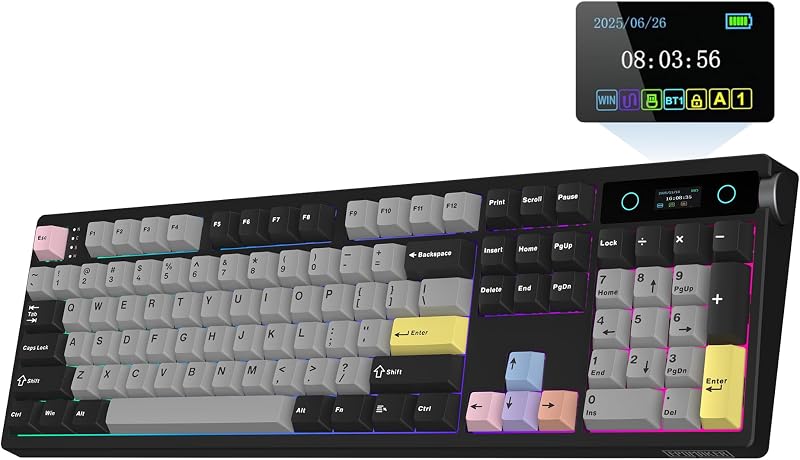
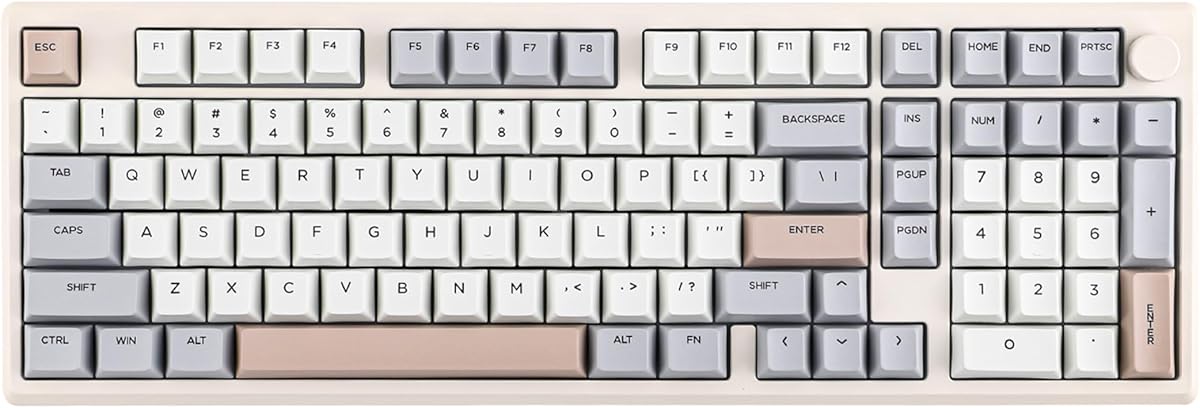
Product description EPOMAKER Galaxy100 Mechanical Keyboard in Aluminum with VIA Support Previous page Rechargeable Battery Relish in the enduring and stable performance of Galaxy100, with its outstanding 8000mAh battery. Fast & Responsive Response in mere milliseconds, be one step ahead in game and life. (USB 2ms; 2.4G 4ms; BT 15ms) Versatile Tri-Modes Enjoy the hassle-free wired mode, or the wireless convenience with 2.4 GHz and BT 5.0. Intuitive Control Configurable for pause, mute, RGB mode , and switch anything from brightness to volume. Work Across Systems Ideal for gaming and office, compatible with PC, Mac, and Android devices. (FN+A/S=Mac/WIN Mode) Next page Multi-Device Compatible Gaming Keyboard with Rechargeable Battery & Custom Roller 1 Long-Lasting Power 2 Low Latency 3 BT/2.4G/USB-C 4 Programmable Knob 5 Mac/WIN/Android Previous page CNC-cut & Sandblasted Aluminum Alloy Shell Thick and weighty for durability and stability. Top-notch in more than appearance. Sound-enhanced Gasket Poron/Foam/IXPE/EMDP/PET Stuffed with soft materials as cushions, the typing sound is dampened to a satisfying keystroke ASMR Flex-cut PC Plate Perfect Mix of Rigidity & Flexibility Flex-cut PC plate & Gasket design for unbeatable comfort that's supportive, tactile & soft. Stable & Smooth Typing Plate-Mounted Stabilizers Each keystroke is stable without shake, shock, or finger strain, perfect for various scenarios. Length*Width: 40.5*3.23cm Size Comparison of Galaxy70, Galaxy80 & Galaxy100 Only slightly longer than 75% layout, but comes with a fully functional numpad for numerical input. Next page 1 Premium Sound & Feel 2 Creamy & Thocky 3 Soft & Tactile Typing 4 Factory Lubed & Tuned 5 Compact 96% Layout Previous page Durable & Sleek Houses 101 keycaps in Cherry profile, made of grease-resistant PBT against daily wear. Experiment & Custom No soldering is needed, changing the switch is as simple as pinch, pull, and push. Maxium Control Endless possibilities in mapping key, editing automating repetitive macros, and customizing layers. N-key Rollover No chattering or unwanted double input, type multiple keys accurately simultaneously. Next page VIA Custom Keyboard with Hot-Swappable Switches & NKRO 1 Cherry Profile 2 Hot-swappable 3 VIA Software 4 Anti-ghosting 360° Showcasing: Switch Sound, Connectivity, Configuration and Package Content The video showcases the product in use.The video guides you through product setup.The video compares multiple products.The video shows the product being unpacked.Video Player is loading.Click to play videoPlayMuteCurrent Time 0:00/Duration 0:35Loaded: 0%0:00Stream Type LIVESeek to live, currently behind liveLIVERemaining Time -0:35 1xPlayback RateChaptersChaptersDescriptionsdescriptions off, selectedCaptionsCaptions off, selectedAudio Trackdefault, selectedFullscreenThis is a modal window. EPOMAKER Galaxy100 アルミゲーミングキーボード How to Use VIA Software VIA Programming Download the Epomaker Galaxy100 JSON file at the "EPOMAKER" websitePlease visit the VIA web driver. Turn on the “Show Design tab” on the "Settings" PageUpload the Epomaker Galaxy100 SON file on the "Design" PageWhen the loading is completed, the "Configure" tab displays the layout and programmable functions The video showcases the product in use.The video guides you through product setup.The video compares multiple products.The video shows the product being unpacked.Video Player is loading.Click to play videoPlayMuteCurrent Time 0:00/Duration 0:12Loaded: 0%0:00Stream Type LIVESeek to live, currently behind liveLIVERemaining Time -0:12 1xPlayback RateChaptersChaptersDescriptionsdescriptions off, selectedCaptionsCaptions off, selectedAudio Trackdefault, selectedFullscreenThis is a modal window. EPOMAKER Galaxy100 アルミゲーミングキーボード Pair to up to 5 Devices at once 3 Connectivity Modes, Triple Convenience Immerse in continuous gaming sessions with no debuff from low-battery nor interruptions from charging, and relish in the versatile compatibility of Galaxy100 keyboards that connect to up to 5 devices simultaneously. 1st Time Pairing: 1). Toggle mode switch to BT or 2.4G. 2). Pressing FN+Q/W/E or FN+R until the flash quicken from slow to rapid. 3). Connect on PC or plug dongle to PC.Connect to Paired Devices: 1). Toggle mode switch to BT or 2.4G. 2). Tap FN+Q/W/E or FN+R once. The video showcases the product in use.The video guides you through product setup.The video compares multiple products.The video shows the product being unpacked.Video Player is loading.Click to play videoPlayMuteCurrent Time 0:00/Duration 0:42Loaded: 0%0:00Stream Type LIVESeek to live, currently behind liveLIVERemaining Time -0:42 1xPlayback RateChaptersChaptersDescriptionsdescriptions off, selectedCaptionsCaptions off, selectedAudio Trackdefault, selectedFullscreenThis is a modal window. EPOMAKER Galaxy100 アルミゲーミングキーボード Compatible with 3/5-pin Mechanical Switches with Pre-lubed Linear Switch (Wisteria Linear & Marble White) Lubed in the factory, the Galaxy100 keyb
Agregás al carrito
Sumás este y otros productos que querés traer.
Cotizás el envío
Calculamos flete aéreo y aranceles a Argentina.
Confirmás y pagás
Un asesor te contacta con el link de pago.
Lo recibís en casa
Tracking en tiempo real. Aduana incluida.
Lo que suele llevarse para tu celular · un solo envío para todo
De la misma marca, empezando por lo más reseñado
Los mejor puntuados del mismo tipo de producto
Mismo tipo de producto y precio parecido

![ivoler 4-Pack Tempered Glass Screen Protector Designed for Nintendo Switch 2 2025 [Easy Alignment Frame] 30s Installation, 9H Hardness Transparent HD Clear, Anti-Scratch Updated Version 7.9''](https://m.media-amazon.com/images/I/71cEA2Ucd1L._AC_SL800_.jpg)