Cargando el producto…
Precio de origen
$ 161.389
+ flete y aranceles — se calculan al cotizar
Compra protegida
Puerta a puerta
Aduana incluida
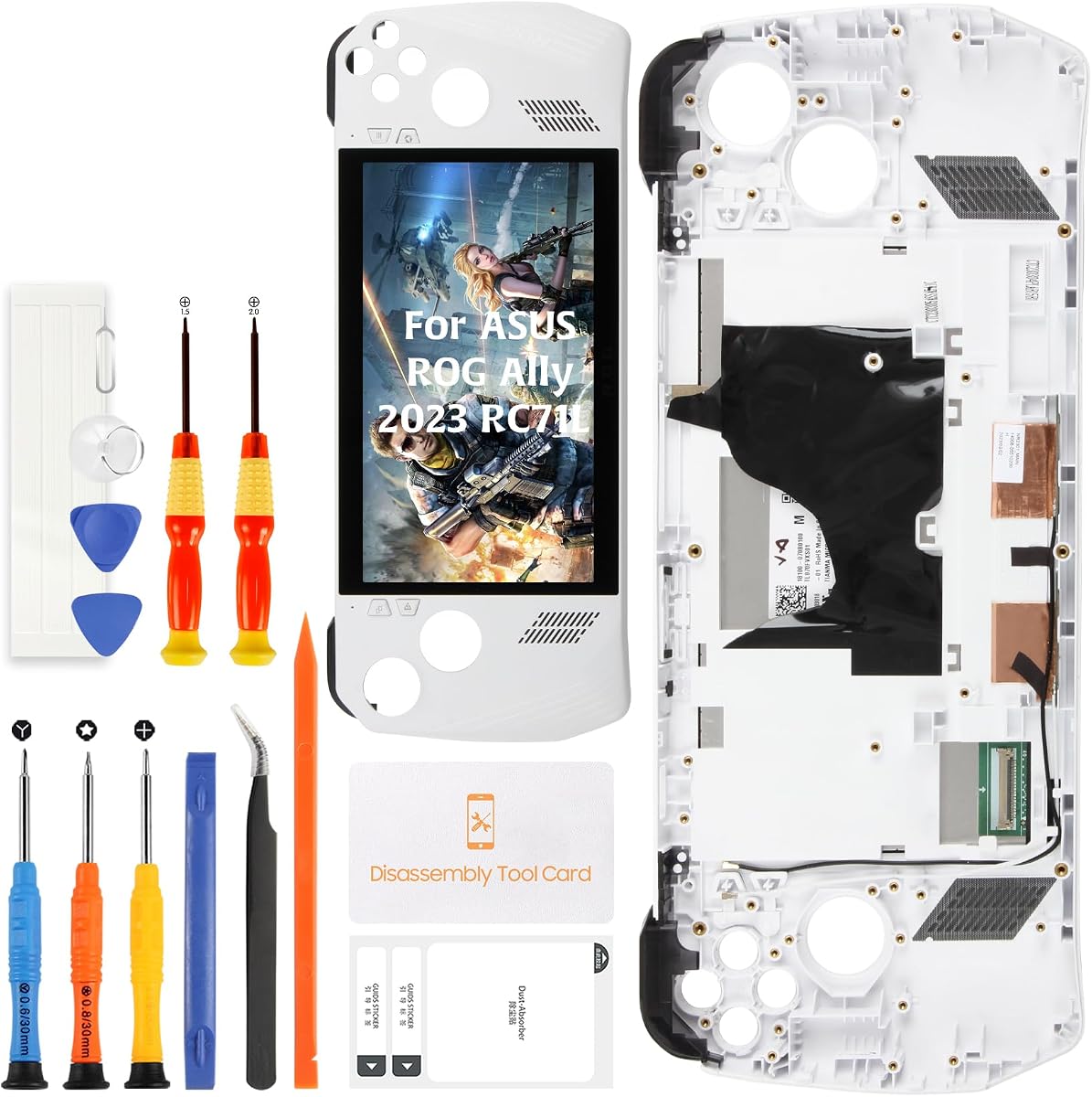
Olivechard Original Screen Replacement Assembly for ASUS ROG Ally 2023 RC71L This replacement screen assembly is designed for ASUS ROG Ally 2023 RC71L handheld console repair. It includes the LCD display, touch screen digitizer, and white frame as a pre-assembled repair part, helping restore display and touch function after cracked glass, black screen, no display, display lines, dead pixels, flickering, or touch failure. 🎮 Compatible Model Family Compatible with ASUS ROG Ally 2023 RC71L 7-inch handheld console models, including RC71L-series Z1 and Z1 Extreme versions when the device model is RC71L. Not intended for ROG Ally X 2024, ROG Xbox Ally X 2025, or ROG Xbox Ally 2025 models. Please confirm the model number before purchase. Do not order by device appearance only, because different ROG Ally generations may use different screen structure, connector layout, and frame design. ✨ Original Display Repair Value This product is made as an original replacement screen assembly for RC71L repair needs. It supports 7-inch FHD 1920x1080 display output and 120Hz refresh rate, helping bring the handheld console back to smooth game menus, responsive touch control, media viewing, launcher navigation, and portable PC use. The white frame design helps restore a clean front appearance after screen or frame damage, while reducing the amount of screen-to-frame separation work during installation. 🔍 Repair Scenario and Decision Points This replacement is suitable for repair shops, refurbishers, resale preparation, and experienced DIY users repairing a damaged ROG Ally screen. It is intended for screen-related faults such as cracked glass, broken touch panel, no image, unstable display, screen lines, dead pixels, or touch response failure. It does not repair unrelated motherboard, battery, charging port, speaker, button, fan, graphics, software, or power-management faults. Please diagnose the device before purchase if the console does not power on at all. 📦 Package Contents Package includes: 1 x screen replacement assembly for ASUS ROG Ally 2023 RC71L LCD display and touch screen digitizer pre-assembled white frame pre-installed 1 x basic repair tool kit The basic tool kit may include triangular pry tool, screwdriver set, tweezers, flat pry bar, adhesive tape, dust removal sticker, or similar repair accessories depending on batch. The included tools are only basic assistance tools. Some repairs may still require additional precision screwdrivers, heating equipment, ESD protection, stronger adhesive, and professional repair experience. 🔌 Installation and Testing Notes Before final installation: power off the handheld console completely disconnect the battery cable before connecting the new screen connect the replacement screen for testing first verify display output test touch response across the full screen check brightness and refresh smoothness confirm frame seating and edge alignment complete final sealing only after all functions are confirmed Do not press hard on screen corners, bend the flex cable sharply, or force the connector into place. Do not remove protective films or complete adhesive bonding until the screen passes testing. Professional installation is strongly recommended if you do not have handheld console repair experience. 💬 Support and Return Reminder Please inspect the part before installation. If the item arrives damaged, or if display or touch issues appear during pre-install testing, contact support with clear photos or video before completing the repair. Installation damage, torn flex cables, connector damage, pressure marks, wrong model selection, or sealing the device after failed testing are not considered product defects. FAQ Q: Does this fit ROG Ally X? A: No. This screen is made for ASUS ROG Ally 2023 RC71L only. It is not intended for ROG Ally X 2024 or newer ROG Xbox Ally models. Q: Does the assembly include the touch screen digitizer and frame? A: Yes. The LCD display, touch screen digitizer, and white frame are pre-assembled. Q: Why should the battery be disconnected before testing? A: Disconnecting the battery helps reduce short-circuit and connector-damage risk while the display cable is being connected or reseated. Q: What should be checked before final sealing? A: Display output, full-screen touch response, brightness, refresh smoothness, frame seating, and cable stability should be checked before adhesive bonding. Q: Will this fix a ROG Ally that does not power on? A: Not necessarily. This part repairs screen and touch-related faults. No-power issues may involve battery, motherboard, charging, or other internal hardware faults. Q: Are the included tools enough for the full repair? A: The package includes basic tools, but console screen repair may still require heating tools, proper precision screwdrivers, adhesive, ESD protection, and repair experience.
Agregás al carrito
Sumás este y otros productos que querés traer.
Cotizás el envío
Calculamos flete aéreo y aranceles a Argentina.
Confirmás y pagás
Un asesor te contacta con el link de pago.
Lo recibís en casa
Tracking en tiempo real. Aduana incluida.
De la misma marca, empezando por lo más reseñado
Los mejor puntuados del mismo tipo de producto
Mismo tipo de producto y precio parecido