Cargando el producto…

Precio desde
$ 94.150
+ flete y aranceles — se calculan al cotizar
Color
Compra protegida
Puerta a puerta
Aduana incluida
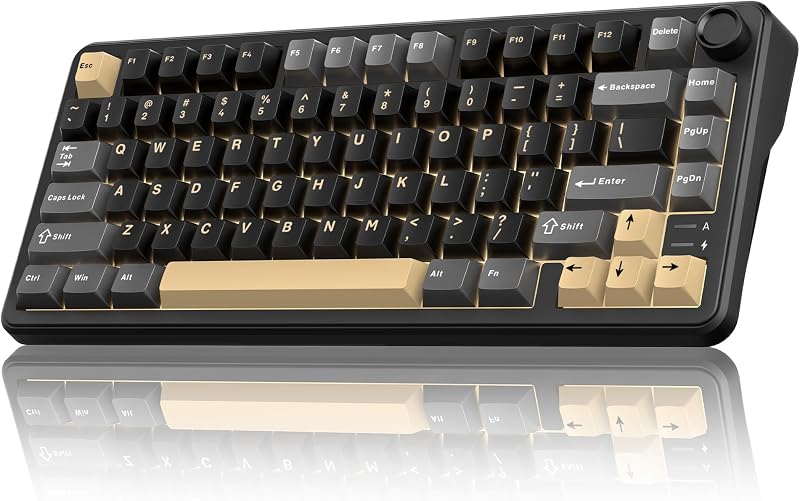
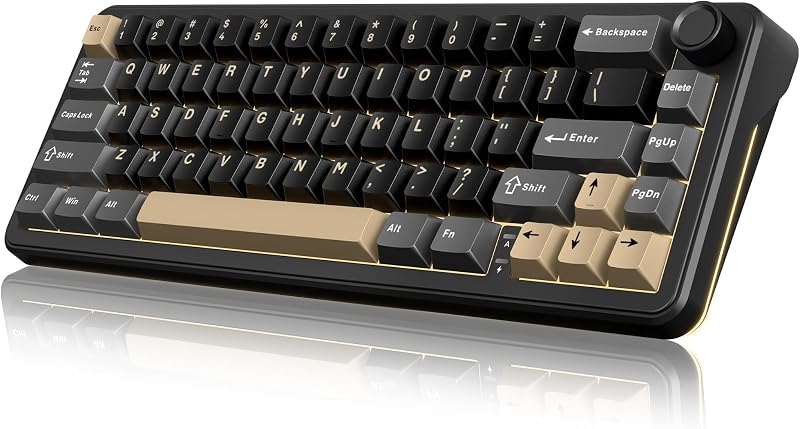
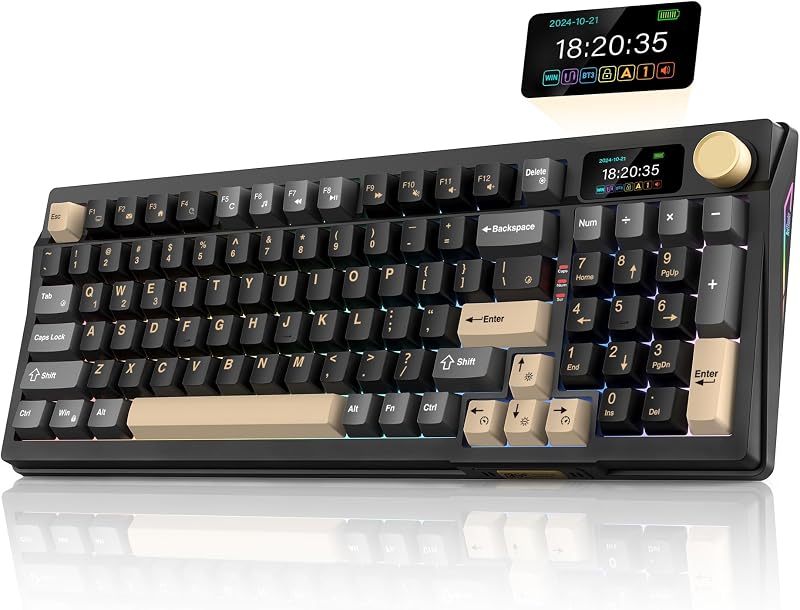
Product description Previous page Next page 1 Multi-Function Knob 2 3-Mode Connection 3 65% Layout 4 PBT Keycaps K65 Wireless Mechanical Gaming Keyboard Compact 65% layout saves desk space while retaining essential keys.3-mode connectivity (e.g., wired, Bluetooth, 2.4G) offers flexible device pairing.Gasket mount design reduces noise and delivers a softer, more comfortable typing feel.Mechanical switches ensure crisp, responsive keystrokes for gaming precision. The video showcases the product in use.The video guides you through product setup.The video compares multiple products.The video shows the product being unpacked. K65 Wireless Mechanical Gaming Keyboard Gasket Mechanical Gaming Keyboard The Gasket structure is typing stable, pressing comfortable, and bring you a relaxing typing experience.Five-Layer Padding Eliminates Most of the Noise and Resonance of the Keyboard. The video showcases the product in use.The video guides you through product setup.The video compares multiple products.The video shows the product being unpacked. Gasket Mechanical Gaming Keyboard BT/Wired/Wireless Keyboard for WIN/Mac Dual-System: Toggle with one click to easily switch between MacOS and Windows systems.Tri-mode: stable wired, cable-free 2.4G, mobile-friendly Bluetooth, catering to diverse scenarios. 1. Long press FN + Q/W/E: BT1/BT2/BT3 pairing. Short press FN + Q/W/E: BT1/BT2/BT3 switching. 2. FN + R: 2.4GHz wireless mode repairing(Paired by defaultat thefactory). The video showcases the product in use.The video guides you through product setup.The video compares multiple products.The video shows the product being unpacked. Dual-System, Tri-Mode, Multi-Device Vibrant RGB Backlight Customize full RGB lighting settings via K65 driver.Customize RGB lighting settings via CNC knob.Customize RGB lighting settings via the following shortcuts Tips: FN + Backspace = Turn on/off the backlight (including the side backlight); FN + Tab = Custom Side Light.; FN + \| = Toggle Backlit Effect, FN + PU = Toggle Backlit Color in pure color mode, FN + ↑↓←→ = Toggle Light Brightness/Speed, FN + PD: Press once to activate Self-set Game Lighting. Press twice to start Self-set Game Lighting The video showcases the product in use.The video guides you through product setup.The video compares multiple products.The video shows the product being unpacked. Vibrant RGB Backlight Hot-swappable Mechanical Keyboard Hot-swappable design works with 3Pin/5Pin switches for easy replacement.Under-light position enhances backlight effect clearly.Compatible with side-printed and various other keycaps.2-in-1 keycap puller for easy custom keyboard setup. The video showcases the product in use.The video guides you through product setup.The video compares multiple products.The video shows the product being unpacked. Full-Key Hot-Swap Functionality with Keycap K65 US Driver Copy the link "bit.ly/4peR61j" to the search bar and run the driver via wired mode on your windows computer.Redefine the keys, RGB light modes in Windows system and wired mode. The video showcases the product in use.The video guides you through product setup.The video compares multiple products.The video shows the product being unpacked. Download the software and custom image/Gif Previous page Next page 1 Gasket Structure 2 Hot-Swappable 3 Pre-lubed 4 Adjustable RGB 5 K65 Driver How to download the K65 US Driver? Copy "bit.ly/4peR61j" to the search bar. How to use CNC knob? Long press the CNC knob for 5s to switch between light mode and sound mode. Short press the CNC knob to select light mode or toggle mute/unmute. Turn the CNC knob to adjust backlight brightness/volume. Why the keyboard becomes disconnected in the BT mode/2.4GHz Wireless mode? When the battery level is low, the keyboard cannot support the BT/2.4GHz function normally. Please re-update the BT/2.4GHz function of the device and fully charge the keyboard. How to charge or use the K65 Wireless Keyboard? Charge with original cable via computer USB (DC:5V). Avoid non-original/non-compliant cables or high-voltage sockets. Insufficient voltage/current from a USB-split dock may stop the keyboard from charging/working (due to varying keyboard power). Can you re-program the keys for Mac users? No. Only in wired mode on Windows systems can it be used.
Agregás al carrito
Sumás este y otros productos que querés traer.
Cotizás el envío
Calculamos flete aéreo y aranceles a Argentina.
Confirmás y pagás
Un asesor te contacta con el link de pago.
Lo recibís en casa
Tracking en tiempo real. Aduana incluida.
De la misma marca, empezando por lo más reseñado
Los mejor puntuados del mismo tipo de producto
Mismo tipo de producto y precio parecido