Cargando el producto…

Precio de origen
$ 181.886
+ flete y aranceles — se calculan al cotizar
Compra protegida
Puerta a puerta
Aduana incluida
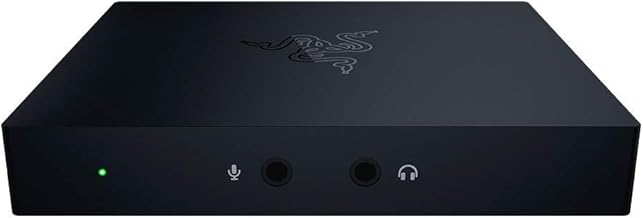
Product description HDMI TO USB Video Capture Card with HDMI Loop OUT 4K HDMI Video Capture Card HD 1080p HDMI capture cards Note: 1. This capture card can work with PS3/PS4, but can not with PS5. 2. This capture card accepts and passes through a 4K 30FPS input, but you can not get 60FPS at 4K. 3. This capture card can capture and record in 1080P 60FPS, but make sure your computer supports 1080P 60FPS, or you have to decrease to 1080P at lower frame rate or lower resolution at 60FPS. HDMI LOOP OUT Through the included HDMI cable, you can loop the video stream to a TV or computer monitor in real time, which can be used to check the real-time picture of the video stream, and can also be used for TV and surveillance cameras USB 3.0 USB3.0 is faster than USB2.0 video transmission speed and more stable video, Mic & Headphone 4k capture card has been upgraded with two 3.5mm AUX ports, which can be used to connect microphones and headphones for voice speech and audio monitoring when recording videos and live broadcasts Trouble Shooting 1. Q: Why is there no picture? --A: First check whether the driver is automatically installed after capture card connected to your computer, then test your video source through HDMI output to TV, and finally run your capture software after all connected. On the OBS interface, you can only see the picture after creating a new video capture task to set the video output properties. 2. Q: How do I turn on audio using OBS studio software? --A: After checking your cables are greatly connected and your video source is ok, open your own video capture software to get your audio settings properly. Usually, you should first select "Output desktop audio(Direct Sound)" from the audio output mode dropdown list, then tick "use custom audio device", and finally select "USB3 Digital Audio" from the audio device dropdown list. If you want to add microphone sound, just plug your microphone cable into the Mic interface of the capture card. 3. Q: If the video is stuck, how can I quickly check the cause? --A: 1) Replace HDMI and USB cables. 2) Replace a computer with a higher configuration. 3) Decrease the video resolution. 4. Q: How does this product work? --A: After connecting the video capture card to your video source and your computer using hdmi and usb cables, run your video capture software and set the video output properties properly and start to record and stream. 5. Q: Does it work with 720P? --A: Of course, this capture card supports to record in up to 1080P, and is backwards compatible, so you can set the video stream resolution you need through the video capture software.
Agregás al carrito
Sumás este y otros productos que querés traer.
Cotizás el envío
Calculamos flete aéreo y aranceles a Argentina.
Confirmás y pagás
Un asesor te contacta con el link de pago.
Lo recibís en casa
Tracking en tiempo real. Aduana incluida.
Lo que suele llevarse para tu pantalla · un solo envío para todo
Los mejor puntuados del mismo tipo de producto
Mismo tipo de producto y precio parecido