Cargando el producto…

Precio de origen
$ 26.777
+ flete y aranceles — se calculan al cotizar
Compra protegida
Puerta a puerta
Aduana incluida
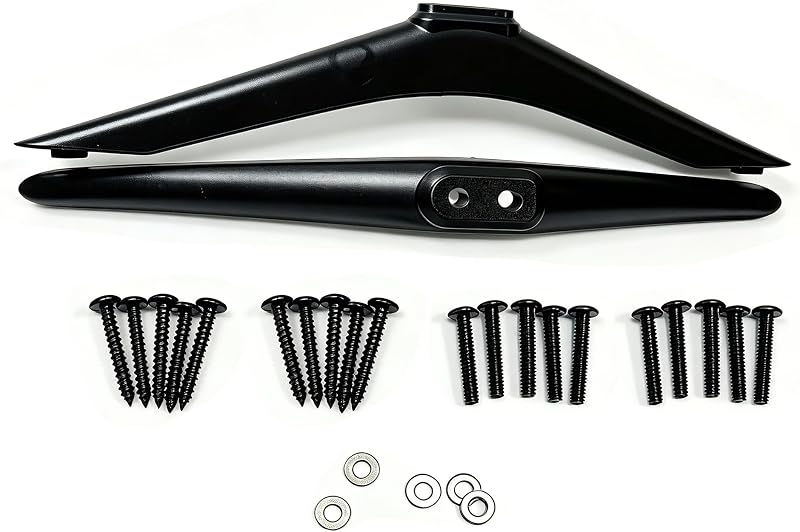
Hisense TV Stand Base Installation & User Manual I. Parts Check 1. TV stand legs: 2 pieces (1 for left, 1 for right, symmetrical design) 2. Fixing screws & gaskets: 1 set (for securing the stand to the TV) II. Pre-installation Preparation 1. Surface protection: Lay a soft cloth or foam pad on a flat table. Place the TV screen-side down to prevent scratches on the LCD screen. 2. Tools needed: Phillips screwdriver for tightening screws. 3. Left & right placement: The two legs are identical in appearance. Install them onto the reserved mounting holes on the left and right sides at the bottom of the TV respectively. III. Step-by-Step Installation 1. Align and clip into place Align the double-hole mounting boss on the top of one leg with the two pre-embedded screw holes on one side of the TV bottom, then press vertically to fit tightly. Install the other leg on the opposite side in the same way. 2. Fasten the screws Take out the black self-tapping screws from the package. Use 2 screws for each leg. Insert screws through the holes of the legs and screw into the TV body. Tighten all screws slightly for positioning first, then fully fasten them one by one. Place gaskets between screw heads and the legs to prevent slipping and abrasion. 3. Flip the TV Hold the TV frame with both hands and flip the TV gently to place it upright on a flat surface. Shake the TV slightly to check that the stand is firm and the TV stands steadily without tilting. IV. Placement & Usage Guidelines 1. Load-bearing placement Place the TV only on a firm and flat surface such as a TV cabinet or solid wood table. Do not place it overhanging the edge. Avoid using flimsy small tables for large-size TVs to prevent tipping over. 2. Heat dissipation clearance Reserve a space of more than 5 cm behind the TV for heat dissipation. Do not block the ventilation openings at the bottom of the TV with the stand. 3. Angle adjustment This straight-type stand has no tilt adjustment function and keeps the TV at a fixed viewing angle. To raise the TV height, you may place anti-slip soft pads under the stand legs. V. Safety Precautions 1. Do not allow children to climb or pull the TV. An anti-tip strap is recommended for large-size TVs for extra safety. 2. Always hold both sides of the TV body when moving it. Never lift the TV by the stand legs alone, which may cause the stand to break and fall off. 3. Keep liquid and spilled drinks away from gaps of the stand. 4. Retighten loose screws in a timely manner. Replace missing screws with Phillips self-tapping screws of the same specification. Do not use overly long screws, as they may damage internal components of the TV. VI. Removal Instructions Power off the TV and lay it screen-side down on a soft pad. Unscrew the fixing screws on both sides counterclockwise with a Phillips screwdriver, then lift the two stand legs straight upward to remove them.
Agregás al carrito
Sumás este y otros productos que querés traer.
Cotizás el envío
Calculamos flete aéreo y aranceles a Argentina.
Confirmás y pagás
Un asesor te contacta con el link de pago.
Lo recibís en casa
Tracking en tiempo real. Aduana incluida.
Mismo tipo de producto y precio parecido