Cargando el producto…

Precio de origen
$ 487.881
+ flete y aranceles — se calculan al cotizar
Compra protegida
Puerta a puerta
Aduana incluida
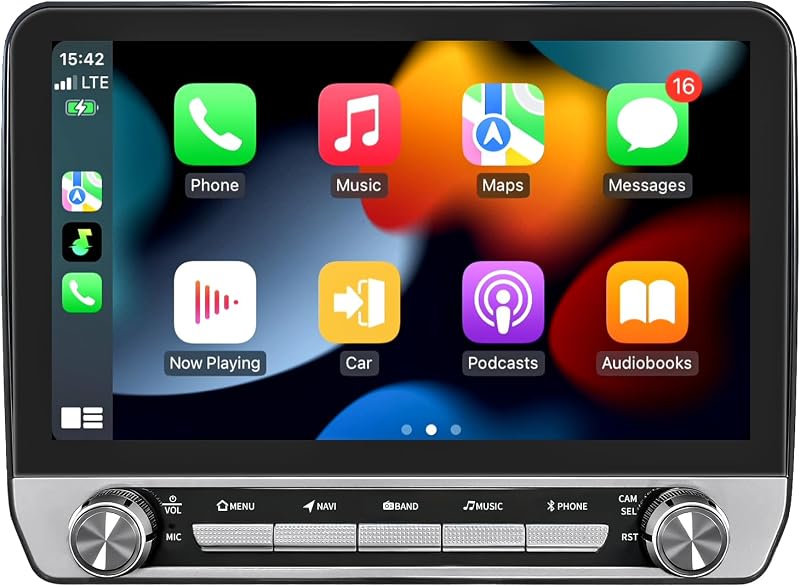
Product description Upgrade Car Radio for Chevy GMC Pickup 1988 1989 1990 1991 1992 1993 1994 Note: The car model and year are for reference only. Please confirm your center console's shape and size before purchasing. If you are unsure about compatibility, please provide your car model and a picture of your center console. We will confirm and offer suggestions to you. Year is for Reference Only. Please Verify All Details Before Buying. For Chevy radio: Silverado Pickup C1500 C2500 C3500 radio 1988-1994, Silverado Pickup K1500 K2500 K3500 radio 1988-1994, Blazer radio 1992-1994; For GMC radio: Sierra Pickup C1500 C2500 C3500 radio 1988-1994, Sierra Pickup K1500 K2500 K3500 radio 1988-1994, Yukon radio 1992-1994. Previous page Apps appear smoothly on your Silverado Pickup accessories display. Maps load quickly on your Chevy Pickup radio 1988-1994 system. Travel feels simpler with Chevy Pickup stereo 1988-1994. Two tasks stay visible on GMC Pickup radio 1988-1994 screen. Audio tuning improves with Silverado Pickup radio 1988-1994. Next page 1 Wireless Carplay 2 5G WIFI 3 GPS 4 FM Radio 5 EQ DSP Android 15.0 4G RAM+32G ROM Powered by Android 15 4-core and 32G ROM for faster performance and fluid multitasking. Wired CarPlay & Android Auto Simple smartphone integration puts your maps and music on the dash for intuitive, safer control. HD Rearview Camera HD rear camera helps improve reversing and parking visibility. Built-in GPS Supports online offline navigation with free maps for accurate guidance. Faster 5GWifi Connectivity Reliable 5GWiFi hotspot connection supports fast loading and seamless streaming. Bluetooth Easily manage calls and music from the steering wheel safely. FM radio + RDS FM radio with DSP HiFi 36EQ offers immersive sound and live updates. 2 USB Ports with Fast Charging power up one device quickly while using the other to play media straight from the drive. DSP EQ sound tuning Charge multiple devices and access media easily with dual USB. 6.86 inches HD Split Display IPS display supports dual app viewing with crisp visuals. Wheel control compatible Seamlessly works with your existing wheel buttons to keep your most-used controls within easy reach. Plug & play installation Plug and play design ensures simple installation without cutting wires. Vehicle Fit Car radio optimized for Chevrolet radio: Silverado Pickup C1500 C2500 C3500 radio 1988-1994, Silverado Pickup K1500 K2500 K3500 radio 1988-1994, Blazer radio 1992-1994, Suburban radio 1992-1994. For GMC radio: Sierra Pickup C1500 C2500 C3500 radio 1988-1994, Sierra Pickup K1500 K2500 K3500 radio 1988-1994, Yukon radio 1992-1994, Suburban radio 1992-1994. System Android 15 Car Stereo CPU 1.8Ghz 8239 ROM 32G Previous page Hands stay on wheel with Blazer Stereo 1992-1994. Quick pairing on Stereo for Silverado Pickup C1500 C2500 C3500 system. Parking improves with Suburban Stereo 1992-1994. Two apps show on Stereo for Sierra Pickup K1500 K2500 K3500. No complex wiring for Sierra Pickup accessories. Next page 1 Steering Wheel Cntrol 2 Bluetooth Function 3 Reverse Camera 4 Split Screen 5 Plug & Play Why can’t Bluetooth connect or why is the connection unstable? 1.Check whether the reversing cable is linked to the Bluetooth Wi-Fi booster; 2.Open Bluetooth on the stereo and search for your phone; 3.Select “Car-BT”, enter “0000”, and delete previous pairings if needed. How can I connect or disconnect CarPlay manually? 1.Pair Bluetooth and Zlink will launch CarPlay automatically; 2.Turn off Background Connection to stop auto reconnect; 3.Control CarPlay in iPhone Settings > General > CarPlay > Zlink. How do I mirror my phone to the stereo wirelessly? iPhone: Open Zlink5 Wireless Mirroring, enable hotspot, connect Wi-Fi, and choose zj-airplay; Android: Open Zlink5 Wireless Mirroring, install Zlink, pair Bluetooth, and activate hotspot. Why does Wi-Fi disconnect while using it? Wi-Fi disconnects automatically when CarPlay is running, so disable Background Connection to avoid reconnecting. Why is the backup camera not displaying video? 1.Check reverse trigger wire and camera wiring; 2.Set the correct camera format in Factory Settings (8888) under Camera & Protocol Parameter Settings. How can I turn off the backup guide lines? Open Factory Settings (8888), enter Protocol Parameter Settings, and switch off Reverse Track and Auxiliary Line. Why is the screen completely black? 1.Verify the CANBUS box connection; 2.Press the RST button and inspect the rear fuse. Why isn’t the touchscreen working? Use the five-finger calibration method shown in the tutorial video. Why is there no audio output? 1.Check whether speaker wires are reversed or connected incorrectly; 2.Confirm the CANBUS box is installed correctly. Why are the steering wheel buttons not functioning? 1.Check if the protocol cable is reversed or disconnected and verify SWC cable wiring; 2.Choose the proper vehicle protocol.
Agregás al carrito
Sumás este y otros productos que querés traer.
Cotizás el envío
Calculamos flete aéreo y aranceles a Argentina.
Confirmás y pagás
Un asesor te contacta con el link de pago.
Lo recibís en casa
Tracking en tiempo real. Aduana incluida.
Los mejor puntuados del mismo tipo de producto
Mismo tipo de producto y precio parecido


![[8Core 64GB] Estéreo de auto Android para Toyota Tacoma JBL 2005-2015 | Radio Tacoma con pantalla táctil de 9 pulgadas con Carplay Android Auto Bluetooth WiFi GPS AM FM - Cámara incluida](https://m.media-amazon.com/images/I/718DJ1etZvL._AC_SL800_.jpg)

![[4+64G] para Toyota Camry 2006-2011 (con JBL) Android 15 estéreo de auto, pantalla táctil Incell de 9 pulgadas Radio CarPlay/Android Auto GPS WiFi Bluetooth FM/RDS+ AHD cámara de respaldo](https://m.media-amazon.com/images/I/718GFyJJ5ML._AC_SL800_.jpg)