Cargando el producto…

Precio de origen
$ 39.180
$ 48.980
+ flete e impuestos
Compra protegida
Puerta a puerta
Gestión aduanera
Tu compra, acompañada de principio a fin
Todo esto está en los Términos y Condiciones. Leerlos
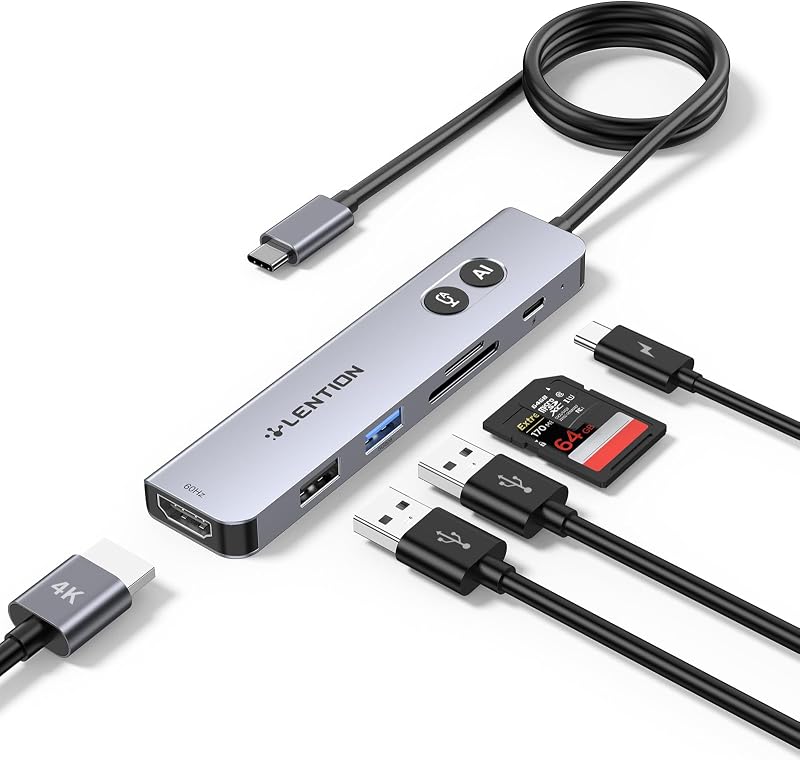
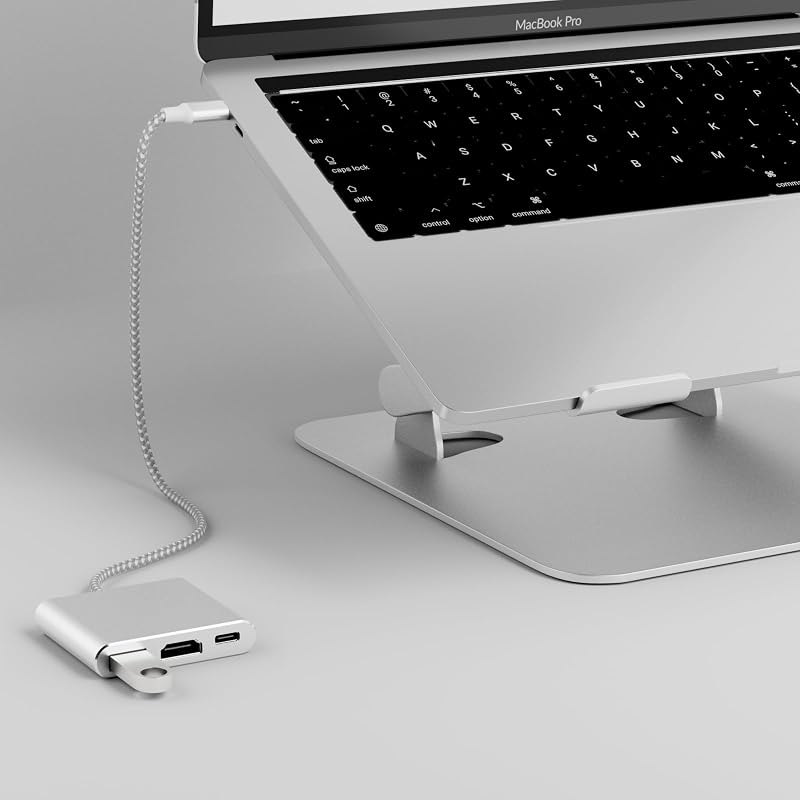
Product description The video showcases the product in use.The video guides you through product setup.The video compares multiple products.The video shows the product being unpacked. Acer 7-in-1 USB C Hub Previous page Next page 1 Crisp 4K@60Hz 2 Mirror&Extend Mode 3 PD 100W 4 5Gbps High-Speed Data 5 SD/Micro SD Card Reader Previous page Next page 1 Durable Aluminum Housing 2 Compact 3 Portable 4 Privacy Screen Control Previous page Next page 1 Privacy Screen Control 2 Daily Excercise 3 Entertainment Previous page Next page Usage Tips ✔️Check before buy 𝐏𝐥𝐞𝐚𝐬𝐞 𝐦𝐚𝐤𝐞 𝐬𝐮𝐫𝐞 𝐲𝐨𝐮𝐫 𝐝𝐞𝐯𝐢𝐜𝐞’𝐬 𝐔𝐒𝐁-𝐂 𝐩𝐨𝐫𝐭 𝐬𝐮𝐩𝐩𝐨𝐫𝐭𝐬 𝐝𝐢𝐬𝐩𝐥𝐚𝐲 𝐟𝐮𝐧𝐜𝐭𝐢𝐨𝐧 (𝐃𝐢𝐬𝐩𝐥𝐚𝐲𝐏𝐨𝐫𝐭 𝐀𝐥𝐭𝐞𝐫𝐧𝐚𝐭𝐞 𝐌𝐨𝐝𝐞). This means your USB-C port should support video output, data transfer, and Power Delivery (PD). So please check your device specs before purchasing. ✔️Cable Length Note For best performance, use a cable no longer than 10 ft. Q1 𝐖𝐡𝐲 𝐜𝐚𝐧'𝐭 𝐦𝐲 𝐥𝐚𝐩𝐭𝐨𝐩 𝐛𝐞 𝐜𝐡𝐚𝐫𝐠𝐞𝐝 𝐯𝐢𝐚 𝐭𝐡𝐞 𝐔𝐒𝐁 𝐂 𝐩𝐨𝐫𝐭? A1 1) Please connect an external power source to the DC port of the product first, and then connect the laptop to the USB-C port of the product - 2) Please confirm whether the USB-C port of the laptop supports charging function - 3) Disconnect the product from the computer, and then reconnect it Q2 𝐖𝐡𝐲 𝐝𝐨𝐞𝐬 𝐦𝐲 𝐥𝐚𝐩𝐭𝐨𝐩 𝐠𝐞𝐭 𝐡𝐨𝐭 𝐰𝐡𝐞𝐧 𝐢𝐭 𝐢𝐬 𝐜𝐨𝐧𝐧𝐞𝐜𝐭𝐞𝐝 𝐭𝐨 𝐭𝐡𝐞 𝐮𝐬𝐛 𝐜 𝐡𝐮𝐛? A2 When the product works at full load for a long time, the built-in chip will operate at high speed, resulting in increased power and temperature. The maximum working temperature of docking is controlled within the range of 0℃-50℃, so please feel free to use it. Q3 𝐖𝐡𝐲 𝐢𝐬 𝐭𝐡𝐞𝐫𝐞 𝐧𝐨 𝐢𝐦𝐚𝐠𝐞 𝐨𝐮𝐭𝐩𝐮𝐭 𝐟𝐫𝐨𝐦 𝐇𝐃𝐌𝐥 𝐚𝐟𝐭𝐞𝐫 𝐜𝐨𝐧𝐧𝐞𝐜𝐭𝐢𝐧𝐠? A3 1) Make sure the USB-C port of the laptop supports the video function - 2) Check the port is firmly plugged in; Adjust the resolution setting of the laptop - 3) Select the correct input signal source (some require manual selection of the signal source Q4 𝐇𝐨𝐰 𝐭𝐨 𝐬𝐞𝐭 𝐭𝐡𝐞 𝐦𝐢𝐫𝐫𝐨𝐫 𝐦𝐨𝐝𝐞 𝐨𝐫 𝐞𝐱𝐭𝐞𝐧𝐝𝐞𝐝 𝐦𝐨𝐝𝐞? A4 ✔️For Win laptops: Click Graphics Settings or Win+P to select Mirror or Extend mode. ✔️For MacBook laptops: Apple logo-System Preferences-Display-Mirror Displays (Yes or No). Q5 𝐖𝐡𝐲 𝐢𝐬 𝐦𝐲 𝐔𝐒𝐁 𝐂 𝐇𝐔𝐁 𝐌𝐮𝐥𝐭𝐢𝐩𝐨𝐫𝐭 𝐀𝐝𝐚𝐩𝐭𝐞𝐫 𝐧𝐨𝐭 𝐰𝐨𝐫𝐤𝐢𝐧𝐠 𝐨𝐫 𝐝𝐢𝐬𝐜𝐨𝐧𝐧𝐞𝐜𝐭𝐢𝐧𝐠? A5 ✔️ Test another cable → Rule out cable damage ✔️ Try another device → Confirm Compatibility ✔️ Clean ports → Remove dust or debris ✔️ Adjust resolution and refresh rate → Please Try 1080p @ 60Hz ✔️ Update drivers → Ensure latest graphics and system drivers ✔️Check power supply → Please connect an external power supply to ensure sufficient power for the adapter and video output. COMPATIBLE LIST (not a full list) ✔️ (✔) Compatible With USB-C 3.1 or thunderbolt 3/4 port interfaces which support "DisplayPort Alternate Mode". ✔️MacBook MacBook Pro (2025 /2024 /2023 / 2022 / 2021 / 2020 / 2019 / 2018 / 2017 / 2016), MacBook (Early 2015 and newer), MacBook Air (Late 2018 and newer) ✔️Apple iPad Pro (2021 / 2020 / 2018), iMac (Mid 2017 and newer), iMac Pro, Mac Mini (Late 2018 and newer), iPhone 17 Pro / 17 Pro Max, iPhone 16 Pro / 16 Pro Max, iPhone 15 Pro / 15 Pro Max ✔️Microsoft Surface Book 2 / 3, Surface Laptop 3 / 4, Surface 8 / 7, Surface Go / Go 2 / Go 3, Surface Pro 7 / 7+ / 8 / X, Surface Studio 2 ✔️Samsung Samsung Galaxy S23 / S22 / S21 / S20 / S20+ / S20 Ultra / S10e / S10 / S10+ / Note 20 / Note 9, S8 / S8+ / S9 / S9+ ✔️Phones HTC 10 / U Ultra / U11 / U11+ / U12+, Asus ZenFone / ROG Phone and more ✔️Dell Dell Latitude 7373 / 5570 / 5490 / 5400 (2 019), XPS 13 / 15 / 17 ✔️ Chromebook Google Chromebook Pixel (2015), Pixelbook, Pixel Slate, Asus Chromebook (✘) (✘) Not compatible with devices that don't support the protocol of DP Alt Mode. (✘) Other (✘) iPhone (Lightning), iPad (Lightning), X Box, PS5/PS4, 𝖪𝗂𝗇𝖽𝗅𝖾 Fire Tablet, Fire HD, DVD/CD Player (✘) Samsung (✘) Galaxy Xcover Pro, Samsung Galaxy Flip series, Samsung A series phone/J6/J7/M20/M30s, Galaxy Tab A series, Galaxy Tab3/S3 (✘) Phones (✘) Huawei Series; Xiaomi Series; One Plus Series, LG Stylo 3/4/5; Pixel phones; OnePlus 2/3/3T/5/5T/6/6T; (✘) More (✘) Car, GoPro, 𝖪𝗂𝗇𝖽𝗅𝖾. **Note: If you are not sure, please feel free to let us know, we are very glad to check. (✘) Motorola series (✘) ALL Motorola series, such as Moto 6, Moto 8, etc. !!Note!! **𝐍𝐨𝐭𝐞: 𝐈𝐟 𝐲𝐨𝐮 𝐚𝐫𝐞 𝐧𝐨𝐭 𝐬𝐮𝐫𝐞, 𝐩𝐥𝐞𝐚𝐬𝐞 𝐟𝐞𝐞𝐥 𝐟𝐫𝐞𝐞 𝐭𝐨 𝐥𝐞𝐭 𝐮𝐬 𝐤𝐧𝐨𝐰, 𝐰𝐞 𝐚𝐫𝐞 𝐯𝐞𝐫𝐲 𝐠𝐥𝐚𝐝 𝐭𝐨 𝐜𝐡𝐞𝐜𝐤.
Agregás al carrito
Sumás este y otros productos que querés traer.
Cotizás el envío
Calculamos flete aéreo y aranceles a Argentina.
Confirmás y pagás
Online con tarjeta, o por transferencia, con el total final a la vista.
Lo recibís en casa
Seguimiento en tiempo real. El despacho lo hacemos nosotros.
De la misma marca, empezando por lo más reseñado
Los mejor puntuados del mismo tipo de producto
Mismo tipo de producto y precio parecido




![Anker Hub USB de 4 puertos con transferencia de datos de 5 Gbps, concentrador USB 3.0 múltiple, divisor USB para computadora portátil, extensor para un puerto portátil, PC, computadora de escritorio y más [carga no compatible] (USB-A de 0,7 pies) (paquete de 2)](https://m.media-amazon.com/images/I/51gQWHVLMGL._AC_SL800_.jpg)