
Cargando el producto…

Precio desde
$ 54.860
+ flete e impuestos
Tamaño
Compra protegida
Puerta a puerta
Gestión aduanera
Tu compra, acompañada de principio a fin
Todo esto está en los Términos y Condiciones. Leerlos
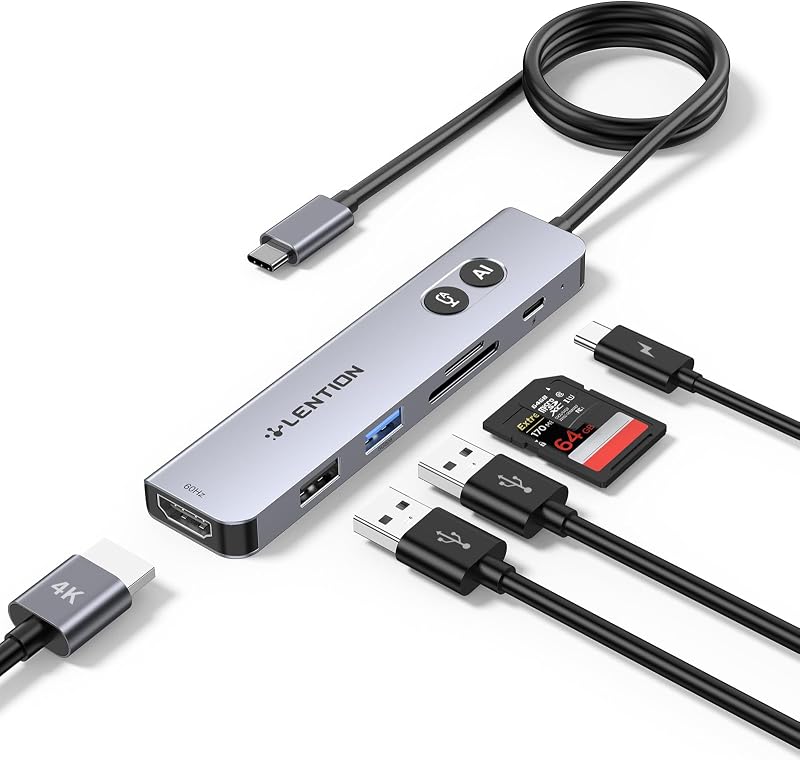
Descripción del producto Página anterior Página siguiente 1 4K@60Hz Visual 2 Alta velocidad de 10 Gbps 3 Carga rápida PD de 100 W 4 Lector de tarjetas TF/SD de 104 MB/s Página anterior Página siguiente Página anterior Página siguiente Página anterior Página siguiente (✘)No es compatible con iPhone/iPad equipado con puerto Lightning (✘)No es compatible con dispositivos que no admiten el protocolo de modo DP Alt. (✔) Compatible con interfaces de puerto USB-C 3.1 o Thunderbolt 3/4 que admitan el “Modo alternativo DisplayPort”. Dispositivos compatibles (LISTA INCOMPLETA): ✔ Apple Macbook Neo; Serie iPhone 16; MacBook Pro (finales de 2016) y posteriores, MacBook Air (finales de 2018) y posteriores; MacBook (finales de 2015) y posteriores; Mac Studio (2022), Mac Mini (finales de 2018) y posteriores; ✔ iPad Pro 12,9" 6/5/4/3, iPad Pro 11" 3/2/1; iPad aire 5/4; iPad mini 6; iPad 10c ✔ Otros iPhone Serie 1; MacBook Pro (finales de 2016) y posteriores, MacBook Air (finales de 2018) y posteriores; MacBook (finales de 2015) y posteriores; Mac Studio (2022), Mac Mini (finales de 2018) y posteriores; ✔ iPad Pro 12,9" 6/5/4/3, iPad Pro 11" 3/2/1; iPad aire 5/4; iPad mini 6; iPad 10 ✔ Samsung Galaxy S22 Ultra/S20/ S20+/ S20 Ultra/ S10e/ S10/ S10+/ Note 8/ 9/10/20 Ultra; Recuerde activar el modo Samsung DeX en la tableta Samsung Galaxy antes de usarla. ✘ iPhone (Lightning), iPad (Lightning), X Box, PS5/PS4, GoPro, Car play ✘ Samsung: teléfono serie A/J6/J7/M20/M30s, serie Galaxy Tab A, Galaxy Tab3/S3; Amazon Tablet ✘ Teléfonos de la serie Motorola; LG Stylo 4/5; Teléfonos píxeles; OnePlus 2/3/3T/5/5T/6/6T; Serie Huawei; Serie Xiaomi; One Plus Seriescc ✘ El puerto C situado más a la derecha solo admite carga y el puerto C del medio solo admite transferencia de datos; ambos no admiten salida de video. !!¡¡Nota!! Cuando se utiliza el monitor externo con puerto HDMI por primera vez, se necesitan unos segundos para reconocer la conexión. Si el monitor tiene varios puertos de video, es posible que deba verificar cada fuente de señal una por una (lo que también demora unos segundos). !!¡¡Nota!! Si el sonido no se transmite al televisor, intente elegir su televisor como dispositivo de salida de audio. - Para Mac: Configuración → Preferencias del Sistema → Sonido → Salida → Seleccione su televisor!! ¡¡Nota!! Verifique si su dispositivo/cargador/cable de carga puede alcanzar una potencia nominal de 100 W y si todos son compatibles con el protocolo PD. !!¡¡Nota!! Generalmente la pérdida de energía es de 5W, que es el consumo de energía normal. Si el dispositivo está funcionando, el consumo de energía aumentará. P1 ¿Por qué no hay salida de imagen o parpadea desde HDMI después de la conexión? A1 (𝟏) Asegúrese de que el puerto USB-C de la computadora portátil admita la función de video; (𝟐) Verifique que el puerto esté firmemente enchufado; Ajuste la configuración de resolución de la computadora portátil; (3)Utilice cables HDMI 4K@60Hz de alta calidad; (4) Seleccione la fuente de señal de entrada correcta (algunas requieren la selección manual de la fuente de señal. P2 ¿Por qué no se puede cargar mi computadora portátil a través del puerto PD? A2 (𝟏) Primero conecte una fuente de alimentación externa al puerto PD del producto, conecte la computadora portátil al puerto USB-C del producto; (𝟐) Confirme si el puerto USB-C de la computadora portátil admite la función de carga; (𝟑) Desconecte el producto de la computadora y luego vuelva a conectarlo
Agregás al carrito
Sumás este y otros productos que querés traer.
Cotizás el envío
Calculamos flete aéreo y aranceles a Argentina.
Confirmás y pagás
Online con tarjeta, o por transferencia, con el total final a la vista.
Lo recibís en casa
Seguimiento en tiempo real. El despacho lo hacemos nosotros.
Lo que suele llevarse para tu notebook · un solo envío para todo
De la misma marca, empezando por lo más reseñado
Los mejor puntuados del mismo tipo de producto
Mismo tipo de producto y precio parecido





![Anker Hub USB de 4 puertos con transferencia de datos de 5 Gbps, concentrador USB 3.0 múltiple, divisor USB para computadora portátil, extensor para un puerto portátil, PC, computadora de escritorio y más [carga no compatible] (USB-A de 0,7 pies) (paquete de 2)](https://m.media-amazon.com/images/I/51gQWHVLMGL._AC_SL800_.jpg)






![4 puertos USB 3.0 Hub + [3-Pack] 22AWG Premium 3 pies USB-C a USB A 3.0 Cables de sincronización y carga](https://m.media-amazon.com/images/I/71HjtWW0QvL._AC_SL800_.jpg)