Cargando el producto…

Precio desde
$ 170.500
+ flete e impuestos
Color
Compra protegida
Puerta a puerta
Gestión aduanera
Tu compra, acompañada de principio a fin
Todo esto está en los Términos y Condiciones. Leerlos
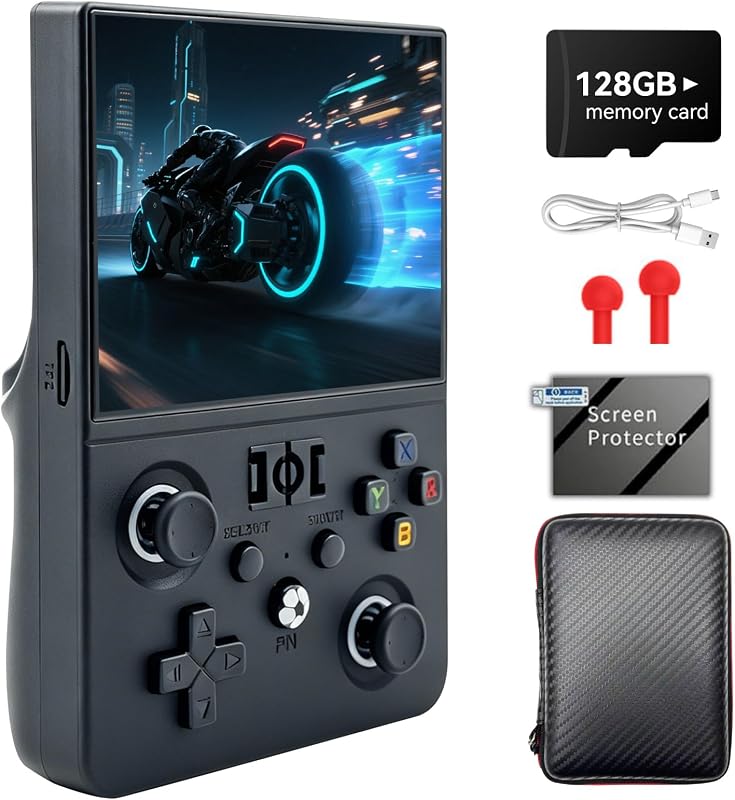
Descripción del producto RG CubeXX tiene WIFI 802.11a/b/g/n/ac 2.4/5G incorporado, admite controlador inalámbrico 2.4G y conexión de controlador con cableConexión de controlador BluetoothConexión H-D-M-I a TVMotor de vibración, juegos multijugador en línea a través de WiFi y medios de transmisiónAdmite reproductor de video, administrador de archivos y lector de libros electrónicos (admite formato txt), especialmente agregando la función de reproducción en línea WiliWili Manual de posventa Primero de ¡A todos, gracias por elegir nuestro producto! Si encuentra los siguientes problemas durante el uso, le pedimos disculpas y le ayudaremos sinceramente. Siga los pasos a continuación para intentar resolver el problema. Si aún no se resuelve, no dude en comunicarse con el vendedor para obtener más ayuda: 一、 Si encuentra los siguientes problemas de pantalla cuando se puede encender el producto, que incluyen: pantalla negra, líneas blancas en la pantalla, perturbación de la señal, etc., puede probar los siguientes métodos: 1. Presione la tecla R debajo del botón de encendido para reiniciar y observar si hay una pantalla de inicio. Si es así, puedes comunicarte con el vendedor para que te proporcione la dirección oficial para descargar el paquete del sistema para reinstalar el sistema 2. El dispositivo tiene una pantalla negra. ¿Hay un sonido al presionar el botón? Excluir daños en la pantalla. Si no hay sonido al presionar el botón, puedes contactar directamente con el vendedor para reemplazar la máquina. 3. Antes de realizar las operaciones anteriores, tome la máquina y verifique si la luz indicadora de carga está verde, si la tarjeta del sistema está insertada correctamente y otra información básica. 二、 Si encuentra los siguientes problemas con el producto, como el arranque, la carga o el logotipo de arranque atascado, puede probar los siguientes métodos: 1. Primero confirme su dispositivo de carga: confirme que el cabezal de carga sea de 5V 2A y que el cable de carga sea original (el cable de carga de Apple no es aceptable); necesita usar el cabezal de carga para cargar y no puede usar una computadora o un banco de energía para cargar. 2. Luego presione la tecla R debajo del botón de encendido para reiniciar o forzar el arranque. Si aún no funciona, comuníquese con el vendedor para que le proporcione la dirección oficial para descargar el paquete del sistema y reinstalar el sistema. 3. Además, antes de realizar las operaciones anteriores, verifique si la luz indicadora de carga está verde, si la tarjeta del sistema está insertada correctamente y si la máquina original tiene suficiente energía y otra información básica. 4. Si las operaciones anteriores no pueden resolver el problema, comuníquese con el vendedor para devolución o cambio. 三、Si encuentra una situación en la que el botón no funciona, puede probar los siguientes métodos 1. Puede reinstalar la carcasa y aflojar los tornillos con una herramienta 2. Realice una prueba de función clave. Si el resultado clave de la prueba es una mala funcionalidad, es necesario reemplazar la placa. Si el resultado clave de la prueba es una buena funcionalidad, puede deberse a simuladores individuales. Comuníquese con el vendedor a tiempo para la devolución o el cambio. 3. Además, antes de realizar las operaciones anteriores, verifique si la luz indicadora de carga está verde, si la tarjeta del sistema está insertada correctamente y si la máquina original tiene suficiente energía y otra información básica. Su satisfacción es nuestro objetivo principal y haremos un seguimiento hasta que el problema se resuelva exitosamente. ¡Gracias nuevamente por su comprensión y apoyo!
Agregás al carrito
Sumás este y otros productos que querés traer.
Cotizás el envío
Calculamos flete aéreo y aranceles a Argentina.
Confirmás y pagás
Online con tarjeta, o por transferencia, con el total final a la vista.
Lo recibís en casa
Seguimiento en tiempo real. El despacho lo hacemos nosotros.
De la misma marca, empezando por lo más reseñado
Los mejor puntuados del mismo tipo de producto
Mismo tipo de producto y precio parecido