Cargando el producto…
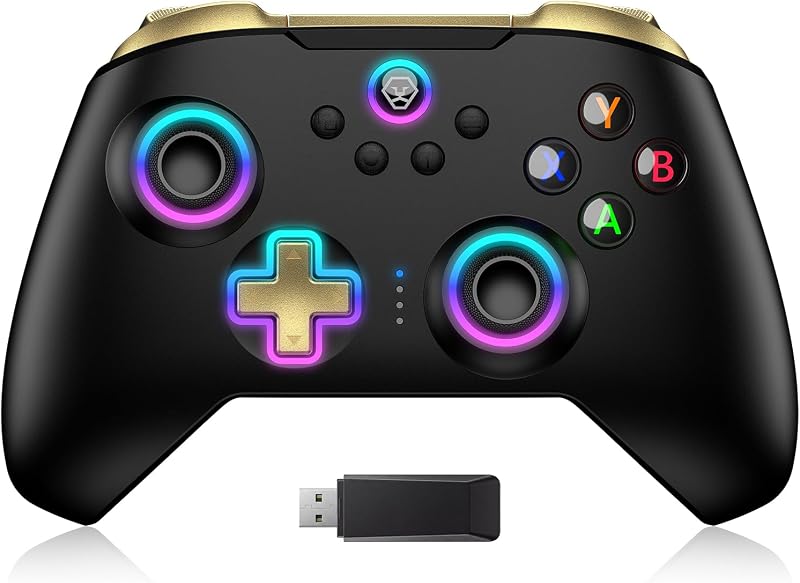
![arVin Wireless Gamepad Controller for iPhone/iPad/iOS/Android/Tablet [Within 5-13"]Support Xbox Cloud Gaming/Remote Play/Steam/CODM/Genshin - with Hall Effect Sensing Joystick/RGB Light/Turbo/Back Key](https://m.media-amazon.com/images/I/71c2pem0c8L._AC_SL1200_.jpg)
Precio desde
$ 58.780
+ flete e impuestos
Tamaño
Color
Compra protegida
Puerta a puerta
Gestión aduanera
Tu compra, acompañada de principio a fin
Todo esto está en los Términos y Condiciones. Leerlos
Product description The video showcases the product in use.The video guides you through product setup.The video compares multiple products.The video shows the product being unpacked. backbone iphone controller Previous page Hall Trigger with Precise Control Linear Hall effect triggers with a 0.11 mm travel distance and 256 levels of changes ensure precise throttle control, great for racing games Esports Level Hall Joystick The Hall joystick applies the principle of electromagnetic induction to solve the problem of traditional joystick drift, with delicate operation and a leap in gaming experience. 2 Types of Arrow Keys The Bluetooth controller is designed with 2 types of directional buttons, which fully satisfies the usage habits of different players. Three Joystick Mode FPS Mode: Controller Right joystick no dead zone in shooter games.Racing Mode: Controller Left joystick no dead zone in racing games;Normal Mode: This mode is recommended for regular players. Microswitch Cross Key No string keys, no sticking, achieving fast button performance, sensitive, quick moves, and good button rebound feel. What will you get? 1x Stretchable Mobile Game Controller; 1x USB-C Charging Cable; 1xExtra Arrow Keys; 2x Non-slip Mats; 1x User manual Next page Previous page M1 M2 Programming Keys With 2 back programming buttons, there are two modes, which are single programming or multi-programming. M1/M2= A+B+X+Y+LB+LT+RB+RT+D-pad, then you can use other fingers to operate more comfortably. Adjustable RGB Lighting This cell phone controller with cool RGB lighting, which can provide you with an excellent gaming experience in the dark. Features 7 fixed color modes and Breathing color cycling modes. 3-Speed Turbo Function 3-speed turbo speed: 8 shoots/s, 15 shoots/s, and 25 shoots/sYou can set A/ B/ X/ Y/ LT/LB/RT/RB/cross key for Turbo function, make it easier for you to win the game! Six-axis Gyroscope Function This Wireless pro controller built-in sensitive 6-axis gyro can realize high-precision directional control, help you react quickly in the game, enhance the gaming experience iOS/Android do not support Dual Vibration Function - iOS/Android Not Support The pro controller built-in dual vibration motors provides you with excellent vibration feedback to enhance game immersionPress & hold 'T + Right joystick up and down' to adjust the vibration effect. Next page Previous page Support cloud gaming on iOS/Android mobile or tablet Next page 1 Streaming 2 Play Cloud Games 3 Play Controller Game Supports tablets and ipad with a screen distance of 13 inches from the bottom of the side to the top of the sideSupports iPad and Tablet up to 5.03~11.37inch in lengthSupports mobile devices up to 0.51inch in thickness. Mobile Game Controller Wireless Connection The video showcases the product in use.The video guides you through product setup.The video compares multiple products.The video shows the product being unpacked. phone controller for iphone Wireless Game Controller for iOS 13.0+ system Play Directly on your iPad/iPhone Ensure that the controller is turned off before Bluetooth pairing connection If you experience any issues with the Bluetooth connection or buttons not working, try resetting the controller. The 'Reset' button is the small hole that beside 'LT'. The video showcases the product in use.The video guides you through product setup.The video compares multiple products.The video shows the product being unpacked. phone controller for android Phone Game Controller for Android 6.0+system Play Directly on your Android Tablet/Cell Phone Ensure that the controller is turned off before Bluetooth pairing connectionAndroid has 2 boot modes for different games, if you find supported games can't work on this controller, please switch the boot mode.If you experience any issues with the Bluetooth connection or buttons not working, try resetting the controller. The 'Reset' button is the small hole that beside 'LT'. The video showcases the product in use.The video guides you through product setup.The video compares multiple products.The video shows the product being unpacked. Nintendo Switch controller Switch Pro Controller NOT for Nintendo Switch 2 Ensure that the controller is turned off before Bluetooth pairing connectionOnce the controller is connected to the Switch, if it has not been connected to other devices(e.g. PS4), then the next time you want to connect Switch, you can press the 'Home’ button to boot controller, and it will automatically reconnect to the Switch. However, if you have connected to other devices before reconnecting Switch, you need to connect it according to the steps of the first connection. The video showcases the product in use.The video guides you through product setup.The video compares multiple products.The video shows the product being unpacked. xbox phone controller X-box Streaming Connection Remote Play only for Xbox One/Series console Make sure your Microsoft login account on the Xbox APP is the same as
Agregás al carrito
Sumás este y otros productos que querés traer.
Cotizás el envío
Calculamos flete aéreo y aranceles a Argentina.
Confirmás y pagás
Online con tarjeta, o por transferencia, con el total final a la vista.
Lo recibís en casa
Seguimiento en tiempo real. El despacho lo hacemos nosotros.
Los mejor puntuados del mismo tipo de producto
Mismo tipo de producto y precio parecido