Cargando el producto…

Precio desde
$ 137.160
+ flete e impuestos
Color
Opción 2
Compra protegida
Puerta a puerta
Gestión aduanera
Tu compra, acompañada de principio a fin
Todo esto está en los Términos y Condiciones. Leerlos
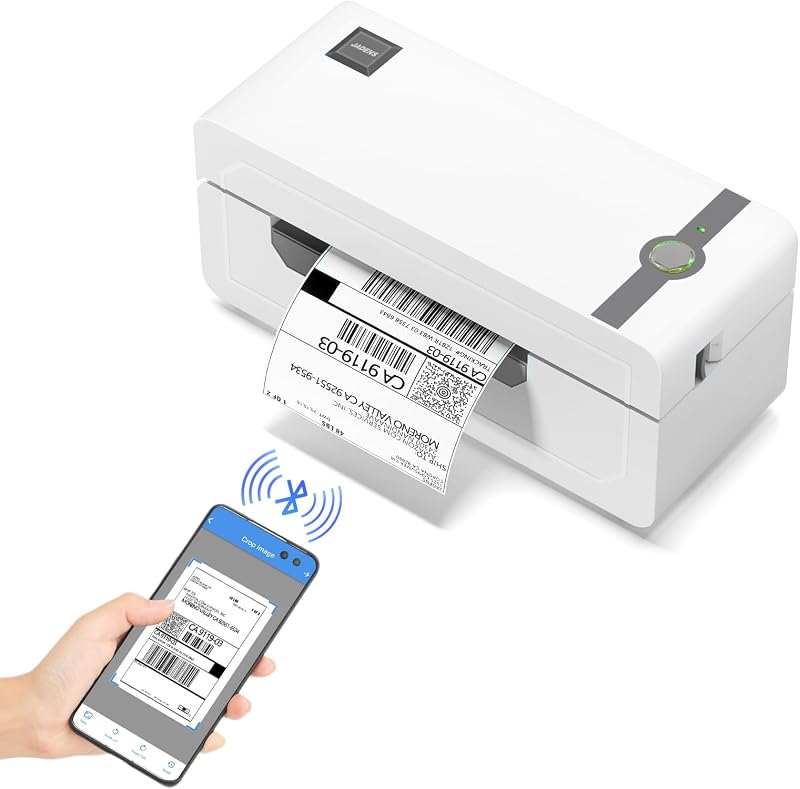
Descripción del producto Impresora de etiquetas Omezizy D450-BT: gran ayuda para su negocio Conexión verdaderamente Bluetooth, hace que el trabajo sea más inalámbrico y simple LIVESeek to live, actualmente detrás de liveLIVERTiempo restante -0:28 1xVelocidad de reproducciónCapítulosCapítulosDescripcionesdescripciones desactivadas, seleccionadasSubtítulosSubtítulos desactivadas, seleccionadaPista de audiopredeterminada, seleccionadaPantalla completaEsta es una ventana modal. Impresora de etiquetas de envío Admite conexión Bluetooth y USB, use nuestra APLICACIÓN para imprimir con Bluetooth y hacer posible administrar un negocio solo con un teléfono inteligente o tableta. Ahora, Windows y Mac también admiten la impresión a través de Bluetooth Página anterior Página siguiente Funciones más potentes que le ayudarán a simplificar su trabajo Página anterior Página siguiente 1 Conexión sencilla 2 Mantenga la oficina ordenada 3 Más herramientas inteligentes 4 Plantillas en abundancia 5 ¿Por qué elegir Omezizy? ¿Cómo conectar la impresora de etiquetas D450-BT con su teléfono o computadora? Conexión de su teléfono al D450-BT a través de Bluetooth Paso 1: descargue la aplicación mencionada en la guía de Google Play o App Store Paso 2: encienda el Bluetooth de su teléfono inteligente y busque la impresora en la aplicación Paso 3: importe el PDF impreso a la aplicación y comience a imprimir Nota: no se conecte a través de la configuración Bluetooth de su teléfono, debe conectarse directamente en la aplicación El video muestra el producto en uso. El video lo guía a través de la configuración del producto. El video compara varios productos. El video muestra el producto en uso. desempaquetado.El reproductor de video se está cargando.Haga clic para reproducir el videoReproducirSilencioHora actual 0:00/Duración 1:11Cargado: 4.23%0:00Tipo de transmisión LIVEBuscar en vivo, actualmente detrás de liveLIVERTiempo restante -1:11 1xTasa de reproducciónCapítulosCapítulosDescripcionesdescripciones desactivadas, seleccionadasSubtítulosSubtítulos desactivados, seleccionadaInglés (Automatizado)Pista de audiopredeterminada, seleccionadaPantalla completaEsto es una ventana modal. Impresora de etiquetas D450BT Video comercial Impresión a través de Bluetooth - Emparejamiento directo del sistema Windows Paso 1: Descargue y ejecute el controlador, luego seleccione el modelo de impresora: "Impresora D450" Paso 2: Elija "Conexión Bluetooth" para finalizar la instalación del controlador Paso 3: Abra la configuración de Bluetooth en la computadora, agregue el modelo de impresora "D450BT-Z" Paso 4: Edite etiquetas y comience a imprimir El video muestra el producto en uso. El video lo guía a través de la configuración del producto. El video compara varios productos. El video muestra el producto que se está desempaquetando.El reproductor de video se está cargando.Haga clic para reproducir el videoReproducirSilencioHora actual 0:00/Duración 1:38Cargado: 3.06%0:00Tipo de transmisión LIVESeek to live, actualmente detrás de liveLIVERTiempo restante -1:38 1xTasa de reproducciónCapítulosCapítulosDescripcionesdescripciones desactivadas, seleccionadasSubtítulosSubtítulos desactivadas, seleccionadaInglés (Automatizado)Pista de audiopredeterminado, seleccionadoPantalla completaEsta es una ventana modal. Impresora de etiquetas de envío D450BT Video del comerciante Impresión a través de Bluetooth - Emparejamiento directo del sistema masOS Paso 1: Descargue y ejecute el controlador, luego seleccione el modelo de impresora: "Impresora D450" Paso 2: Elija "Conexión Bluetooth" para finalizar la instalación del controlador Paso 3: Abra la configuración de Bluetooth en la computadora, agregue el modelo de impresora "D450BT-Z" Paso 4: Edite etiquetas y comience a imprimir El video muestra el producto en uso. El video lo guía a través de la configuración del producto. El video compara varios productos.El video muestra el producto que se está desempaquetando.El reproductor de video se está cargando.Haga clic para reproducir el videoReproducirSilencioHora actual 0:00/Duración 2:26Cargado: 2.06%0:00Tipo de transmisión LIVEBuscar en vivo, actualmente detrás de liveLIVERTiempo restante -2:26 1xTasa de reproducciónCapítulosCapítulosDescripcionesdescripciones desactivadas, seleccionadasSubtítulosSubtítulos desactivadas, seleccionadaInglés (Automatizado)Audio Trackdefault, selectedFullscreenEsta es una ventana modal. Impresora térmica D450BT Video comercial ''Labelife'' Conexión Bluetooth para computadora Paso 1: descargue el software mencionado en la guía desde el sitio web oficial Paso 2: vaya a "Conexiones inalámbricas" en el software, seleccione su impresora y haga clic en "Conectar" Paso 3: edite las etiquetas en el software y comience a imprimir El video muestra el producto en uso. El video lo guía a través de la configuración del producto. El video compara varios productos. El video muestra el producto que se está desempaquetando. El reproductor de video se está cargando. Haga clic para reproducir videoReproducirSilencioHora actual 0:00/Duración 0:29Cargado: 10.36%0:00Tipo de transmisión LIVEBuscar en vivo, actualmente detrás de liveLIVERTiempo restante -0:29 1xTasa de reproducciónCapítulosCapítulosDescripcionesdescripciones desactivadas, seleccionadasSubtítulosSubtítulos desactivados, seleccionadoInglés (Automatizado)Pista de audiopredeterminado, seleccionadoPantalla completaEsta es una ventana modal. Video comercial de la impresora térmica de etiquetas D450BT Guía previa a la operación de la D450-BT para cargar papel Paso 1: Ajuste la guía del papel Paso 2: Inserte la etiqueta, asegúrese de que esté recta y suave Paso 3: La impresora de etiquetas moverá la etiqueta hacia adelante y hacia atrás para conocer el tamaño del espacio y otras propiedades de su etiqueta El video muestra el producto en uso. El video lo guía a través de
Agregás al carrito
Sumás este y otros productos que querés traer.
Cotizás el envío
Calculamos flete aéreo y aranceles a Argentina.
Confirmás y pagás
Online con tarjeta, o por transferencia, con el total final a la vista.
Lo recibís en casa
Seguimiento en tiempo real. El despacho lo hacemos nosotros.
Lo que suele llevarse para tu celular · un solo envío para todo
Los mejor puntuados del mismo tipo de producto
Mismo tipo de producto y precio parecido
![Funda Mkeke para iPhone 14 Pro transparente [no amarillenta] | [Protección de grado militar] Funda para teléfono a prueba de golpes para Apple iPhone 14 Pro 2022](https://m.media-amazon.com/images/I/71XkP-M0RfL._AC_SL800_.jpg)