Cargando el producto…

Precio de origen
$ 313.579
$ 391.978
+ flete e impuestos
Compra protegida
Puerta a puerta
Gestión aduanera
Tu compra, acompañada de principio a fin
Todo esto está en los Términos y Condiciones. Leerlos
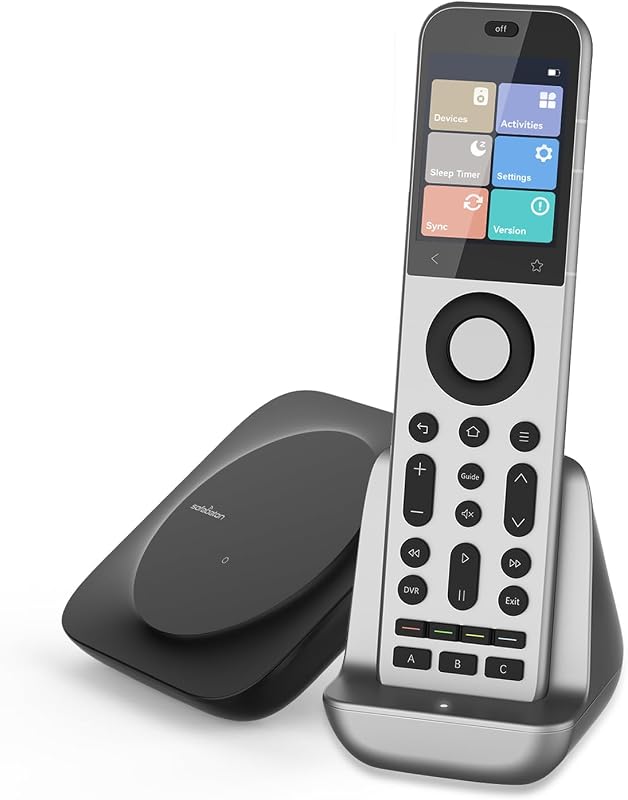
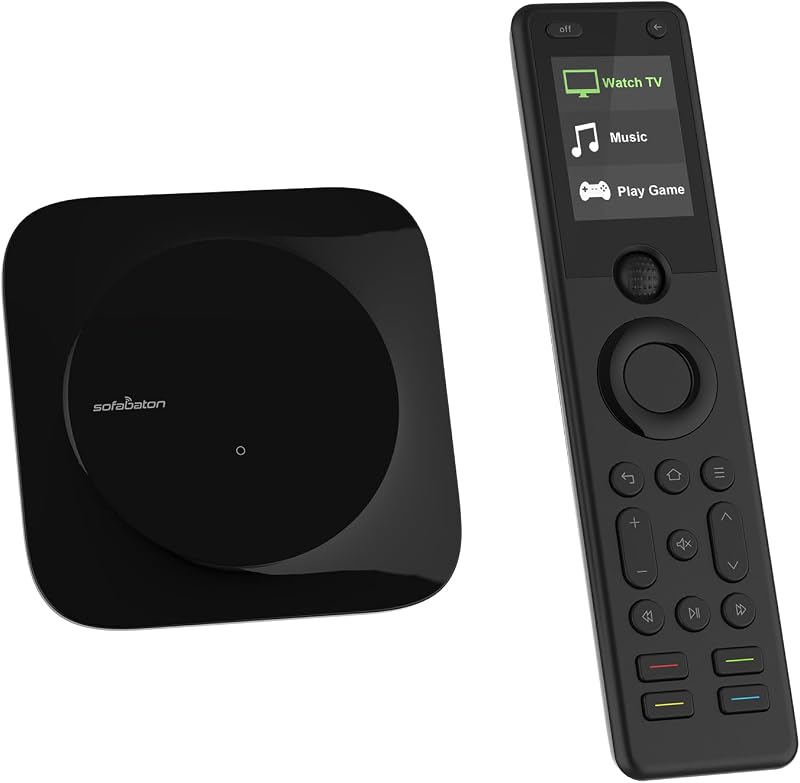
Descripción del producto Simplifique su vida con un solo control remoto: control remoto universal SofaBaton X1S ¿Por qué elegir SofaBaton X1S? Un buen control remoto universal puede cambiar completamente la experiencia de tu sala de estar. En lugar de hacer malabares con un montón de controles remotos diferentes para su televisor, DVD, decodificador de cable, consola de juegos, decodificador de transmisión, reproductor de Blu-ray, proyector, receptor AV, barras de sonido o cualquier otra cosa. Sin desconexiones: disfrute de una conexión estable impulsada por tecnología de concentrador avanzada. Con los emisores de infrarrojos con cable incluidos, logre una cobertura total de la señal, incluso dentro de gabinetes o espacios cerrados. Actividad inteligente y programación de macros: cree rutinas personalizadas y programe comandos avanzados de varios pasos para un control perfecto. Compatibilidad universal todo en uno: controle más de 500 000 dispositivos, con actualizaciones periódicas para garantizar la compatibilidad con la última tecnología. Personalización a través de la aplicación SofaBaton: para una experiencia verdaderamente personalizada. Haga que su control remoto universal X1S se adapte a sus hábitos, configuración y preferencias únicos, transformándolo en el centro de comando potente y personalizado de su entretenimiento en el hogar. Control por voz con Alexa y el Asistente de Google: operación con manos libres a través de su asistente de voz favorito para controlar sin esfuerzo su sistema de entretenimiento. Levantar para despertar: la pantalla LCD se ilumina automáticamente cuando levanta el control remoto, lo que garantiza una visibilidad y control sin esfuerzo de sus dispositivos en cualquier condición de iluminación. Por consideraciones de ahorro de batería, la pantalla se apagará automáticamente cuando el control remoto no se utilice durante un período prolongado. ¡Compatibilidad sin límites! Admite hasta 6000 marcas y 500 000 dispositivos de entretenimiento doméstico ¿Tiene problemas de compatibilidad? ¡Así es como ayudamos! 1. Amplia biblioteca de códigos Admite más de 500.000 dispositivos. Busca tu marca/modelo en la base de datos de la aplicación. 2. Modo de aprendizaje para dispositivos no listados Si su dispositivo no aparece en la lista: Use Infrarrojos → Aprendiendo a enseñar comandos desde su control remoto original. Apunte el control remoto al concentrador y mantenga presionados los botones para sincronizar. 3. Prueba de comandos Intente "Buscar → Prueba de comandos" para encontrar un código que funcione para su dispositivo. 4. Actualizaciones gratuitas de la base de datos ¿No encuentras el modelo de tu dispositivo? Háganos saber la marca/número de modelo a través de la aplicación Sofabaton (soporte 24 horas al día, 7 días a la semana). Nuestro equipo: ✓ Verificará los códigos en nuestra biblioteca en vivo ✓ Proporcionará asistencia de configuración instantánea 5. Nuestra promesa: si nuestra biblioteca de códigos no es compatible con sus dispositivos electrónicos, ¡lo arreglaremos! Cree actividades en la aplicación para personalizar sus propias experiencias en el hogar: disfrute de una vida verdaderamente inteligente Configure actividades personalizadas que activen varios comandos a la vez, como: actividad "Ver televisión", encienda su decodificador de cable, receptor de audio y televisor, cambie el receptor al canal correcto y cambie su televisor a la entrada HDMI correcta, etc. "Ver película", el proyector, los parlantes y los reproductores multimedia ingresarán rápidamente al modo de película. Agregar una actividad "Escuchar música" le permite ingresar inmediatamente al mundo de la música sin la molestia de operar cada dispositivo. Su receptor de audio, sistema de sonido o parlantes se activarán automáticamente con un disparador de un toque. Cuando selecciona la actividad "Jugar", la consola de juegos, el monitor de juegos, el controlador de juegos y los parlantes de juegos se encenderán automáticamente, lo que le permitirá sumergirse inmediatamente en el mundo de los juegos y disfrutar de la diversión y la emoción que brinda. Señal fuerte y estable El concentrador SofaBaton proporciona una señal de 360° y un alcance de 40 pies para enviar una señal fuerte y confiable a sus dispositivos de entretenimiento en el hogar. Incluye 2 amplificadores de infrarrojos para fortalecer la señal. La señal IR no se verá afectada incluso si oculta el concentrador en el gabinete. No más preocupaciones por la desconexión de la señal. Tampoco es necesario apuntar al dispositivo. Puedes apuntar el control remoto a cualquier lugar. Lo bueno es que puedes ocultar el Hub en el gabinete para crear un área de entretenimiento ordenada. Recordatorio amable: si su control remoto muestra un mensaje de "Hub perdido", podría deberse a que la distancia es demasiado grande o a que la transmisión de datos se interrumpió durante la sincronización. Para resolver esto, acerque el control remoto al Hub y vaya a "Establecer–>>Sincronizar" en el control remoto para volver a sincronizar. En caso de que la sincronización falle, es posible que el control remoto se desempareje del Hub. Para reparar esto, puede seguir los siguientes pasos. Abra la aplicación Sofabaton y vaya a Yo –>> Configuración –>> Emparejar con un nuevo control remoto. Siga las instrucciones de la página y opere el control remoto para completar el emparejamiento. El Hub mantendrá el estado de emparejamiento durante 90 segundos. Si la operación tarda más, repita el proceso de uso de la aplicación y el control remoto. Pregunta: ¿Por qué mi X1S no controla remotamente mis dispositivos? Respuesta: El control remoto en sí no emite ninguna señal de infrarrojos. Todos los comandos se envían a través del X1S Hub. Cómo colocar el concentrador: • Gabinete abierto: coloque el concentrador encima o en un estante grande y sin obstrucciones. Las señales IR se reflejan en las paredes/superficies. • Gabinete cerrado: instalar debajo o al lado de los dispositivos. Las señales se reflejarán internamente. • Evite: Colocar directamente detrás o encima de los dispositivos. • Para dispositivos de esquina/gabinete: use el emisor de infrarrojos incluido; apunte el transmisor al dispositivo (por ejemplo, colóquelo en la parte superior del gabinete).
Agregás al carrito
Sumás este y otros productos que querés traer.
Cotizás el envío
Calculamos flete aéreo y aranceles a Argentina.
Confirmás y pagás
Online con tarjeta, o por transferencia, con el total final a la vista.
Lo recibís en casa
Seguimiento en tiempo real. El despacho lo hacemos nosotros.
De la misma marca, empezando por lo más reseñado
Los mejor puntuados del mismo tipo de producto
Mismo tipo de producto y precio parecido