Cargando el producto…

Precio de origen
$ 58.780
+ flete e impuestos
Color
Compra protegida
Puerta a puerta
Gestión aduanera
Tu compra, acompañada de principio a fin
Todo esto está en los Términos y Condiciones. Leerlos
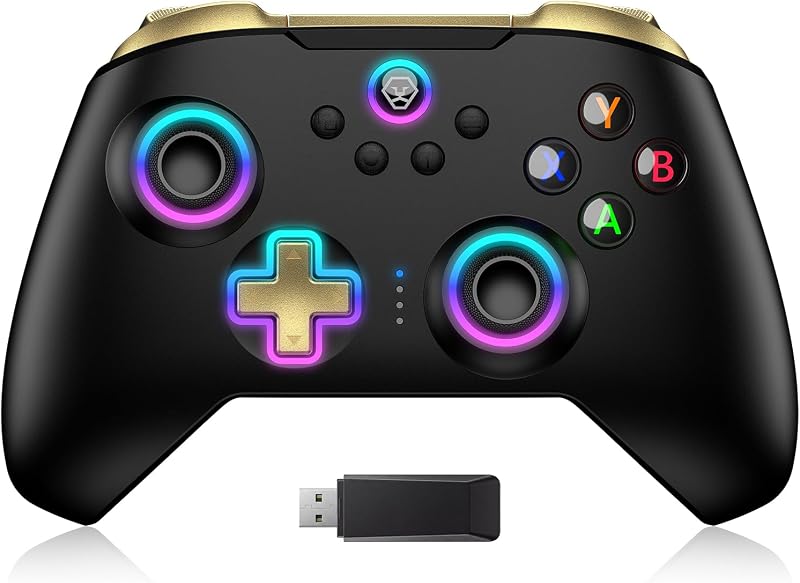
Product description Direct Play on USB C Phones Work with USB C iPhone: Phone game controller for iPhone 17, iPhone 17 Plus, iPhone 17 Pro, iPhone 17 Pro Max, iPhone 16, iPhone 16 Plus, iPhone 16 Pro, iPhone 16 Pro Max,iPhone 15, iPhone 15 Pro, iPhone 15 Pro Max, iPhone 15 Plus (No support for lightning iPhone, Not for iPad, Apple TV&iPod,Fire TV/TV Box.) Work with USB C Android Phone: Android controller for Samsung Galaxy S25 Ultra, S25+, S25, S24 Ultra, S24+, S24, S23 Ultra, S23+, S23, S23 FE, S22 Ultra, S22+, S22, S21 Ultra, S21+, S21, S21 FE, S20 Ultra, S20+, S20, S10, S10+, S10e, Galaxy Z Flip6, Galaxy A55, Samsung W23 Flip, W24 Flip, Note 20, Note 20 Ultra, Note 10, Note 10+; Huawei Meta 60 Pro+, 60 Pro, 60, 60 RS, Meta 50 pro, 50 SE, 50 RS, 50, P60, Pura 70 Ultra, 70S; One Plus, TCL, oppo, M-otorola, Vivo and most type-c Android.(Not for Android phone with Micro USB interface/Tablet/Switch) * For some Android phones, please enable phone OTG function in order to link with our controller successfully. You can search ‘OTG’ in your phone ‘Setting’ to see if you need to switch it on before using our controller Turbo Function Hold down ‘A’ key, then press ‘T’ key to complete the A-key Manual turbo function setting. (When in use, you need to keep press ‘A’ key for bursts.)Second time: Hold down 'A' key then press 'T' key, then you can set the A-key to AUTO function setting. (When in use, just press the ‘A’ key once to send bursts.)When the ‘A’ key is in AUTO mode, press ‘A+Left joystick up/down’ to set the speed of the automatic burst, which is 15 times/s, 25 times/s and 8 times/s. Notice: The Turbo function only support single key (e.g. A/B/X/Y/LT/LB/RT/RB), not support for combination key, such as ‘A+B’. Macro Programming Function Hold down 'SELECT' key, then long press 'M1’ key until the LED indicator light flahes quickly.Press the key you want to set for macro programming function (such as 'A+B+X+Y key), then press 'M1' key again, the LED light keeps on, setting is done now.After setting, press 'M1’ key, the function of A+B+X+Y will be automatically used once. (This setting also applies to 'M2’) Play your Xbox, PlayStation or PC from anywhere Support streaming PS5/PS4 console, download 'PS Remote Play' APP from mobile phone Please Note: Make sure your Sony login account on the PS remote play APP is the same as on your PS4/PS5 console. Support streaming Xbox One/Xbox Series console, download 'Xbox' APP from mobile phone Please Note: Make sure your Xbox login account on the Xbox APPis the same as on your Xbox One or Series console. Support streaming PC, download 'Steam Link' APP for mobile phone, Download ‘Steam’ from PC Please Note: Connect your PC and iOS/Android device with same network. Controller Connetion: Turn 'Mode Switch Key' to 'MFi' first, then insert phone into the controller, controller will power up and the Blue light will on. Play Anytime, Anywhere Supports Most Cloud Games: Play amazing games on the phone you have through Xbox Game Pass, Nvidia GeForce Now, Luna, Google Stadia or Rainway Supports Most Controller Games: You can download the games that support controller play in App Store/Google Play. For example: Call of Duty mobile(COD), Call of Duty: Warzone Mobile, Sky: Children of Light, Genshin Impact, Combat Modern 5, Asphalt 8: Airborne, Asphalt 9: Legends, Roblox, Minecraft, NBA 2K,Zenless Zone Zero, GTA: San Andreas Definitive, Honkai Impact 3 and more. iOS Not for 'PUBG mobile'Android not for ‘Genshin Impact’In COD gaming interface, if you’ve received a notice to choose a controller model within "PS4,PS5 and XBOX". Please select "XBOX"Some controller supported games need to enter the game interface and select "controller mode" in the setting, such as "Genshin Impact” "COD" Hall Effect Trigger Hall Effect sensing sticks deliver 360° seamless pinpoint control, provide the precision and durability that mobile gamers demand Hall Effect Joystick Hall Effect analog triggers offer unparalleled smoothness and responsiveness, giving you a competitive advantage in any game. Pass-Through Charging Support playing while charging your mobile devices.(Charger charging cable not included)*Tested incompatible with pass-through charging: Realme X2 Pro/Redmi k30 Pro/Sony Xperia 1/Xiaomi Mix 3/Xiaomi MlX 4 iOS/Android MFi Mode Turn 'Mode Switch Key' to 'MFi' Plug the usb-c phone into the controller Controller will power up and the Blue light will on Play app controller games, cloud games, remote play, emulators Android X-input Mode Turn 'Mode Switch Key' to 'X-input' Plug the usb-c phone into the controllerController will power up and the Green light will on Android play other supported games Android V3 Mode Turn 'Mode Switch Key' to 'MFi' Plug the usb-c phone into the controllerLong press ‘Home’ key until the Purple light on Android play Call of Duty mobile without app Android V3 Mapping Mode Turn 'Mode Switch Key' to 'MFi' Plug the usb-c phone into the controllerController will power up and the Red
Agregás al carrito
Sumás este y otros productos que querés traer.
Cotizás el envío
Calculamos flete aéreo y aranceles a Argentina.
Confirmás y pagás
Online con tarjeta, o por transferencia, con el total final a la vista.
Lo recibís en casa
Seguimiento en tiempo real. El despacho lo hacemos nosotros.
Los mejor puntuados del mismo tipo de producto
Mismo tipo de producto y precio parecido