Cargando el producto…

Precio desde
$ 130.143
+ flete e impuestos
Tamaño
Compra protegida
Puerta a puerta
Gestión aduanera
Tu compra, acompañada de principio a fin
Todo esto está en los Términos y Condiciones. Leerlos
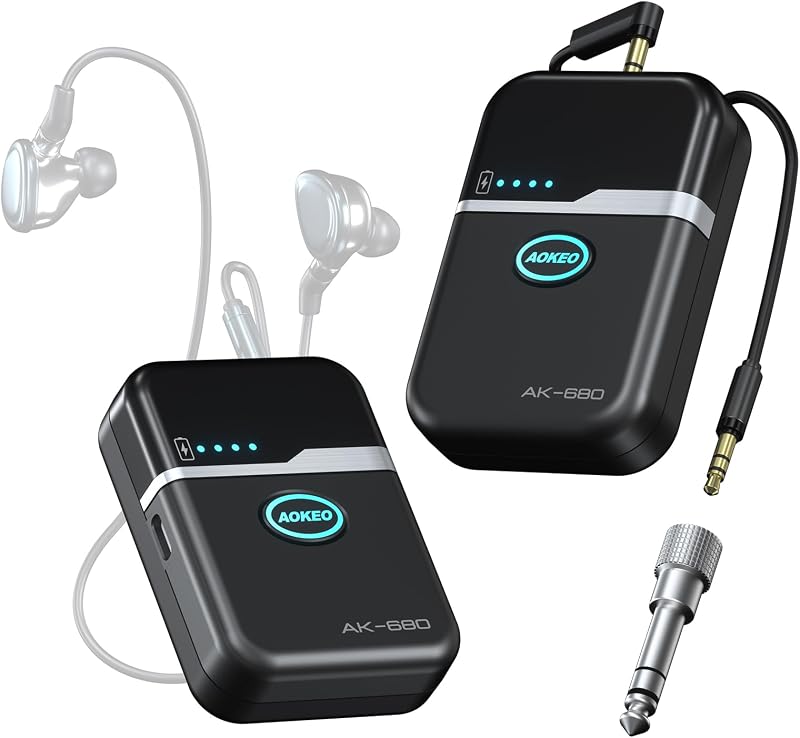
Descripción del producto El video muestra el producto en uso. El video lo guía a través de la configuración del producto. El video compara varios productos. El video muestra el producto desembalándolo. El reproductor de video se está cargando. Haga clic para reproducir el videoReproducirMuteHora actual 0:00/Duración 1:34Cargado: 3.19%0:00Tipo de transmisión LIVESeek to live, actualmente detrás de liveLIVERTiempo restante -1:34 1xReproducción Calificar Capítulos Capítulos Descripciones descripciones desactivadas, seleccionadas Subtítulos Subtítulos desactivados, seleccionado Inglés (Automatizado) Pista de audio predeterminado, seleccionado Pantalla completa Esta es una ventana modal. Sistema de monitorización intraaural inalámbrico M-PROI ¿Cómo emparejar un petaca con el transmisor? a. Encienda el transmisor después de conectarlo a sus dispositivos de envío de señales y encienda el receptor de bolsillo. b. Presione los botones Grupo y Canal para seleccionar la frecuencia deseada para un canal. do. Presione el botón Sync del canal designado para activar el progreso de sincronización IR. d. Apunte verticalmente la ventana de infrarrojos del bodypack hacia la del transmisor para emparejarlos. El video muestra el producto en uso. El video lo guía a través de la configuración del producto. El video compara varios productos. El video muestra el producto desempaquetado. El reproductor de video se está cargando. Haga clic para reproducir el videoReproducirMuteHora actual 0:00/Duración 0:22Cargado: 13.65%0:00Tipo de transmisión LIVESeek to live, actualmente detrás de liveLIVERTiempo restante -0:22 1xReproducción Calificar Capítulos Capítulos Descripciones descripciones desactivadas, seleccionadas Subtítulos Subtítulos desactivados, seleccionado Inglés (Automatizado) Pista de audio predeterminado, seleccionado Pantalla completa Esta es una ventana modal. Sistema inalámbrico de monitorización intrauditiva ¿Cómo conectar el transmisor mediante un cable de 6,5 mm/xlr? Si desea enviar una señal a otros dispositivos, conecte el dispositivo de envío de señal al conector XLR/6,5 MM y luego conecte en cadena esta señal a una entrada del dispositivo deseado, según la muestra. El video muestra el producto en uso. El video lo guía a través de la configuración del producto. El video compara varios productos. El video muestra el producto desempaquetado. El reproductor de video se está cargando. Haga clic para reproducir el videoReproducirMuteHora actual 0:00/Duración 0:26Cargado: 11.55%0:00Tipo de transmisión LIVESeek to live, actualmente detrás de liveLIVERTiempo restante -0:26 1xReproducción Calificar Capítulos Capítulos Descripciones descripciones desactivadas, seleccionadas Subtítulos Subtítulos desactivados, seleccionada Pista de audio predeterminada, seleccionada Pantalla completa Esta es una ventana modal. Sistema inalámbrico de monitorización intrauditiva ¿Cómo montar en bastidor el M-PROI con nuestro kit? a. Prepare una caja de rack estándar de 19 pulgadas para el flujo de trabajo de montaje en rack. b. Instale dos orejas de bastidor en el transmisor. do. Conecte dos cables de extensión al transmisor. d. Monte el transmisor en el bastidor y luego monte cada antena en el frente. El video muestra el producto en uso. El video lo guía a través de la configuración del producto. El video compara varios productos. El video muestra el producto desempaquetado. El reproductor de video se está cargando. Haga clic para reproducir el videoReproducirMuteHora actual 0:00/Duración 0:05Cargado: 60.06%0:00Tipo de transmisión LIVESeek to live, actualmente detrás de liveLIVERTiempo restante -0:05 1xReproducción Calificar Capítulos Capítulos Descripciones descripciones desactivadas, seleccionadas Subtítulos Subtítulos desactivados, seleccionado Inglés (Automatizado) Pista de audio predeterminado, seleccionado Pantalla completa Esta es una ventana modal. Sistema inalámbrico de monitor de oído Página anterior Página siguiente 1 Ingeniosa estación de monitoreo 2 Monitoreo excepcional 3 Desbloquee una mayor libertad 4 BODYPACK VERSÁTIL 5 Profesional y conveniente Página anterior Página siguiente D Debra SISTEMA INALÁMBRICO DE MONITOR DE OÍDO M-PROI Agregar al carrito EST-12 Agregar al carrito ST-202 Agregar al carrito ER-202 Agregar al carrito ER-280 Agregar al carrito Reseñas de clientes 3.8 de 5 estrellas 15 3.8 de 5 estrellas 9 4.6 de 5 estrellas 9 4.2 de 5 estrellas 33 4.4 de 5 estrellas 61 Precio $187.90$187.90 $152.90$152.90 $284.90$284.90 $170.90$170.90 $119.91$119.91 Canal 1 2 2 2 1 Estéreo/Mono Estéreo Estéreo Estéreo Mono Mono Frecuencias seleccionables Sincronización IR y escaneo automático 20 60 100 16 Alcance inalámbrico 260FT 260FT 260FT 300FT 160FT Conector para auriculares del monitor ✔ ✔ ✔ ✔ ✔ Sin sonido o voz débil, la pantalla LCD del receptor está apagada 1. Encienda el receptor. 2. Encienda la tapa del receptor y confirme que las marcas +/- de la batería coincidan con la articulación del cabezal del receptor. 3.Instale baterías nuevas para reemplazar las baterías viejas. Sin sonido, LCD del receptor apagado 1.Compruebe si el cabezal del adaptador de corriente está conectado a la toma de corriente. 2.Confirme si el adaptador de corriente está conectado al receptor. 3. Compruebe si la toma de corriente funciona correctamente. No hay sonido, el transmisor no muestra señal de RF, el indicador del receptor está apagado. 1. Coloque verticalmente la antena del receptor. 2.Compruebe si hay obstáculos entre el transmisor y el receptor. 3.Acerque el transmisor al receptor. 4.Compruebe si el receptor y el transmisor están en la misma frecuencia. Distorsión o exceso de ruido de ráfaga. La pantalla del receptor muestra que hay señal de RF. 1. Baje el volumen máximo. 2.Elimine las interferencias de dispositivos cercanos (por ejemplo, computadoras, reproductores digitales). 3.Reemplace la batería si está casi agotada. 4.Aumente el intervalo de frecuencia cuando utilice múltiples sistemas.
Agregás al carrito
Sumás este y otros productos que querés traer.
Cotizás el envío
Calculamos flete aéreo y aranceles a Argentina.
Confirmás y pagás
Online con tarjeta, o por transferencia, con el total final a la vista.
Lo recibís en casa
Seguimiento en tiempo real. El despacho lo hacemos nosotros.
Lo que suele llevarse para tu celular · un solo envío para todo
Los mejor puntuados del mismo tipo de producto
Mismo tipo de producto y precio parecido