Cargando el producto…

Precio de origen
$ 39.180
$ 48.980
+ flete e impuestos
Compra protegida
Puerta a puerta
Gestión aduanera
Tu compra, acompañada de principio a fin
Todo esto está en los Términos y Condiciones. Leerlos
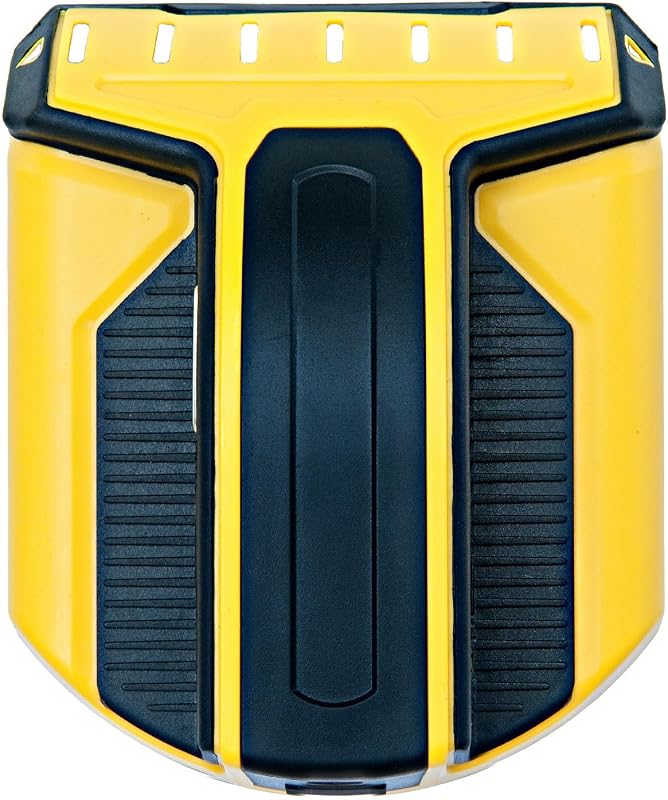
Descripción del producto Escáner de pared con buscador de vigas Ya sea que esté colgando cuadros, colocando un nuevo juego de estantes o preparándose para comenzar una ampliación, ¡saber dónde están las vigas en una pared puede ser extremadamente útil! Y un buen buscador de vigas puede marcar la diferencia entre un proyecto casero de bricolaje exitoso y un desastre. Por eso es importante un buscador de estudios. El buscador de vigas JAXWQ utiliza SENSORES INTELIGENTES ACTUALIZADOS que pueden detectar el cambio de densidad en el espacio detrás de la pared y ubica el centro de las vigas con GRAN PRECISIÓN. No tendrá que preocuparse por perforar muchos agujeros de error en la pared mientras coloca un soporte para TV, una estantería o incluso simplemente un juego de ganchos para ropa en paneles de yeso. Detección de escaneo de postes Este localizador de postes tiene 3 modos de escaneo de postes. El modo de escaneo profundo escanea a través de 2 capas de paneles de yeso de hasta 1,5 pulgadas (38 mm) de profundidad. El modo DeepScan es un modo de escaneo de mayor sensibilidad que debe usarse cuando hay capas adicionales de tableros o paneles. Para minimizar los falsos positivos y/o encontrar otros objetos más detrás de la pared que puedan no ser un montante, siempre comience el escaneo en el intervalo de 0,5 pulgadas. o 1 pulg. Modo StudScan primero. Después de detectar el centro de un objeto, utilice Metal Scan para determinar si la lectura en el modo Stud Scan fue un montante de madera, un montante de metal o una tubería. Detección de escaneo de metales El detector de pared JAXWQ puede localizar montantes metálicos en los modos StudScan, DeepScan y Metal Scan. Dado que los detectores de vigas JAXWQ buscan un cambio en la densidad detrás de los paneles de yeso, no un material en particular, en los modos StudScan y DeepScan el detector reaccionará a las vigas metálicas de la misma manera que lo haría con las vigas de madera. Detección de advertencia de cable La detección de advertencia de cable indica la presencia de cableado eléctrico vivo y sin blindaje de hasta 2 pulgadas (51 mm) de profundidad. Por seguridad, en todos los modos, este escáner de pared siempre detecta e indica el cable de CA activo. Nota: La detección WireWarning funciona en los modos StudScan/DeepScan/MetalScan. El icono de detección de advertencia de cable parpadeará cuando se detecten cables activos y sin blindaje. Paso 1: Calibre la herramienta antes de cada escaneo. Coloque todo el dispositivo contra la pared, luego presione y mantenga presionado el botón de calibración (en el costado de la herramienta) para calibrar esta herramienta. Espere a que desaparezcan las barras reductoras y emita un pitido para confirmar que se ha completado la calibración. Nota: En modo montante/profundo, colóquelo en la pared donde desea detectarlo para calibrarlo; En modo AC/Metal, colóquelo en el aire para calibrarlo. Paso 2: Escanee la pared Después de finalizar la calibración, suelte el botón de calibración. Luego mueva el detector de vigas a lo largo de la pared lentamente; si sacude o levanta el escáner accidentalmente, es necesario recalibrar el dispositivo. Paso 3: encuentre la ubicación del perno Cuando la barra de señal está llena y el pitido de alarma es más fuerte, significa que ha encontrado el centro de un objeto. Márcalo con tu lápiz. Luego elija el modo Metal Scan para comprobar si se trata de un metal. Después de confirmar que no es un metal, significa que encontró el centro de un montante. (Más detalles consulte la descripción anterior de "Detección de escaneo de metales") Luego puede perforarlo para colgarlo.
Agregás al carrito
Sumás este y otros productos que querés traer.
Cotizás el envío
Calculamos flete aéreo y aranceles a Argentina.
Confirmás y pagás
Online con tarjeta, o por transferencia, con el total final a la vista.
Lo recibís en casa
Seguimiento en tiempo real. El despacho lo hacemos nosotros.
Lo que suele llevarse para tu herramienta · un solo envío para todo
Los mejor puntuados del mismo tipo de producto
Mismo tipo de producto y precio parecido