Cargando el producto…

Precio de origen
$ 30.854
+ flete y aranceles — se calculan al cotizar
Compra protegida
Puerta a puerta
Aduana incluida
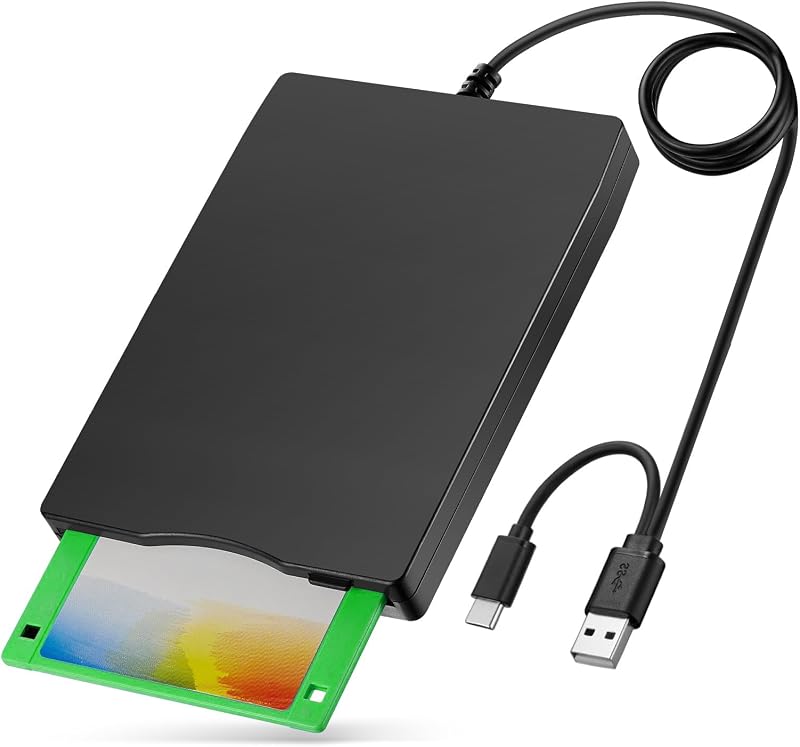
Product description RAAYOO 3.5 inch Floppy Disk Reader with USB Type A and Type C Floppy disks may be a complete stranger to today's youth, but for those who grew up with them, they also carry some precious memories of themselves. There are some of us out here that have been working with computers since the late 80's,diskettes were the usual storage devices, so we have a ton of old archived floppies that storage important files, for example, Wedding photos, kids' photos, papers, research data, previously collected poems and recipes, etc. However, Currect computers no longer come with 3.5 inch floppy disk drives, This unit is a perfect solution to help you quickly and easily see and copy the files in your floppy disks. Feature: 1.Perfect companion for our laptops or desktops without internal floppy disk drive. 2.Dual Connector: USB Type-A and USB Type-C, suitable for most of new and older computers; 2.Plug and play, no need any additional software and extra power supply. 3.High Speed USB 2.0 floppy disc reader. 4.Pop-up button design makes it convenient to read or write discs. 5.Wide Compatibility: Supported Windows 11/ 10/ 8.1/ 7/ Vista/ XP/ 2000 OS, not compatible with mac os. TIPS: ✔Not all of yours disks were readable, that is a factor of age, not the drive. Some of the data had been corrupted if they are too old or they are not stored appropriately. ✔Windows 11/10 system has a lot of show/hide options for File Explore, so you maybe cannot see the drive icon named "Floppy disk drive (A:)" after bring up "Windows File Explorer", please bring up “Devices and Printers” and right-Click on the drive icon named “TEACV0.0” under the “Devices”, Hover cursor over “Browse files” and then click on “Floppy disk drive(A:)”, then you will see the files in your floppy disks. ✔When you insert second diskette, it still shows the files from the 1st disksettefor, for this issue, please make sure you use the refresh button. After insert second floppy disk inside the drive, please right click the Windows Explorer and click "refresh" in order to update the contents of the device and read the data off the newly inserted floppy disk. 3.5 Inch External USB Floppy Disk Drive - Relive Your Beautiful Memories Multi-function 3.5inch External USB Floppy Disk Converter Actual Use Experiences From Some Buyers Here are some actual experiences from some buyers,sincerely hope that this item can also help you achieve beautiful memories. Alice said, “ I had a lot of pictures of my children growing up on floppy disk and now I am able to see them again and order prints.” Jame said, “I needed a floppy reader to retrieve photos off floppies that were found that were taken back in the day with a camera that used floppies as the media. Not knowing what to expect, I ordered this device , I have had an excellent experience so far.” Walker said, "I had a lot of old floppy disks with embroidery designs on them. I recently got a new machine and there was no way to use the designs without transferring them to a flash drive. The external floppy disk drive did this effortlessly." Jenny said, "I bought this to save the pictures that my mother had saved on floppy disks. She found them while down sizing and was going to throw them out....I told her please let me see whats on them first and when I showed her....her heart was full of joy! Thanks" Johnson said, "I bought this reader to play old floppy disc war games. The reader works great but the technology of the old floppy disc was too old for my computers." Michael said, "Found an old floppy disk marked "pictures". They were of my kids and family (20 years ago!). What a fun trip down memory lane. We were able to save them. The floppy drive was plug and play - it couldn't have been easier. Thanks!" Allen said, "Three years ago, I had to get a new computer, and I was no longer able to view the many floppy diskettes I had with photos of our young grandson, until I found your device on AMAZON. I am really enjoying going back down memory lane and viewing all those great shots that I thought were lost to me. I highly recommend this product." How to Locate "Floppy Disk Drive (A:)" in Windows 11/10 Wide Compatibility- Support Windows 11/ 10/ 8.1/ 7/ Vista/ XP/ 2000 OS Warm Tips: ✔Not all of yours disks were readable, that is a factor of age, not the drive. Some of the data had been corrupted if they are too old or they are not stored appropriately. ✔Floppy disk is characterized by small capacity and slow reading speed, please give it some time to load the data. It's normal that you hear the nostalgic soft little whirring sound as it loaded your old files. Please always wait for the disks to stop whirring before trying to do anything else. ✔Windows 11/10 system has a lot of show/hide options for File Explore,so you maybe cannot see the drive icon named "Floppy disk drive (A:)" after bring up "Windows File Explorer", please bring up “Devices and Printers” and right-Click on the drive icon named “TEACV0.0” under the
Agregás al carrito
Sumás este y otros productos que querés traer.
Cotizás el envío
Calculamos flete aéreo y aranceles a Argentina.
Confirmás y pagás
Un asesor te contacta con el link de pago.
Lo recibís en casa
Tracking en tiempo real. Aduana incluida.
Los mejor puntuados del mismo tipo de producto
Mismo tipo de producto y precio parecido