Cargando el producto…

Precio desde
$ 68.580
+ flete e impuestos
Color
Compra protegida
Puerta a puerta
Gestión aduanera
Tu compra, acompañada de principio a fin
Todo esto está en los Términos y Condiciones. Leerlos
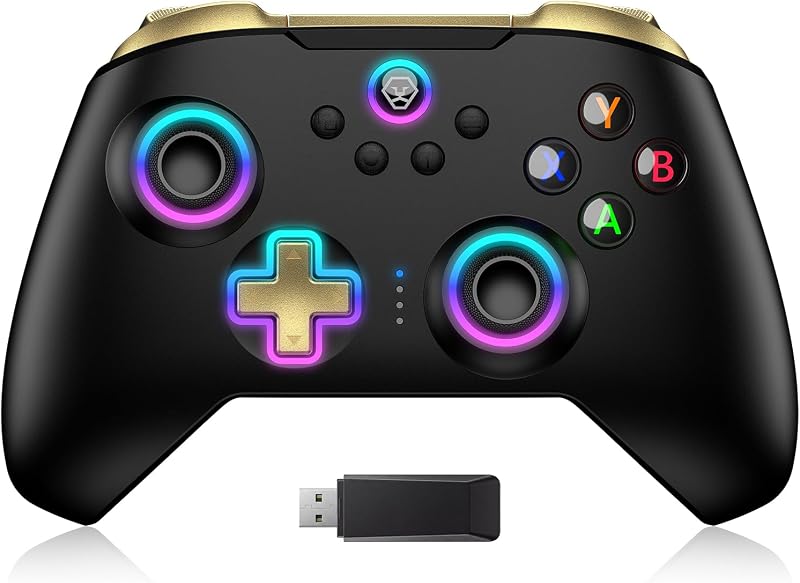
Product description Tap, Glow, and Venture! The video showcases the product in use.The video guides you through product setup.The video compares multiple products.The video shows the product being unpacked.Video Player is loading.Click to play videoPlayMuteCurrent Time 0:00/Duration 0:08Loaded: 37.54%0:00Stream Type LIVESeek to live, currently behind liveLIVERemaining Time -0:08 1xPlayback RateChaptersChaptersDescriptionsdescriptions off, selectedCaptionsCaptions off, selectedEnglish (Automated)Audio Trackdefault, selectedFullscreenThis is a modal window. aplus content video Dark Mystery, Luminous Play! Previous page Ergonomic Design Precise Control Next page 1 Hall Effect Joysticks 2 Game-playing Time 3 Pro-level Buttons 4 Ergonomic Design 5 Compatibility More Compatibility, More Choices Previous page For Switch 2/OLED/LITEFor PhonesFor PCFor Steamdeck For Switch 2/OLED/LITE For PC Windows XP and above For Steamdeck SteamOS Holo 3.4 and above For Phones Android - 6.0 and aboveiOS - 13.3 and above Next page How-To Video Connection Method Instruction From the HOME Menu, select Controllers, then Change Grip and Order.Press and hold Y + HOME for 3 seconds and 4 LED lights flash quickly. The LED(s) becoming stable, pairing finishes.If you are not connecting for the first time, you can click HOME Button to connect successsfully. The video showcases the product in use.The video guides you through product setup.The video compares multiple products.The video shows the product being unpacked.Video Player is loading.Click to play videoPlayMuteCurrent Time 0:00/Duration 0:34Loaded: 8.83%0:00Stream Type LIVESeek to live, currently behind liveLIVERemaining Time -0:34 1xPlayback RateChaptersChaptersDescriptionsdescriptions off, selectedCaptionsCaptions off, selectedEnglish (Automated)Audio Trackdefault, selectedFullscreenThis is a modal window. aplus content video Turbo Function Instruction Press and hold “T” Button + one of the Function Button (A/B/X/Y/L/R/ZL/ZR/D-pad Button).1st: Manual TURBO Function (Press and hold to launch continuously).2st: Automatic TURBO Function (Automatically continuous launch).3st: Clear TURBO Function. The video showcases the product in use.The video guides you through product setup.The video compares multiple products.The video shows the product being unpacked.Video Player is loading.Click to play videoPlayMuteCurrent Time 0:00/Duration 0:30Loaded: 10.01%0:00Stream Type LIVESeek to live, currently behind liveLIVERemaining Time -0:30 1xPlayback RateChaptersChaptersDescriptionsdescriptions off, selectedCaptionsCaptions off, selectedEnglish (Automated)Audio Trackdefault, selectedFullscreenThis is a modal window. aplus content video Light Control Instruction Turn on the light: Press HOME Button.Turn off the light: Press and hold Light Button for 3 seconds.Change the Light Color: Press Light Button. Colors will change each time you press Light Button. Change the Lighting Mode: Press Light Button + “⊕”: 1st: Breathing light mode; 2st: Quick flash mode; 3st: Vibration light mode.If the controller is not connected to the console, press Home Button and the LED pattern will be illuminated. The video showcases the product in use.The video guides you through product setup.The video compares multiple products.The video shows the product being unpacked.Video Player is loading.Click to play videoPlayMuteCurrent Time 0:00/Duration 0:45Loaded: 6.67%0:00Stream Type LIVESeek to live, currently behind liveLIVERemaining Time -0:45 1xPlayback RateChaptersChaptersDescriptionsdescriptions off, selectedCaptionsCaptions off, selectedEnglish (Automated)Audio Trackdefault, selectedFullscreenThis is a modal window. aplus content video Connection Method Instruction Press and hold “MR” Button, then input the single button (A/B/X/Y/L/R/ZL/ZR/+/-/D-pad Button and L/R joysticks) you want to map;The controller will have the vibration cue after loosing “MR” Button, and then press “XR” Button to trigger Programmable Buttons.The mapping function can also be achieved by using the ML Button as described above.) The video showcases the product in use.The video guides you through product setup.The video compares multiple products.The video shows the product being unpacked.Video Player is loading.Click to play videoPlayMuteCurrent Time 0:00/Duration 0:20Loaded: 15.01%0:00Stream Type LIVESeek to live, currently behind liveLIVERemaining Time -0:20 1xPlayback RateChaptersChaptersDescriptionsdescriptions off, selectedCaptionsCaptions off, selectedEnglish (Automated)Audio Trackdefault, selectedFullscreenThis is a modal window. aplus content video How do I make this pure color switch pro controller show the exquisite pattern? The first time you receive the controller without being connected to your console, you can press the Home button to active it. Then you can see its unique pattern. Why does the pattern still not appear after pressing the Home button of this controller? Check whether it is in either of the following conditions: A.Out
Agregás al carrito
Sumás este y otros productos que querés traer.
Cotizás el envío
Calculamos flete aéreo y aranceles a Argentina.
Confirmás y pagás
Online con tarjeta, o por transferencia, con el total final a la vista.
Lo recibís en casa
Seguimiento en tiempo real. El despacho lo hacemos nosotros.
Lo que suele llevarse para tu consola · un solo envío para todo
Los mejor puntuados del mismo tipo de producto
Mismo tipo de producto y precio parecido
![Mumba Funda acoplable para Nintendo Switch (lanzamiento 2017), [Serie Blade] Funda protectora de agarre de TPU compatible con consola Nintendo Switch y controlador Joy-Con (azul marino)](https://m.media-amazon.com/images/I/7139Sn2wIgL._AC_SL800_.jpg)