Cargando el producto…

Precio de origen
$ 39.004
$ 58.780
+ flete e impuestos
Compra protegida
Puerta a puerta
Gestión aduanera
Tu compra, acompañada de principio a fin
Todo esto está en los Términos y Condiciones. Leerlos
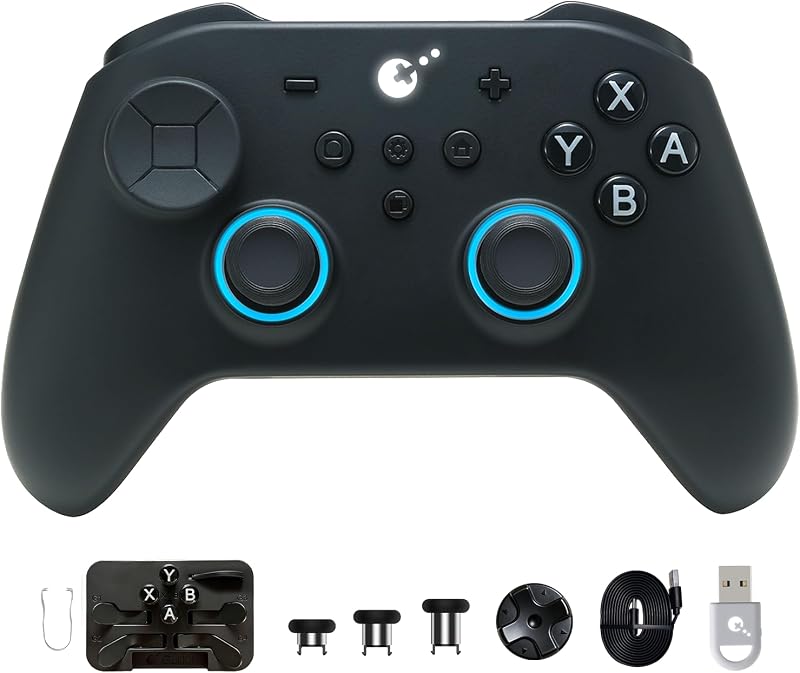
Descripción del producto Página anterior Página siguiente 1 PC Play para PS5 DS/DSE 2 Asignación de botones traseros 3 Latencia ultrabaja de 2,95 4 Personalización completa Guía de emparejamiento de PC Emparejamiento con guardado automático. Se reconecta automáticamente. 1. Encienda el controlador y configúrelo en modo de emparejamiento Bluetooth. 2.Inserte el Adaptador Goku 2 en el puerto USB-A de su dispositivo. 3. El LED del adaptador parpadeará rápidamente y se emparejará automáticamente. 4.El LED del adaptador permanece fijo cuando se empareja correctamente. El video muestra el producto en uso. El video lo guía a través de la configuración del producto. El video compara varios productos. El video muestra el producto desembalándolo. El reproductor de video se está cargando. Haga clic para reproducir el video. ReproducirMuteHora actual 0:00/Duración 0:39Cargado: 7.70%0:00Tipo de transmisión LIVESeek to live, actualmente detrás de liveLIVERTiempo restante -0:39 1xReproducción Calificar Capítulos Capítulos Descripciones descripciones desactivadas, seleccionadas Subtítulos Subtítulos desactivados, seleccionado Inglés (Automatizado) Pista de audio predeterminado, seleccionado Pantalla completa Esta es una ventana modal. Adaptador de controlador Gulikit Guía de emparejamiento para Switch 1 y 2, Steam Deck, emparejamiento de guardado automático de ROG Ally. Se reconecta automáticamente. 1. Coloque la consola en la base. 2. Encienda el controlador e ingrese al modo de emparejamiento Bluetooth. 3. Conecte el adaptador GOKU 2 al puerto USB-A de la base. El LED del adaptador parpadeará rápidamente y se emparejará automáticamente. 4. El LED del adaptador permanece fijo cuando se empareja correctamente. (NOTA: Para la conexión directa a la consola, se requiere un cable OTG o un adaptador USB-A a USB-C (no incluido).) El video muestra el producto en uso. El video lo guía a través de la configuración del producto. El video compara varios productos. El video muestra el producto desempaquetado. El reproductor de video se está cargando. Haga clic para reproducir el videoReproducirMuteHora actual 0:00/Duración 1:03Cargado: 4.77%0:00Tipo de transmisión LIVEBuscar vivir, actualmente detrás de liveLIVERTiempo restante -1:03 1xVelocidad de reproducciónCapítulosCapítulosDescripcionesdescripciones desactivadas, seleccionadasSubtítulosSubtítulos desactivados, seleccionadoInglés (Automatizado)Pista de audiopredeterminado, seleccionadoPantalla completaEsta es una ventana modal. Adaptador de controlador Gulikit Guía de emparejamiento para emparejamiento de guardado automático de PS4. Se reconecta automáticamente. 1.Apague el controlador original y conéctelo a un extremo del Adaptador GOKU 2 mediante un cable USB (no incluido). 2. Encienda su controlador de terceros e ingrese al modo de emparejamiento Bluetooth. 3. Conecte el otro extremo del adaptador al puerto USB-A de la consola. 4. El LED del adaptador parpadeará rápidamente y se emparejará automáticamente. El LED del adaptador permanece fijo cuando se empareja correctamente. (NOTA: Se requiere el controlador original para el emparejamiento y el uso de juegos) El video muestra el producto en uso. El video lo guía a través de la configuración del producto. El video compara varios productos. El video muestra el producto desembalándolo. El reproductor de video se está cargando. Haga clic para reproducir el videoReproducirSilenciarHora actual 0:00/Duración 0:54Cargado: 5.56%0:00Tipo de transmisión LIVEBuscar en vivo, actualmente detrás de liveLIVERTiempo restante -0:54 1xVelocidad de reproducciónCapítulosCapítulosDescripcionesdescripciones desactivadas, seleccionadasSubtítulosSubtítulos desactivados, seleccionadoInglés (Automatizado)Pista de audiopredeterminado, seleccionadoPantalla completaEsta es una ventana modal. Adaptador de controlador Gulikit Guía de emparejamiento para Xbox One/Xbox Series S/X Emparejamiento de guardado automático. Se reconecta automáticamente. 1.Apague el controlador original y conéctelo a un extremo del Adaptador GOKU 2 mediante un cable USB (no incluido). 2. Encienda su controlador de terceros e ingrese al modo de emparejamiento Bluetooth. 3. Conecte el otro extremo del adaptador al puerto USB-A de la consola. 4. El LED del adaptador parpadeará rápidamente y se emparejará automáticamente. El LED del adaptador permanece fijo cuando se empareja correctamente. (NOTA: Se requiere el controlador original para el emparejamiento y el uso de juegos) El video muestra el producto en uso. El video lo guía a través de la configuración del producto. El video compara varios productos. El video muestra el producto desempaquetado. El reproductor de video se está cargando. Haga clic para reproducir el videoReproducirSilenciarHora actual 0:00/Duración 1:03Cargado: 4.77%0:00Tipo de transmisión LIVEBuscar en vivo, actualmente detrás de liveLIVERTiempo restante -1:03 1xVelocidad de reproducciónCapítulosCapítulosDescripcionesdescripciones desactivadas, seleccionadasSubtítulosSubtítulos desactivados, seleccionadoInglés (Automatizado)Pista de audiopredeterminado, seleccionadoPantalla completaEsta es una ventana modal. Guía de actualización de firmware del adaptador del controlador Gulikit 1. Mantenga presionado el botón lateral mientras conecta el adaptador al puerto USB-A de su PC. 2. Aparecerá en su PC una unidad USB con el nombre de la versión actual del firmware. 3. Descargue el firmware más reciente del sitio web oficial. 4. Descomprima el archivo y copie el archivo "*.bin" al directorio raíz de la unidad USB. La actualización se completa automáticamente en segundos. El adaptador se apaga y la unidad desaparece. El video muestra el producto en uso. El video lo guía a través de la configuración del producto. El video compara varios productos. El video muestra el producto desempaquetado. El reproductor de video se está cargando. Haga clic para reproducir el video ReproducirMuteHora actual 0:00/Duración 0:53 Cargado: 5.67%0:00 Tipo de transmisión LIVESeek to live, actualmente detrás de liveLIVERTiempo restante -0:53 1xReproducción Calificar Capítulos Capítulos Descripciones descripciones desactivadas, seleccionadas Subtítulos Subtítulos desactivados, seleccionado Inglés (Automatizado) Pista de audio predeterminado, seleccionado Pantalla completa Esto es
Agregás al carrito
Sumás este y otros productos que querés traer.
Cotizás el envío
Calculamos flete aéreo y aranceles a Argentina.
Confirmás y pagás
Online con tarjeta, o por transferencia, con el total final a la vista.
Lo recibís en casa
Seguimiento en tiempo real. El despacho lo hacemos nosotros.
De la misma marca, empezando por lo más reseñado
Los mejor puntuados del mismo tipo de producto
Mismo tipo de producto y precio parecido