Cargando el producto…

Precio desde
$ 162.660
+ flete e impuestos
Tamaño
Compra protegida
Puerta a puerta
Gestión aduanera
Tu compra, acompañada de principio a fin
Todo esto está en los Términos y Condiciones. Leerlos
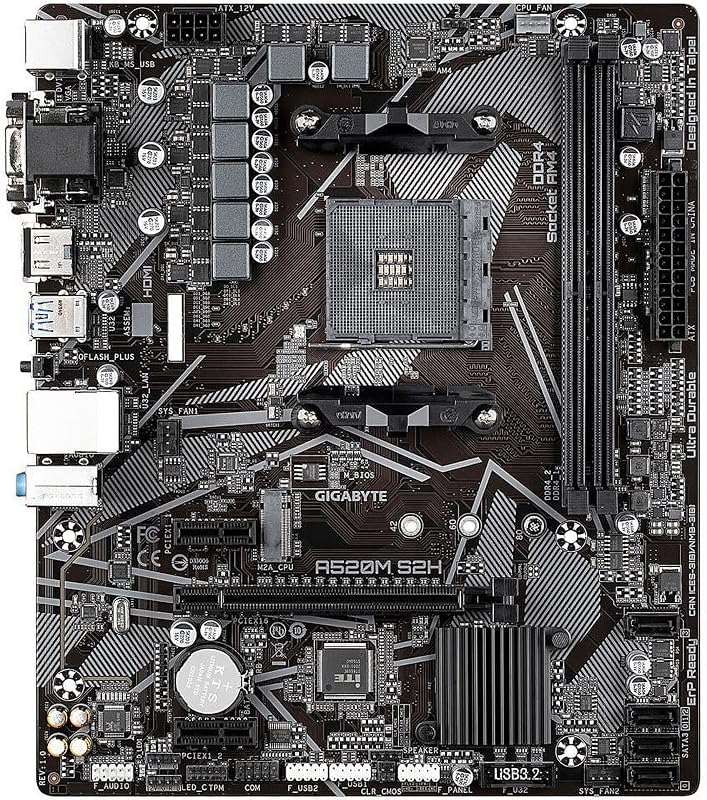
Descripción del producto Placa base SHANGZHAOYUAN H97 STRONG con calidad y mano de obra exquisitas, satisface sus necesidades de oficina, entretenimiento y juegos. Cada placa base ha sido sometida a rigurosas pruebas, rechazando productos defectuosos y usados. El diseño del circuito optimizado y el diseño del circuito de memoria completamente separado garantizan una gran estabilidad. Audio Realtek ALC897 HD, la línea divisoria de audio única para proteger la tarjeta de sonido de interferencias de señal. Ranura M.2, velocidad de transferencia de datos de hasta 32 Gbps. Es una buena opción para un sistema operativo o unidad de aplicación, ya que proporciona un acceso rápido a los datos. Equipado con chipset H97, material PCB de 10 capas, eficiencia de transmisión más rápida y vida útil más larga. El nuevo diseño estético, la rápida disipación del calor y el trabajo estable bajo cargas elevadas. Nota: El manual de usuario no está incluido en el paquete; si lo necesita, descárguelo de la página de descripción del producto o permítanos ayudarlo a obtenerlo. Especificaciones de la placa base H97 STRONG LGA 1150 Conjunto de chips principal Conjunto de chips Intel H97 Zócalo de CPU LGA 1150 Ranura de memoria 2 * DDR3 Memoria máxima 16 GB (2 * 8 GB) Ranura PCIe PCIe 3.0 x16 Tarjeta de video integrada SÍ (requiere CPU para admitir la pantalla integrada) Tarjeta de red integrada 2 * Interfaz LAN Gigabit Interfaz de almacenamiento 4 * SATA 3.0; Interfaz USB NVME M.2 3*USB 3.0; 5 * interfaz de vídeo USB 2,0 compatible con HDMI; VGA; Fuente de alimentación DP Fuente de alimentación de 4 fases Conector de alimentación 24PIN+8PIN Interfaz de ventilador 1*4PIN; Placa base de 1*3 pines Tamaño 170mm * 170mm Dual DDR3 Compatible con DDR3 1333MHz/1600MHz/1866MHz/2400MHz RAM, soporte máximo de 16GB. WIFI M.2 Admite tarjeta de red 2,5G. Conéctate a la red Wi-Fi y navega por la web sin preocupaciones. PCIe 3.0 X16 Aumenta considerablemente la velocidad operativa de la computadora y satisface las necesidades básicas de oficina y juegos. El cuerpo blindado es estable y duradero. Preguntas frecuentes La computadora no arranca, el ventilador no gira, las luces indicadoras están apagadas Verifique la compatibilidad de la CPU o está dañada; comprobar las fuentes de alimentación de la placa base y de la CPU; revise el cable del botón de encendido; comprobar el interruptor de encendido; comprobar la fuente de alimentación; desconecte la tarjeta gráfica, el disco duro, los dispositivos USB, etc., luego intente encender nuevamente; CMOS claro. El ventilador gira brevemente y luego se apaga inmediatamente, o la computadora se reinicia repetidamente. Borre el CMOS; comprobar la compatibilidad o daños de la CPU y la memoria; desconecte la tarjeta gráfica, el disco duro, los dispositivos USB, etc. y luego intente encenderlo. El ventilador está girando, pero presionar la tecla Bloq Mayús en el teclado no activa las luces indicadoras. Intente borrar el CMOS; comprobar que las fuentes de alimentación de la placa base y de la CPU estén conectadas correctamente; comprobar si hay problemas o daños en la compatibilidad de la CPU y la memoria; y comprobando que la memoria está instalada correctamente. El ventilador gira. Al presionar la tecla Bloq Mayús en el teclado se enciende la luz indicadora, pero no aparece ninguna pantalla. Verifique si el monitor está encendido o dañado; verifique si el cable de datos de la pantalla está correctamente conectado o dañado; compruebe si la tarjeta gráfica funciona correctamente. Pantalla azul, falla del sistema. Verifique si el ventilador de enfriamiento de la CPU está girando y si la base del ventilador de enfriamiento está colocada correctamente en la CPU; reemplace la CPU, la memoria, el disco duro, el sistema operativo y la fuente de alimentación.
Agregás al carrito
Sumás este y otros productos que querés traer.
Cotizás el envío
Calculamos flete aéreo y aranceles a Argentina.
Confirmás y pagás
Online con tarjeta, o por transferencia, con el total final a la vista.
Lo recibís en casa
Seguimiento en tiempo real. El despacho lo hacemos nosotros.
Los mejor puntuados del mismo tipo de producto
Mismo tipo de producto y precio parecido