
Cargando el producto…

Precio desde
$ 646.777
+ flete e impuestos
Tamaño
Compra protegida
Puerta a puerta
Gestión aduanera
Tu compra, acompañada de principio a fin
Todo esto está en los Términos y Condiciones. Leerlos
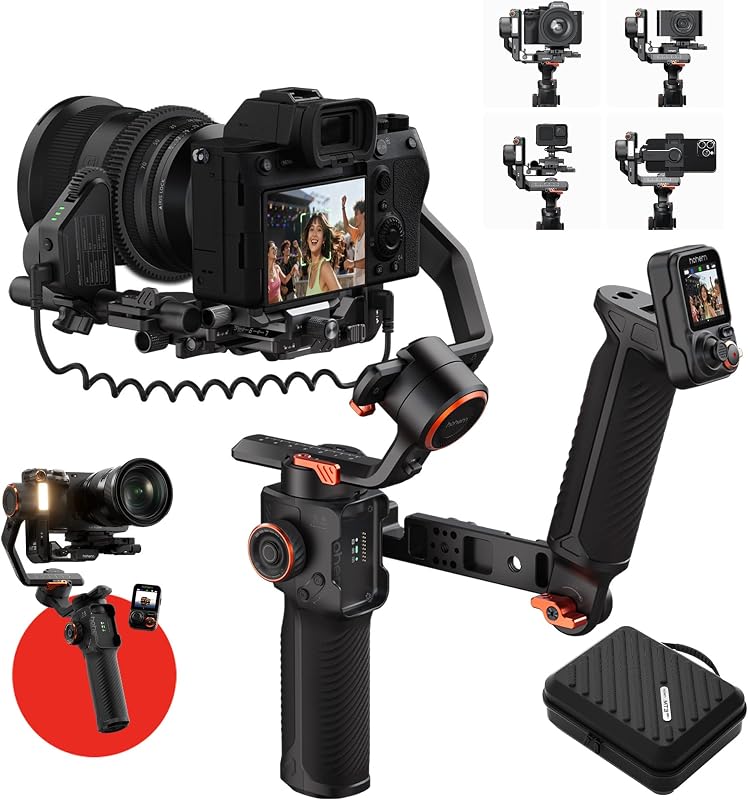
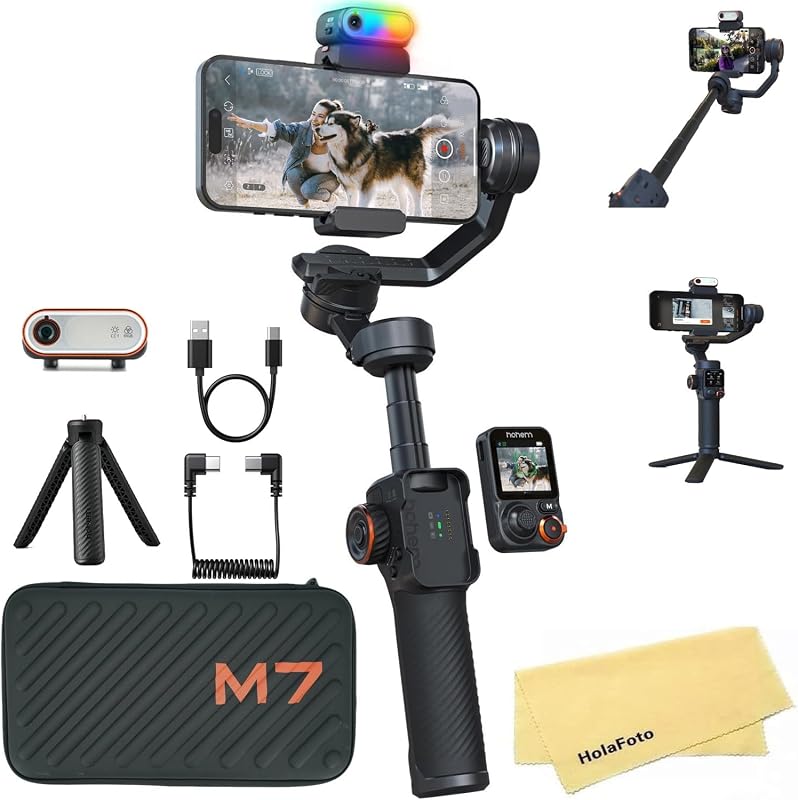
Descripción del producto Hohem iSteady MT3 - Estabilizador de IA para una creación sin esfuerzo El video muestra el producto en uso. El video lo guía a través de la configuración del producto. El video compara varios productos. El video muestra el producto desempaquetado. El reproductor de video se está cargando. Haga clic para reproducir el videoReproducirSilenciarHora actual 0:00/Duración 1:01Cargado: 4.92%0:00Tipo de transmisión EN VIVOBuscar en vivo, actualmente detrás en vivoLIVERTiempo restante -1:01 1xVelocidad de reproducciónCapítulosCapítulosDescripcionesdescripciones desactivadas, seleccionadasSubtítulosSubtítulos desactivados, seleccionadoInglés (Automatizado)Pista de audiopredeterminado, seleccionadoPantalla completaEsta es una ventana modal. Hohem iSteady MT3 Gimbal Página anterior Página siguiente 1 Rastreador AI incorporado 2 Un gesto para comenzar 3 Siempre te mantiene en el encuadre 4 Luz de relleno CCT y RGB Página anterior Página siguiente 1 Estabilización iSteady 2 Segundo interruptor vertical rápido 3 Compatibilidad 4 en 1 4 Equilibrio más fácil y rápido 5 Botón de función Página anterior Página siguiente Página anterior Página siguiente ¿Qué cámaras y dispositivos admite? El iSteady MT3 admite una carga útil máxima de cámaras de 1,4 kg (3,08 lb). Para modelos de cámara más detallados, consulte nuestro sitio web oficial de hohem. ¿Por qué el cardán vibra después de encenderlo? Asegúrese de que el dispositivo esté instalado y equilibrado correctamente. Si la vibración aún ocurre, intente utilizar la función de calibración automática. La ruta específica es: Ingrese al submenú OLED → Fuerza del motor → seleccione [AUTO] y presione el botón M ¿Cómo uso la función de carga inversa del cardán? Cuando el cardán esté encendido o en modo de espera, utilice el cable de carga inversa de tipo C a tipo C incluido. Conecte un extremo al puerto de carga inversa del cardán y el otro extremo al puerto de carga de su dispositivo. La potencia de salida es de 5V/1A. ¿Por qué el cardán tiembla de manera inestable, muestra una advertencia de sobrecarga o error03 y luego se apaga? 1. Pruebe la calibración automática (Calibración del motor) después de encender: Ingrese al submenú OLED → Fuerza del motor → Auto 2. Verifique todos los pestillos y perillas del cardán para ver si ya se han apretado. ¿Existe algún límite de temperatura de funcionamiento para Hohem iSteady MT3? Se puede utilizar en ambientes de -10° C a 40° C (32 ℉ a 104 ℉).
Agregás al carrito
Sumás este y otros productos que querés traer.
Cotizás el envío
Calculamos flete aéreo y aranceles a Argentina.
Confirmás y pagás
Online con tarjeta, o por transferencia, con el total final a la vista.
Lo recibís en casa
Seguimiento en tiempo real. El despacho lo hacemos nosotros.
Lo que suele llevarse para tu celular · un solo envío para todo
De la misma marca, empezando por lo más reseñado
Los mejor puntuados del mismo tipo de producto
Mismo tipo de producto y precio parecido













![Solo para iPhone, estabilizador de cardán MOGO [Apple MFi Certified] para iPhone con clip de teléfono y luz RGB, compatible con la selección de objetivos de seguimiento en Apple Watch y cámaras iOS26 para iPhone 16 15 Pro Max](https://m.media-amazon.com/images/I/614Q5H+41fL._AC_SL800_.jpg)

