Cargando el producto…

Precio desde
$ 231.279
+ flete e impuestos
Color
Compra protegida
Puerta a puerta
Gestión aduanera
Tu compra, acompañada de principio a fin
Todo esto está en los Términos y Condiciones. Leerlos
¿Es una compra grande? Repasala con una persona.
Te contamos cómo queda el costo total —flete, impuestos y aranceles— y cuánto tarda, antes de que pongas la tarjeta.
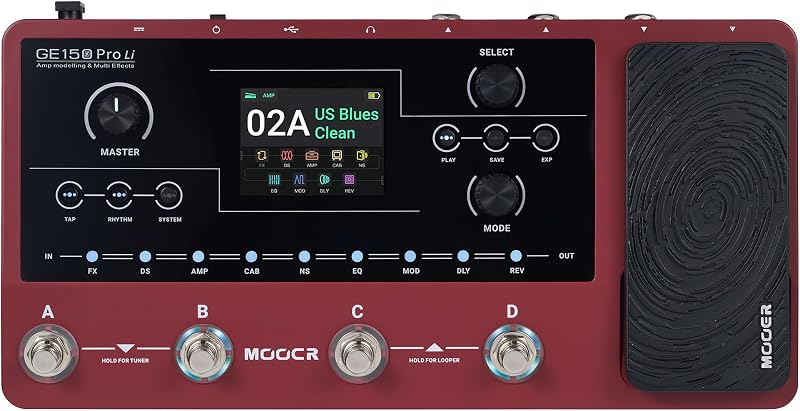
Escribinos por WhatsAppDescripción del producto Serie MOOER GE150 Plus Desde principiantes hasta sonidos premium avanzados Operación intuitiva, presenta una lógica de operación sencilla y simplificada que es muy adecuada para principiantes que son nuevos en los multiefectos. El GE150 Plus ofrece un flujo de trabajo simplificado diseñado para jugadores nuevos en procesadores multiefectos. Y evita que los usuarios se sientan abrumados por ajustes complicados de parámetros, lo que realmente permite una experiencia "plug-and-play y rápida de aprender". MNRS, NAM e IR Loader GE150 Plus presenta 198 parches preestablecidos, modelos de 55 amperios y 26 cabinas diseñadas con la tecnología MNRS exclusiva de MOOER, que brinda una excelente respuesta dinámica y una sensación de amplificador auténtica. Expansión tonal de alta fidelidad a través de formatos GNR/GIR patentados, cargador IR de terceros y soporte completo para NAM/MNRS. Grabación directa USB-C y OTG GE150 Plus está equipado con un puerto USB-C y admite conectividad OTG. Los usuarios pueden conectar el pedal directamente a un teléfono inteligente o computadora para grabar audio móvil de alta calidad, lo cual es muy práctico para grabar videos cortos o grabar demostraciones. La entrada AUX permite tocar junto con las pistas de acompañamiento. Página anterior El proyecto de muestra de respuesta no lineal MOOER es un ecosistema de modelado y muestreo de hardware patentado. Convierta y cargue archivos NAM realistas creados por el reproductor directamente en las 20 ranuras de amplificador vacías del pedal. Capture demostraciones de canciones mientras viaja, filme videos de redes sociales o transmita en vivo con audio claro y directo. GE150 Plus está diseñado como una solución práctica para músicos, músicos callejeros y estudiantes que viajan. Looper estéreo de los 80, 40 baterías + 10 metrónomos, diseñado para la práctica y la improvisación. Página siguiente 1 Proyecto MNRS 2 Soporte NAM 3 Grabación OTG 4 Portabilidad 5 Estación de trabajo de práctica personal todo en uno Looper Drum ¿Puedo importar ajustes preestablecidos de mi antiguo GE150 al GE150 Plus? Sí. En la actualización de firmware v2.1.1, MOOER hizo que los ajustes preestablecidos originales del GE150 fueran totalmente importables al GE150 Plus/Pro/Max. Mi computadora no detecta el pedal. ¿Cómo soluciono esto? Asegúrese de estar utilizando el software de edición GE150 PLUS dedicado. Verifique que esté utilizando un cable USB-C que admita la transferencia de datos, ya que muchos cables de solo carga no permitirán que la computadora se comunique con el pedal. ¿Cómo cambio el pedal de expresión de volumen a Wah? Al igual que los pedales wah clásicos, el GE150 plus utiliza una función de "toe-tap". Pise firmemente la punta del pedal de expresión para activar el interruptor interno. Esto alterna entre control de volumen y efectos mapeados como wah o cambio de tono. GE150 Plus frente a GE150 Pro frente a GE150 Max: ¿Cuál es el adecuado para usted? Si prioriza la portabilidad, elija el GE150 Plus; si desea una navegación de parches más sencilla, elija el GE150 Pro; y si eres un guitarrista que toca en vivo, es posible que prefieras el GE150 Max por su diseño de ocho pedales y sus salidas XLR balanceadas. ¿Cómo está funcionando el derrame? El desbordamiento mantiene vivos los rastros de retardo y reverberación cuando cambias los ajustes preestablecidos. Sin cortes. Sin fallos.
Agregás al carrito
Sumás este y otros productos que querés traer.
Cotizás el envío
Calculamos flete aéreo y aranceles a Argentina.
Confirmás y pagás
Online con tarjeta, o por transferencia, con el total final a la vista.
Lo recibís en casa
Seguimiento en tiempo real. El despacho lo hacemos nosotros.
De la misma marca, empezando por lo más reseñado
Los mejor puntuados del mismo tipo de producto