Cargando el producto…

Precio desde
$ 968.215
+ flete e impuestos
Color
Compra protegida
Puerta a puerta
Gestión aduanera
Tu compra, acompañada de principio a fin
Todo esto está en los Términos y Condiciones. Leerlos
¿Es una compra grande? Repasala con una persona.
Te contamos cómo queda el costo total —flete, impuestos y aranceles— y cuánto tarda, antes de que pongas la tarjeta.
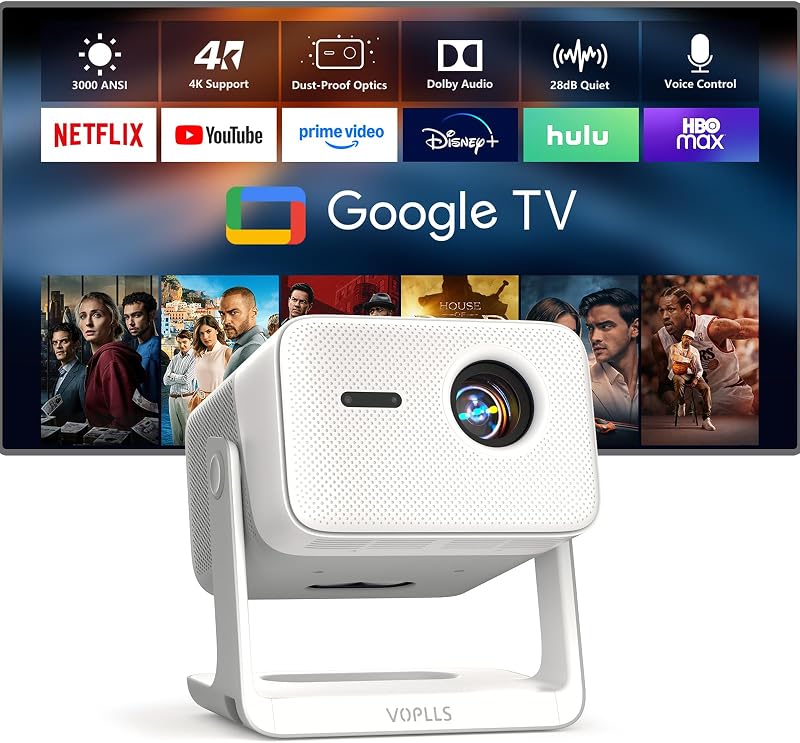
Escribinos por WhatsAppDescripción del producto Página anterior Página siguiente 1 Altavoces Dolby de 60 W 2 Potente Al Sound Master 3 Respetuoso con el clima Página anterior Página siguiente 1 Amplia biblioteca de contenido 2 Detalle 4K mejorado con IA 3 Enfoque automático y Keystone 3 s 4 Evitación automática y ajuste de pantalla 5 Detección de orientación automática con IA Página anterior Página siguiente 1 Modo de juego de baja latencia 2 WiFi 6 y Bluetooth 3 Chromecast integrado Página anterior Página siguiente 1 Control CEC 2 Control remoto Bluetooth 3 Triple Protección de temperatura Conexión de 4 puertos múltiples Resolución 1920 x1080P y soporte de decodificación 4K Tamaño de proyección Hasta 500" WIFI inalámbrico 6/5G+2.4G Entrada de energía 100V-240V-50/60HZ Altavoces incorporados 60W, soporte Dolby Audio Ajuste de imagen Enfoque automático AI, corrección trapezoidal, evitación automática de obstáculos, alineación automática de pantalla y detección de orientación automática AI Entorno de visualización óptimo Recomendado para su uso en entornos con poca luz Acerca de la función de activación El proyector ONO5Pro 2.0 admite la activación del proyector a través de la función de transmisión de pantalla de la aplicación en el teléfono cuando está encendido. Si necesita utilizar esta función, vaya a la página de inicio del proyector - [Configuración] - [General y privacidad] - [Configuración avanzada] - [Wake On Wireless]. función de transmisión de pantalla. Acerca del equilibrio de sonido AI Si necesita utilizar esta función, vaya a la página de inicio del proyector: [Configuración]- [Pantalla y sonido]- [Volumen automático]. Cuando esta función está habilitada, si el volumen cambia repentinamente, esta función suavizará el volumen de manera adecuada. Acerca del ajuste del modo de sonido El proyector ONO5Pro 2.0 proporciona el modo de sonido Estándar/Vívido/Películas/Música/Noticias/Deportes. Puede seleccionar el modo que necesita en [Pantalla y sonido] - [Modo de sonido] O si desea realizar ajustes durante la reproducción del video, presione el botón de configuración en el control remoto para mostrar la opción correspondiente. Acerca del ajuste del modo de vídeo El proyector ONO5Pro 2.0 proporciona el modo de imagen de vídeo Estándar/Vívido/Deporte/Cine/Usuario/Juego. Puede seleccionar el modo que necesita en [Pantalla y sonido] - [Modo de imagen de video] O si desea realizar ajustes durante la reproducción del video, presione el botón de configuración en el control remoto para mostrar la opción correspondiente. NOTA 1. Debido al protocolo de espejo de los teléfonos móviles Motorola y Google, se prohíbe el espejo directamente desde el proyector. Utilice Google Chromecast (no incluido) para conectarlo. 2. La función Bluetooth es solo para transmisión de audio; no admite transmisión de video/imágenes. ¿A qué aplicaciones se puede acceder? ONO5Pro 2.0 es compatible con YouTube, Live TV, YouTube Kids y Prime Video. Además, para Apple TV, se puede acceder a Disney+, Hulu, Plex, Vevo, FLTE, ToonGoggles, HelloKids y Docubay en "Mis aplicaciones". Para explorar más aplicaciones, visite App Store y Open Browser. Tenga en cuenta: debido a las limitaciones de YouTube TV, esta aplicación no es compatible actualmente con este proyector. ¿Por qué elegir ONO5Pro 2.0? Los televisores tienen un tamaño limitado, mientras que otros proyectores inteligentes sufren problemas de compatibilidad y retrasos operativos. ¿Es esta realmente la experiencia de visualización que desea? TheONO5Pro 2.0 ofrece una experiencia de usuario fluida con una amplia gama de aplicaciones para un cómodo acceso al contenido. ¡Elegir el ONO5 Pro significa que no solo obtendrás un proyector, sino que también traerás un televisor inteligente y un sistema de cine en casa a tu hogar!
Agregás al carrito
Sumás este y otros productos que querés traer.
Cotizás el envío
Calculamos flete aéreo y aranceles a Argentina.
Confirmás y pagás
Online con tarjeta, o por transferencia, con el total final a la vista.
Lo recibís en casa
Seguimiento en tiempo real. El despacho lo hacemos nosotros.
Los mejor puntuados del mismo tipo de producto
Mismo tipo de producto y precio parecido







![Proyector para exteriores 4K [VIDAA Live TV/40W Dolby/920 ISO] con WiFi6 y Bluetooth compatible con Netflix, proyector inteligente, control de voz con IA y enfoque automático, HDR10, proyector de películas para cine en casa en el techo](https://m.media-amazon.com/images/I/81JKkw44iPL._AC_SL800_.jpg)