Cargando el producto…

Precio desde
$ 282.130
+ flete y aranceles — se calculan al cotizar
Pantalla
Color
Compra protegida
Puerta a puerta
Aduana incluida
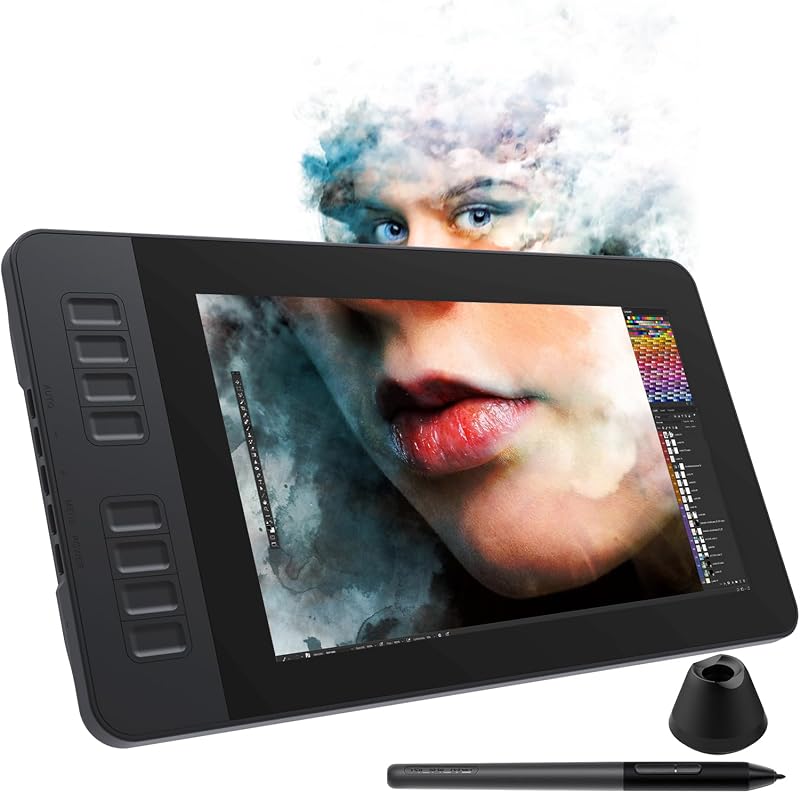
Product description GAOMON PD1161 drawing tablet is not a standalone tablet, It must be connected to a laptop or computer to work. kindly note that insufficient power can cause the PD1161 to malfunction. Using it with the external power adapter connected.And remember extra pen nibs are stored in the pen holder. Previous page Paper-like Canvas The anti-glare film bring you the paper feel to the screen and minimal reflection. High Definition Display The full HD display provides you great clarity and true to life color quality. Boost Up Your Workflow 8 buttons can be customized for any shortcuts helping you work with efficiency and ease. Versitile Compatibility GAOMON PD1161 drawing tablet works seamlessly with most creative softwares on Mac and Windows PC. Next page 1 Paper-like Canvas 2 High Definition Display 3 Boost Up Your Workflow 4 Versitile Compatibility Battery-free Stylus With no need for batteries and 8192 pen pressure, you can draw on the PD1161 drawing monitor anywhere anytime with precise and responsive lines. Programmable pen buttons put your most used shortcuts with easy access. Tip Tilt Support Just tilt the pen, and the lines will automatically become thicker or thinner depending on the angle and weight you place down - just like a regular pencil. Express Your Creativity GAOMON PD1161 is a must-have for the morden-day artist especially beginners. Full HD display & responsive stylus help you draw & design more naturally Edit Photo With Ease You'd be surprised to know just how much easier photo editing can be with graphics tablet & digital stylus rather than computer keyboard & mouse. Make Your Mark Use GAOMON PD1161 to mark up Excel spreadsheets, PDFs, text documents or take notes in a way that’s so familiar, like you would with pencil and paper. Work & Learn Digitally Digital pen technology helps you annotate documents, make presentation, draw diagrams with ease while working from home or in a online class. Compare Similar Drawing Tablets With Screen GAOMON PD1161 Add to Cart GAOMON PD1161 V2 Add to Cart GAOMON PD1561 V2 Add to Cart GAOMON Pro 19 Add to Cart GAOMON PD2200 Add to Cart GAOMON PD1320 Add to Cart GAOMON PD156Pro Add to Cart Customer Reviews 4.3 out of 5 stars 5,265 — — 5.0 out of 5 stars 2 4.5 out of 5 stars 1,047 4.0 out of 5 stars 96 4.3 out of 5 stars 2,024 Price $154.99$154.99 $219.00$219.00 $299.99$299.99 $749.00$749.00 $332.49$332.49 $207.99$207.99 $289.99$289.99 Panel Size 11.6 inch 11.6 inch 15.6 inch 18.4 inch 21.5 inch 13.3 inch 15.6 inch Color Gamut Volume 100% sRGB 99% sRGB 99% sRGB 99% sRGB 130% sRGB 100% sRGB 120% sRGB Full lamination ✘ ✔ ✔ ✔ ✔ ✔ ✔ Resolution 1920 x 1080(16:9) 1920 x 1080(16:9) 1920 x 1080(16:9) 3840 x 2160(16:9) 1920 x 1080(16:9) 1920 x 1080(16:9) 1920 x 1080(16:9) Pen Technology Battery-free Pen AP50 Battery-free G Pen Battery-free G Pen Battery-free G-Pro Pen Battery-free Pen AP32 Battery-free Pen AP50 Battery-free Pen AP50 Pressure Sensitive 8192 Levels 16384 Levels 16384 Levels 16384 Levels 8192 Levels 8192 Levels 8192 levels Tilt Support ✔ ✔ ✔ ✔ ✔ ✔ ✔ Express Keys 8 Express Keys 8 Express Keys 10 Custom Keys - 8 Touch Buttons - Dial Key & 10 Hotkeys OS Compatibility Windows , Mac OS Windows , Mac , Android, Linux Windows , Mac , Android, Linux Windows , Mac , Android, Linux Windows , Mac OS Windows , Mac , Android OS Windows , Mac OS What to do if your pen display shows no signal? 1. Unplug and re-plug the 3-in-1 HDMI cable. 2. Try it with another computer. 3. If you used an adapter to connect the cable, please try to use another adapter. 4. If all the methods mentioned above cannot fix your issue, the HDMI cable is broken. What to do if your pen display shows black screen? 1. Check whether the power cable is damaged or not. If the power cable is damaged, please change your power cable. 2. Check whether all the cables are properly connected. 3.4. If all the methods above cannot fix your issue, the HDMI cable is broken. What to do if you do not know where you can download the driver? Check the link: Please download the driver from our website:www.gaomon.net How to know if my laptop or computer is compatible with GAOMON PD1161 drawing tablet? GAOMON PD1161 digital drawing tablet works with PC (Windows 7 or later) and Mac (macOS 10.12 or later). What to do if I meet PD1161 Cursor offset issues? (Calibration is required) 1.Ensure the resolution of the tablet is set to the optimal resolution. 2.If the offset only occurs in the painting software, reinstall the driver and the painting software. Otherwise, using the screen calibration function in the driver.
Agregás al carrito
Sumás este y otros productos que querés traer.
Cotizás el envío
Calculamos flete aéreo y aranceles a Argentina.
Confirmás y pagás
Un asesor te contacta con el link de pago.
Lo recibís en casa
Tracking en tiempo real. Aduana incluida.
De la misma marca, empezando por lo más reseñado
Los mejor puntuados del mismo tipo de producto
Mismo tipo de producto y precio parecido