Cargando el producto…
Precio desde
$ 84.240
+ flete e impuestos
Color
Compra protegida
Puerta a puerta
Gestión aduanera
Tu compra, acompañada de principio a fin
Todo esto está en los Términos y Condiciones. Leerlos
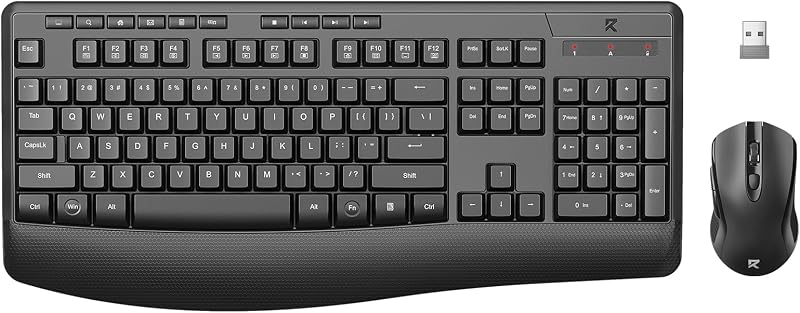
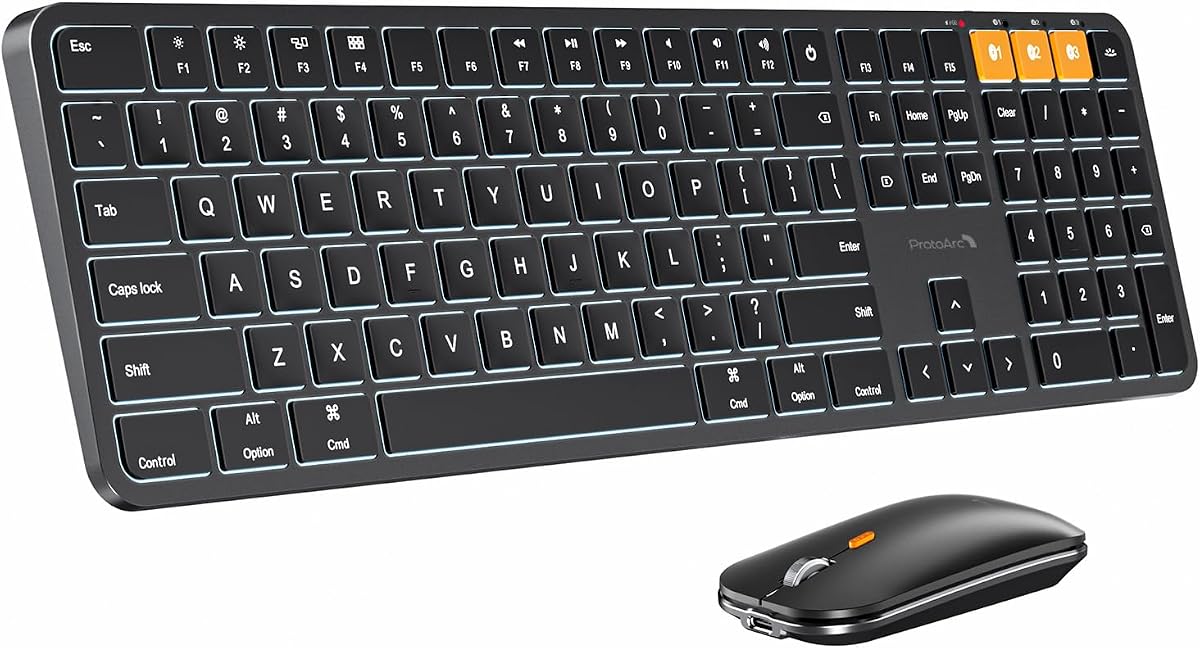
Descripción del producto Teclado y mouse inalámbricos Bluetooth para profesionales de Mac El video muestra el producto en uso. El video lo guía a través de la configuración del producto. El video compara varios productos. El video muestra el producto desembalándolo. Teclado y mouse ProtoArc KM100-A para Mac Nota: El teclado KM100-A está diseñado principalmente para macOS y es posible que no sea totalmente compatible con Windows. Las teclas multimedia y de función no funcionan en Windows Descubra el teclado ProtoArc de tamaño completo con teclado numérico Página anterior Página siguiente Diseño de teclado plano, similar al teclado mágico, para una posición neutra de la muñeca, lo que le permite mantener las muñecas niveladas con los dedos mientras escribe. Este diseño minimiza el riesgo de molestias y posibles problemas, como el síndrome del túnel carpiano, que pueden surgir al usar teclados elevados o inclinados. Cambie sin problemas entre dispositivos para lograr la máxima productividad Página anterior Página siguiente Conozca el teclado y el mouse bluetooth KM100-A para iPad diseñados para potenciar su productividad. Compatible con iPad, iPad Air y iPad Pro, el KM100-A transforma sin esfuerzo su tableta en una poderosa alternativa a una MacBook tradicional. Combinación perfecta de teclado y mouse retroiluminados Página anterior Sostenibilidad certificada, excelencia confiable Diseñado para el bienestar, creado para Mac, certificado para la Tierra Página siguiente El teclado y el mouse Bluetooth ProtoArc KM100-A para Mac son perfectos para el trabajo, las tareas generales y el uso diario. Sin embargo, no se recomiendan los juegos. Modelos de Mac con retroiluminación ProtoArc KM100-A Combo de Mac de tamaño completo KM110-A Combo de Mac de aluminio KM90-A Combo de Mac pequeño Tipo de conexión 3 * Bluetooth 5.1 Tipo de conexión 3 * Bluetooth 5.1 Tipo de conexión 3 * Bluetooth 5.1 Sistema operativo macOS 10.12, iPadOS e iOS 13.0 y superior Sistema operativo macOS 10.12, iPadOS e iOS 13.0 y superior Sistema operativo macOS 10.12, iPadOS e iOS 13.0 y superior Dispositivos compatibles MacBook Pro, MacBook Air, iMac, Mac Mini, iPad, iPhone Dispositivos compatibles MacBook Pro, MacBook Air, iMac, Mac Mini, iPad, iPhone Dispositivos compatibles MacBook Pro, MacBook Air, iMac, Mac Mini, iPad, iPhone Diseño Diseño de tamaño completo, con teclado numérico, 109 teclas Diseño Diseño de tamaño completo, con teclado numérico, 110 teclas Diseño Diseño compacto, no teclado numérico, 78 teclas Retroiluminación 3 niveles de brillo ajustables (bajo-medio-alto) Retroiluminación 3 niveles de brillo ajustables (bajo-medio-alto) Retroiluminación 3 niveles de brillo ajustables (bajo-medio-alto) El teclado/ratón no puede conectarse Conéctese a su dispositivo 1. Asegúrese de que el teclado/ratón esté completamente cargado. 2.Confirme que el teclado/ratón esté en el modo correcto. 3.Elimine el emparejamiento Bluetooth del teclado/ratón de la lista de Bluetooth de su dispositivo. 4.Repare el teclado/ratón con su dispositivo. Algunas teclas del teclado no funcionan / Las teclas del teclado tienen retraso al escribir / Las teclas del teclado repiten la escritura: 1. Asegúrese de que el teclado esté completamente cargado. 2. Elimine la conexión Bluetooth del teclado del historial de conexiones Bluetooth de su computadora. Después de eliminar la conexión Bluetooth, reinicie su computadora. 3. Vuelva a emparejar el teclado con su computadora. ¿El teclado Bluetooth KM100-A es compatible con PC con Windows? No. Este conjunto de teclado y mouse KM100-A está diseñado exclusivamente para macOS 10.12 y superior, iOS y iPadOS 13.0 y superior. Mac anteriores a 2013, Windows y Linux no son compatibles. En macOS, ¿por qué las teclas 7, 8, 9, U, I, O, J, K o las teclas numéricas (0-9) del teclado dejan de responder? Debido a que la función "Teclas del mouse" está habilitada, para deshabilitar esta función en MacBook, iMac y Mac Mini, siga estos pasos: ○ Vaya a Configuración > Accesibilidad > Control del puntero > Teclas del mouse. ○ Mueva el interruptor de las teclas del mouse a la posición de apagado. Después de reiniciar el dispositivo, el inicio de sesión requerido, ¿el teclado y el mouse no se volvían a conectar? El motivo es FileVault en Mac. Para desactivar FileVault: 1. Vaya a Configuración del sistema/Preferencias del sistema 2. Haga clic en Privacidad y seguridad 3. Haga clic en FileVault 4. Haga clic en el icono de candado en la parte inferior izquierda e ingrese su contraseña. 5. Haga clic en Desactivar cifrado ¿Cómo utilizar la función multimedia o F1-F12? El teclado Bluetooth viene preconfigurado con funciones multimedia. Las funciones F1-F12 deben activarse presionando las teclas Fn + F1-F12. O puede configurar el teclado con las funciones F1-F12 de forma predeterminada en su Mac. ¿Cuánto tiempo tarda la luz de fondo del teclado en apagarse automáticamente si no está en uso? Si el teclado no se utiliza durante 2 minutos, la luz de fondo se apagará automáticamente y podrá activarse presionando cualquier tecla. ¿Viene con un receptor USB o adaptador bluetooth? No. Este equipo se conecta solo a través de Bluetooth: sin dongle ni obstrucción de puertos. Está diseñado para la experiencia inalámbrica limpia que esperan los usuarios de Mac. ¿Puedo conectar y cambiar entre varios dispositivos con la combinación de teclado y mouse? Sí. Nuestro combo ofrece 3 canales bluetooth y admite la versión bluetooth 5.1 o superior. El uso de nuestro teclado y mouse para múltiples dispositivos ayuda a ordenar su espacio de trabajo al eliminar la necesidad de periféricos separados para cada dispositivo. ¿Cómo saber si el teclado/ratón tiene poca batería? Cuando la batería está baja, el nivel bajo
Agregás al carrito
Sumás este y otros productos que querés traer.
Cotizás el envío
Calculamos flete aéreo y aranceles a Argentina.
Confirmás y pagás
Online con tarjeta, o por transferencia, con el total final a la vista.
Lo recibís en casa
Seguimiento en tiempo real. El despacho lo hacemos nosotros.
De la misma marca, empezando por lo más reseñado
Los mejor puntuados del mismo tipo de producto
Mismo tipo de producto y precio parecido