Cargando el producto…

Precio desde
$ 84.260
+ flete e impuestos
Color
Compra protegida
Puerta a puerta
Gestión aduanera
Tu compra, acompañada de principio a fin
Todo esto está en los Términos y Condiciones. Leerlos
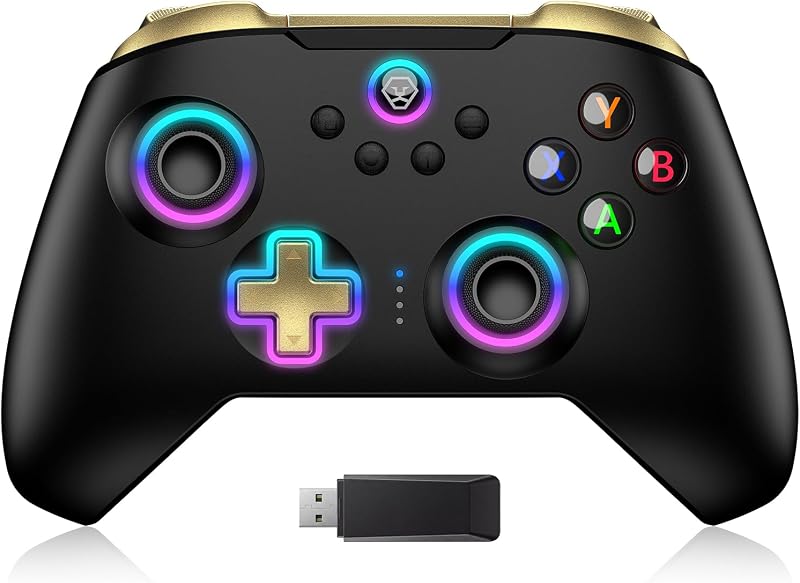
Descripción del producto Chipset Firefly EX RGB Su motor de iluminación ambiental definitivo El video muestra el producto en uso. El video lo guía a través de la configuración del producto. El video compara varios productos. El video muestra el producto desempaquetado. El reproductor de video se está cargando. Haga clic para reproducir el videoReproducirSilenciarHora actual 0:00/Duración 0:07Cargado: 42.90%0:00Tipo de transmisión LIVEBuscar en vivo, actualmente detrás de liveLIVERTiempo restante -0:07 1xVelocidad de reproducciónCapítulosCapítulosDescripcionesdescripciones desactivadas, seleccionadasSubtítulosSubtítulos desactivados, seleccionadoPista de audio japonés (automatizado)Predeterminado, seleccionadoPantalla completaEsta es una ventana modal. Controlador Switch 2 Pro con base de carga - DAVE Elija sus colores Brillo similar a una medusa para vibraciones instantáneas de las profundidades marinas El video muestra el producto en uso. El video lo guía a través de la configuración del producto. El video compara varios productos. El video muestra el producto desempaquetado. El reproductor de video se está cargando. Haga clic para reproducir el videoReproducirSilencioHora actual 0:00/Duración 0:32Cargado: 9.38%0:00Tipo de transmisión EN VIVOBuscar en vivo, actualmente detrás de liveLIVERTiempo restante -0:32 1xVelocidad de reproducciónCapítulosCapítulosDescripcionesdescripciones desactivadas, seleccionadasSubtítulosSubtítulos desactivados, seleccionadoJaponés (Automatizado)Pista de audiopredeterminado, seleccionadoPantalla completaEsta es una ventana modal. Controlador Switch 2 Pro con base de carga: ¡DAVE siempre listo para jugar! con base de carga con conexión de iluminación inteligente El video muestra el producto en uso. El video lo guía a través de la configuración del producto. El video compara varios productos. El video muestra el producto desempaquetado. El reproductor de video se está cargando. Haga clic para reproducir el videoReproducirSilencioHora actual 0:00/Duración 0:06Cargado: 50.05%0:00Tipo de transmisión LIVESeek to live, actualmente detrás de liveLIVERTiempo restante -0:06 1xReproducción Calificar Capítulos Capítulos Descripciones descripciones desactivadas, seleccionadas Subtítulos Subtítulos desactivados, seleccionado Japonés (Automatizado) Pista de audio predeterminado, seleccionado Pantalla completa Esta es una ventana modal. Controlador Switch 2 Pro con base de carga - Tarjeta Marinca exclusiva de DAVE Beneficio exclusivo para los fanáticos de Dave the Diver: ¡Tarjetas Marinca raras para llevarte a casa lo mejor del Blue Hole! Página anterior Página siguiente Página anterior Página siguiente 1 Base de carga inteligente 2 IMD sin pintura 3 Agarre antideslizante 4 Clics satisfactorios 5 Diseño ergonómico Más compatibilidad, más opciones Método de conexión Instrucción Desde el menú INICIO, seleccione Controladores, luego cambie el agarre y el orden. Mantenga presionado Y + HOME durante 3 segundos y 4 luces LED parpadearán rápidamente. Los LED se estabilizan y el emparejamiento finaliza. Si no se está conectando por primera vez, puede hacer clic en el botón INICIO para conectarse correctamente. El video muestra el producto en uso. El video lo guía a través de la configuración del producto. El video compara varios productos. El video muestra el producto desempaquetado. El reproductor de video se está cargando. Haga clic para reproducir el videoReproducirMuteHora actual 0:00/Duración 0:26Cargado: 11.55%0:00Tipo de transmisión LIVESeek to live, actualmente detrás de liveLIVERTiempo restante -0:26 1xReproducción Calificar Capítulos Capítulos Descripciones descripciones desactivadas, seleccionadas Subtítulos Subtítulos desactivados, seleccionada Pista de audio predeterminada, seleccionada Pantalla completa Esta es una ventana modal. Método de conexión Instrucción Instrucción de carga Conecte la base del cargador y coloque el controlador Switch Pro en la base para cargar. El video muestra el producto en uso. El video lo guía a través de la configuración del producto. El video compara varios productos. El video muestra el producto desembalándolo. El reproductor de video se está cargando. Haga clic para reproducir el videoReproducirSilencioHora actual 0:00/Duración 0:06Cargado: 50.05%0:00Tipo de transmisión EN VIVOBuscar en vivo, actualmente detrás liveLIVERTiempo restante -0:06 1xVelocidad de reproducciónCapítulosCapítulosDescripcionesdescripciones desactivadas, seleccionadasSubtítulosSubtítulos desactivadas, seleccionadaPista de audiopredeterminada, seleccionadaPantalla completaEsta es una ventana modal. Instrucción de carga del controlador Instrucción de control de luz Encienda la luz: presione el botón INICIO. Apague la luz: presione y mantenga presionado el botón de luz durante 3 segundos. Cambie el color de la luz: presione el botón de luz. Los colores cambiarán cada vez que presione el botón de luz. Cambie el modo de iluminación: presione el botón de luz + “⊕”: 1.º: modo de luz de respiración; 2º: Modo de parpadeo rápido; 3º: modo de luz de vibración. Si el controlador no está conectado a la consola, presione el botón de inicio y el patrón de LED se iluminará. El video muestra el producto en uso. El video lo guía a través de la configuración del producto. El video compara varios productos. El video muestra el producto desempaquetado. El reproductor de video se está cargando. Haga clic para reproducir el video ReproducirMuteHora actual 0:00/Duración 0:32 Cargado: 9.38%0:00 Tipo de transmisión LIVESeek to live, actualmente detrás de liveLIVERTiempo restante -0:32 1xReproducción Calificar Capítulos Capítulos Descripciones descripciones desactivadas, seleccionadas Subtítulos Subtítulos desactivados, seleccionada Pista de audio predeterminada, seleccionada Pantalla completa Esta es una ventana modal. Instrucción de control de luz Instrucción de función turbo Mantenga presionado el botón “T” + uno de los botones de función (botón A/B/X/Y/L/R/ZL/ZR/D-pad). 1.°: Función TURBO manual (presione y mantenga presionado para iniciar continuamente). 2.°: Función TURBO automática (lanzamiento continuo automático). 3.°: Borrar función TURBO. El vídeo muestra el producto en uso.
Agregás al carrito
Sumás este y otros productos que querés traer.
Cotizás el envío
Calculamos flete aéreo y aranceles a Argentina.
Confirmás y pagás
Online con tarjeta, o por transferencia, con el total final a la vista.
Lo recibís en casa
Seguimiento en tiempo real. El despacho lo hacemos nosotros.
Los mejor puntuados del mismo tipo de producto
Mismo tipo de producto y precio parecido