Cargando el producto…

Precio desde
$ 95.895
+ flete e impuestos
Tamaño
Color
Compra protegida
Puerta a puerta
Gestión aduanera
Tu compra, acompañada de principio a fin
Todo esto está en los Términos y Condiciones. Leerlos
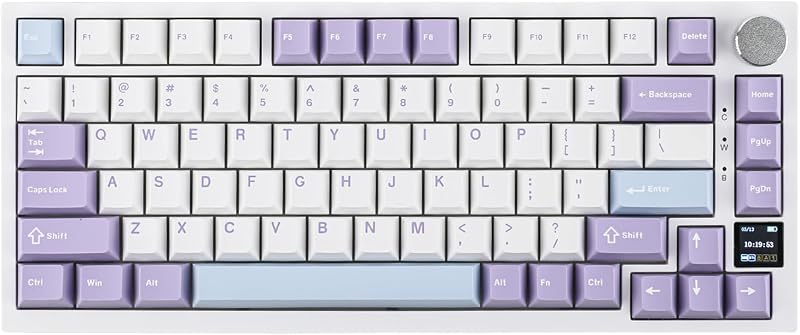
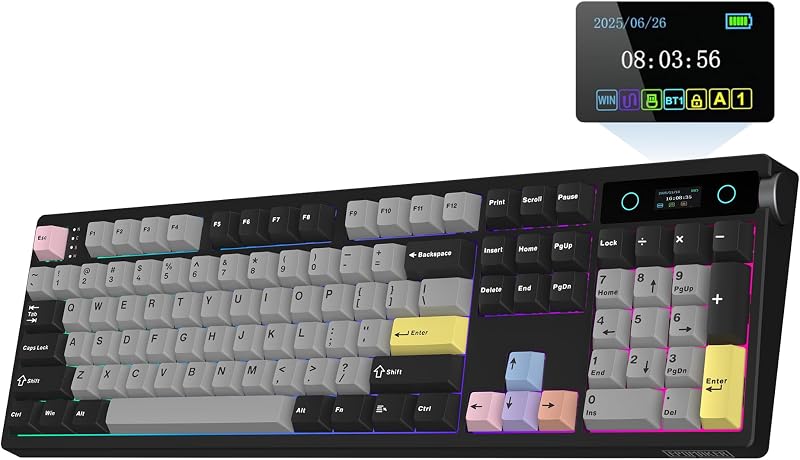
Descripción del producto El video muestra el producto en uso. El video lo guía a través de la configuración del producto. El video compara varios productos. El video muestra el producto desembalándolo. presentación de teclado Página anterior Página siguiente 1 Características 2 Hot Swap 3 3 modos 4 Teclas PBT 5 Controlador personalizado Interruptores mecánicos lineales prelubricados Sonido sólido y cremoso Interruptor de media luna TTC: Fuerza: 42 gf/56 gf, recorrido: 1,5 mm/3,6 mm LEOBOG Reaper Switch: Fuerza: 45 gf/55 gf, recorrido: 1,8 mm/3,6 mmLEOBOG Interruptor Ice Vein: Fuerza: 42 gf/55 gf, recorrido: 1,5 mm/3,6 mm Interruptor LEOBOG Greywood V3: Fuerza: 40 gf/53 gf, recorrido: 1,5 mm/3,6 mm El video muestra el producto en uso. El video lo guía a través de la configuración del producto. El video compara varios productos. El video muestra el producto desempaquetado. Teclado mecánico inalámbrico F75 Retroiluminación RGB Vibrante iluminación RGB de 16,8 M Disfrute del brillo dinámico de la retroiluminación RGB del F75, que presenta un rico espectro de 16,8 millones de colores para un entorno de escritura personalizado. Adapte los patrones de iluminación a sus preferencias, creando una atmósfera de escritorio que se adapte a su estado de ánimo. El video muestra el producto en uso. El video lo guía a través de la configuración del producto. El video compara varios productos. El video muestra el producto desembalándolo. changer la couleur RVB Perilla de control multifunción 2 en 1 Equipada con una perilla de función para cambiar entre el modo de juego y el modo de oficina. En el modo de juego, puedes girar la perilla para ajustar el brillo de las luces y hacer clic en la perilla para cambiar fácilmente los efectos de iluminación; en el modo oficina, gire la perilla para ajustar el volumen y haga clic en la perilla para reproducir o pausar. (Consejos: Knob no puede reactivar la PC desde el estado de suspensión). El video muestra el producto en uso. El video lo guía a través de la configuración del producto. El video compara varios productos. El video muestra el producto desembalándolo. control de volumen 5 luces indicadoras del teclado Indicador de carga + Modo de conexión + Sistema operativo + Bloqueo de mayúsculas + Bloqueo WIN Al presionar y mantener presionado "FN" se puede verificar el modo de conexión y el sistema operativo del teclado Indicador de carga: "FN+L_shfit" puede cambiar el efecto de luz indicadora de carga hasta que se apague Modo de conexión: ~`=modo inalámbrico 2.4g, 1/2/3=modo BT1/BT2/BT3 Sistema operativo: Q=Android, W=Windows, E=MAC, conmutación FN+Q/W/E Nota: Si la tecla WIN o Alt deja de funcionar correctamente, use FN+Q/W/E/R para cambiar al modo de sistema operativo correcto. El video muestra el producto en uso. El video lo guía a través de la configuración del producto. El video compara varios productos. El video muestra el producto desembalándolo. aplus content video Estructura de junta + Acolchado de cinco capas + Carcasa de plástico El F75 cuenta con un diseño interno de cinco capas que absorbe el sonido y los impactos, que incluye dos capas de espuma Poron, una almohadilla de interruptor IXPE, una almohadilla de mejora de sonido de PET y una almohadilla de silicona inferior. Esta sofisticada construcción reduce el ruido y la resonancia al escribir, brindando un entorno de escritura tranquilo y concentrado. El video muestra el producto en uso. El video lo guía a través de la configuración del producto. El video compara varios productos. El video muestra el producto desembalándolo. saisie au clavier Detalles de teclado más confiables Centro de conectividad Fácil de conectar y cambiar de modo. Viene con un cable de teclado tipo C, velocidad de transmisión rápida y durabilidad. Diseño ergonómico El pie de apoyo de dos pasos permite a los usuarios ajustar la altura del teclado al ángulo deseado. Verifique el nivel de la batería En modo inalámbrico, presione "FN+B" al mismo tiempo para verificar el nivel de la batería. Lista de embalaje Teclado * 1 Manual en inglés * 1 Cable de teclado * 1 Interruptores mecánicos adicionales Extractor de teclas * 1, cubierta antipolvo * 1 ¿Se puede apagar la luz de carga? Sí, presione "FN+L_Shfit" para cambiar el indicador de carga hasta que el LED se apague. ¿Cómo se hace que la perilla ajuste el volumen? La perilla tiene dos funciones, si descubre que al girar la perilla no se puede ajustar el volumen. Mantenga presionada la "perilla" hasta que los LED de las teclas "Win" y "Caps Lock" parpadeen 3 veces, lo que indica un cambio de modo exitoso. Entonces puedes ajustar el volumen. ¿El interruptor Ice Vein es lineal o táctil? El Ice Vein Switch es un interruptor mecánico lineal. ¿Puedes reprogramar las claves para usuarios de Mac? Este teclado es compatible con Mac y Windows, pero el controlador sólo es compatible con Windows, por lo que los usuarios de Mac no podrán reprogramar las teclas. ¿Por qué no funciona la tecla "WIN"? La combinación "FN+WIN" puede bloquear o desbloquear la tecla "WIN". Cuando la tecla "WIN" esté bloqueada, se iluminará en blanco. En el estado bloqueado, la tecla "WIN" estará deshabilitada. Teclado inalámbrico compacto para juegos 75% de EPOMAKER F75 Agregar al carrito EA75 MAX Agregar al carrito RT85 Agregar al carrito F75 MAX Agregar al carrito TH85 Agregar al carrito Reseñas de los clientes 4.6 de 5 estrellas 4,008 4.4 de 5 estrellas 86 4.5 de 5 estrellas 80 4.7 de 5 estrellas 1,792 4.2 de 5 estrellas 241 Precio $63.99$63.99 $70.54$70.54 $63.99$63.99 $66.99$66.99 $40.00$40.00 Material de la caja Plástico Plástico Plástico Plástico Plástico Llave 80+1 80+1 82 80+1 84 Conectividad BT/2.4Ghz/USB-C Cableado BT/2.4Ghz/USB-C Cableado BT/2,4 Ghz/USB-C con cable BT/2,4 Ghz/USB-C con cable BT/2,4 Ghz/USB-C con cable Capacidad de la batería
Agregás al carrito
Sumás este y otros productos que querés traer.
Cotizás el envío
Calculamos flete aéreo y aranceles a Argentina.
Confirmás y pagás
Online con tarjeta, o por transferencia, con el total final a la vista.
Lo recibís en casa
Seguimiento en tiempo real. El despacho lo hacemos nosotros.
De la misma marca, empezando por lo más reseñado
Los mejor puntuados del mismo tipo de producto
Mismo tipo de producto y precio parecido