Cargando el producto…

Precio desde
$ 108.662
+ flete e impuestos
Color
Tamaño
Compra protegida
Puerta a puerta
Gestión aduanera
Tu compra, acompañada de principio a fin
Todo esto está en los Términos y Condiciones. Leerlos
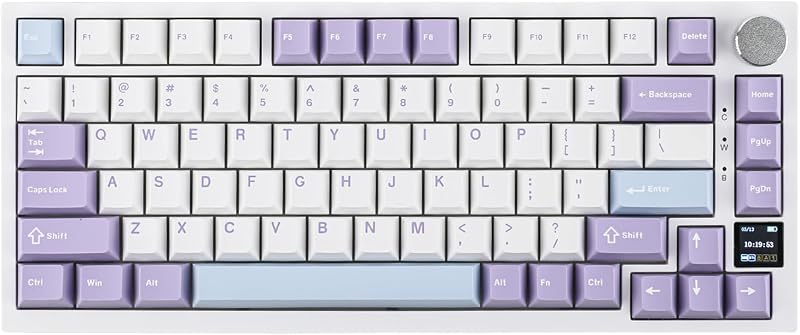
Descripción del producto EPOMAKER RT85 75% Teclado mecánico trimodal intercambiable en caliente con pantalla y joystick Configuración de teclas de acceso directo de pantalla: 1. FN+\| Encender/apagar la pantalla 2. FN+←/→/ENTER: Desplácese/haga clic en la pantalla, para configuración RGB e intercambio Mac/WIN El teclado RT85 con software EPOMAKER 3.0 (Win/Mac) cuenta con sincronización automática de hora con su dispositivo. Página anterior Página siguiente 1 Joystick intuitivo 2 Software potente 3 Para Mac/Win/Android Página anterior Página siguiente 1 Por Hipyo Tech 2 Montado en junta 3 Capacidad de la batería 4 Anti-Ghosting 5 Tasa de sondeo de 1K Página anterior Página siguiente 1 Interruptor táctil prelubricado 2 Intercambiable en caliente 3 Diseño del 75% Consejos sobre conexión, retroiluminación RGB y paquete Inalámbrico trimodal Unifique su vida digital con el RT85 EPOMAKER RT85 ofrece un dongle dedicado de 2,4 GHz para juegos de PC sin demoras, BT para movilidad Mac/Android y una conexión por cable USB-C confiable. Disfrute de una conmutación fluida y una experiencia de escritura táctil superior en todos sus dispositivos. BT5.0: Fn+Q/W/E 2,4 GHz Inalámbrico: Fn+R USB-C: Plug & Play LED por tecla orientados al sur Retroiluminación RGB dinámica Tome el control total de su iluminación RGB. El teclado RT85 RGB cuenta con 1,6 millones de colores a través de LED por tecla orientados al sur. Personalice cada tono y efecto sin esfuerzo utilizando el joystick, la pantalla integrada o el software para adaptarlo a su estado de ánimo, configuración y estilo. FN+Retroceso: enciende/apaga la retroiluminación; FN+Right_Shift: cambiar el color de la luz de fondo FN+PGUP/PGDN: alternar el efecto de luz de línea/círculo Función del joystick: izquierda/derecha = alternar efecto RGB Contenido del paquete 1* Teclado mecánico RT85 2* Interruptores adicionales y 1* Extractor de interruptor y tecla 2 en 1 1* Cable USB A-to-C desmontable y 1* Receptor inalámbrico de 2,4 Ghz (almacenado en el teclado) 1* Manual del usuario Qué Cuáles son las funciones de la pantalla? La página de información muestra el estado de conexión del teclado, el modo del sistema operativo, el porcentaje de energía y la fecha, la página multimedia permite imágenes DIY o Gif, mientras que el modo personalizado permite a los usuarios personalizar configuraciones RGB, volúmenes, etc. ¿El software del controlador RT85 es compatible con Mac? Sí, el teclado para juegos RT85 es compatible con el software EPOMAKER 3.0, que funciona en sistemas WIN y Mac. ¿Cómo funciona el joystick y cuáles son sus funciones? El joystick se utiliza inclinándolo hacia arriba, abajo, izquierda, derecha o presionándolo hacia abajo. Sus funciones son fijas y no se pueden personalizar. Arriba/Abajo=Subir/Bajar volumen, Izquierda/Derecha=Activar efecto RGB, Pulsar=Silenciar ¿Puedo rotar el joystick o asignarle mis propios comandos? No, el joystick no se puede girar y su funcionalidad no es personalizable. ¿Cuál es la forma correcta de cargar el teclado? Para una carga segura, conecte su teclado directamente al puerto USB de su computadora o a un concentrador certificado de bajo consumo. Evite los cargadores de pared de alta potencia, ya que pueden dañar la batería o representar un riesgo para la seguridad.
Agregás al carrito
Sumás este y otros productos que querés traer.
Cotizás el envío
Calculamos flete aéreo y aranceles a Argentina.
Confirmás y pagás
Online con tarjeta, o por transferencia, con el total final a la vista.
Lo recibís en casa
Seguimiento en tiempo real. El despacho lo hacemos nosotros.
De la misma marca, empezando por lo más reseñado
Los mejor puntuados del mismo tipo de producto
Mismo tipo de producto y precio parecido