Cargando el producto…

Precio de origen
$ 118.795
+ flete e impuestos
Compra protegida
Puerta a puerta
Gestión aduanera
Tu compra, acompañada de principio a fin
Todo esto está en los Términos y Condiciones. Leerlos
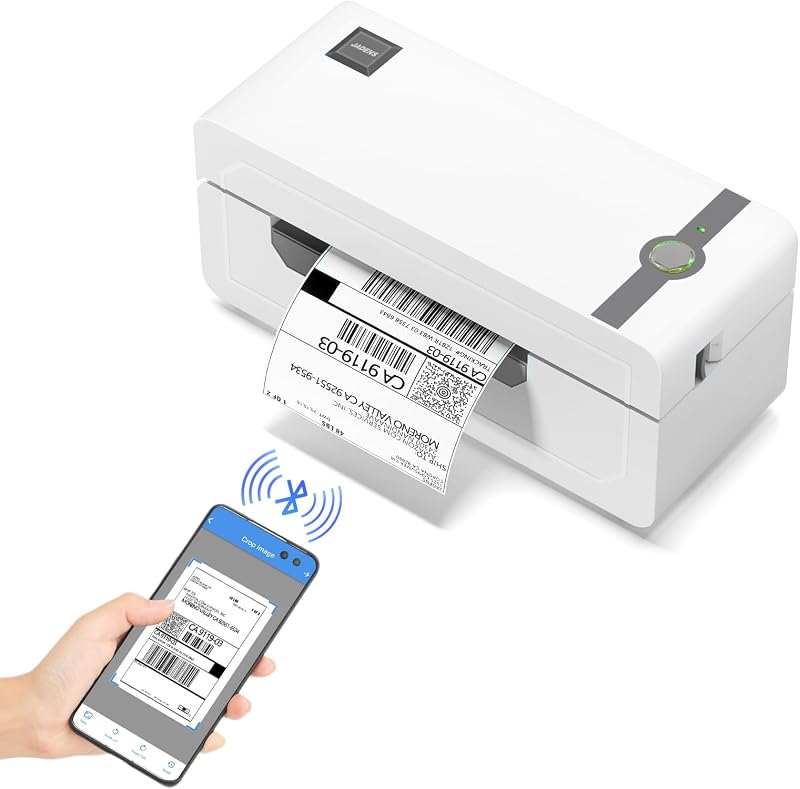
Product description ORGBRO Z1-Plus Bluetooth Thermal Label Printer Previous page Next page 1 Multi-Platform Compatible 2 High Speed and Stability 3 Multiple Label Sizes 4 Better Bluetooth Previous page Next page 1 Wide Compatibility 2 Print via Bluetooth (APP) 3 Print via Bluetooth Key 4 Print via USB Cable How to connect your phone to the printer via Bluetooth? Download the “4Barcode” app and open it. Allow APP access and open "Bluetooth".Tap "Disconnect" option in the upper-right corner of the app.Double-click the button on the top of the printer. (Note: Pairing must be completed within 30 seconds; otherwise, repeat the double-click operation.)Wait for the device to be detected, then select ‘Z1 Plus’ in the app to complete pairing. Note: Do not connect via Bluetooth directly through your phone settings. Pairing must be initiated within the app. The video showcases the product in use.The video guides you through product setup.The video compares multiple products.The video shows the product being unpacked. Connect your phone to the printer via Bluetooth Suitable for Different Use Previous page Next page More related products Bluetooth Label Printer Add to Cart Bluetooth Label Printer Buying Options 4x6 Thermal Labels Add to Cart 2" Circle Thermal Labels Buying Options Tattoo Stencil Printer Add to Cart Customer Reviews 4.2 out of 5 stars 738 3.7 out of 5 stars 108 4.6 out of 5 stars 55 4.6 out of 5 stars 55 4.5 out of 5 stars 421 Price $69.99$69.99 — $18.99$18.99 — $65.99$65.99 Pack 1 1 500 Labels 750 Labels 1 Color Black White White White Black Support Bluetooth & USB Connection Bluetooth & USB Connection 4" Thermal Label Printers 3"&4" Thermal Label Printers Bluetooth & USB Connection Printing Size Wide 0.98-4.56 inches Wide 0.98-4.56 inches 4“x6” 2"&3" A4/A5/A6 Advantage Bluetooth, High Efficiency Bluetooth, High Efficiency Using as Shipping Labels For Commercial Labels Portable, Anti-Wrinkle Why can't my phone connect to the printer via Bluetooth? 1. Double-click the feed button, then within 30 s scan the printer via the "Disconnected" button at the top right of the app (printer light flashes red/blue). 2. The computer Bluetooth Dongle must not be connected. Why is the label printed unclearly? If text is unclear: Increase density and reduce speed. lf issues persist: Clean the printhead with alcohol wipes. Why am I printing blank labels? 1. Use thermal labels. 2. Ensure labels are placed with the printed side facing up
Agregás al carrito
Sumás este y otros productos que querés traer.
Cotizás el envío
Calculamos flete aéreo y aranceles a Argentina.
Confirmás y pagás
Online con tarjeta, o por transferencia, con el total final a la vista.
Lo recibís en casa
Seguimiento en tiempo real. El despacho lo hacemos nosotros.
Lo que suele llevarse para tu celular · un solo envío para todo
Los mejor puntuados del mismo tipo de producto
Mismo tipo de producto y precio parecido
![Funda Mkeke para iPhone 14 Pro transparente [no amarillenta] | [Protección de grado militar] Funda para teléfono a prueba de golpes para Apple iPhone 14 Pro 2022](https://m.media-amazon.com/images/I/71XkP-M0RfL._AC_SL800_.jpg)