Cargando el producto…

Precio de origen
$ 52.900
+ flete e impuestos
Compra protegida
Puerta a puerta
Gestión aduanera
Tu compra, acompañada de principio a fin
Todo esto está en los Términos y Condiciones. Leerlos
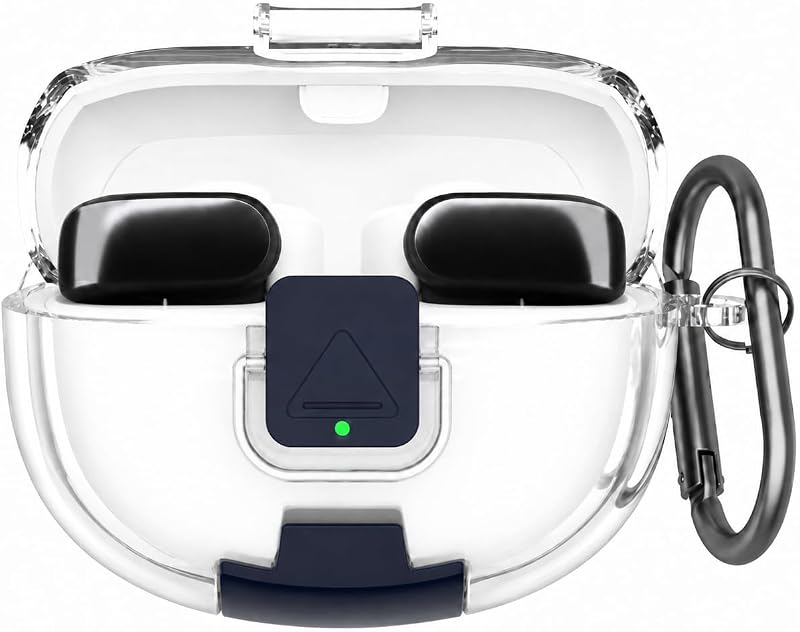
Descripción del producto Estuche de carga MIOLLYBO Reemplazo para brotes Beats Solo con batería incorporada de 660mAh A diferencia del estuche original (que no tiene batería), nuestro estuche de reemplazo cuenta con una batería incorporada de 660mAh Gran reemplazo para cuando perdiste el estuche original. El perfil delgado y que ahorra espacio es el compañero de viaje perfecto para tu bolsillo o bolso. Carga rápida, disfrute escuchando sin preocupaciones Obtenga 1 hora de tiempo de escucha con solo una carga de 5 minutos. Solo funda, auriculares no incluidos Entra en el modo de emparejamiento Coloca tus Beats Solo Buds originales dentro del estuche de carga y mantén la tapa abierta. Presiona y mantén pulsado el botón de los auriculares durante unos 5 segundos hasta que escuches un sonido de aviso, luego suéltalo. 3. Completar el emparejamiento Su teléfono buscará automáticamente el dispositivo. Espere pacientemente: evite abrir y cerrar la tapa repetidamente. Cuando aparezca una ventana emergente (o se muestre el nombre de su auricular), toque [Conectar].Si ve un mensaje que dice "No es su auricular"
Agregás al carrito
Sumás este y otros productos que querés traer.
Cotizás el envío
Calculamos flete aéreo y aranceles a Argentina.
Confirmás y pagás
Online con tarjeta, o por transferencia, con el total final a la vista.
Lo recibís en casa
Seguimiento en tiempo real. El despacho lo hacemos nosotros.
Lo que suele llevarse para tus auriculares · un solo envío para todo
Los mejor puntuados del mismo tipo de producto
Mismo tipo de producto y precio parecido