Cargando el producto…

Precio desde
$ 29.817
+ flete y aranceles — se calculan al cotizar
Tamaño
Compra protegida
Puerta a puerta
Aduana incluida
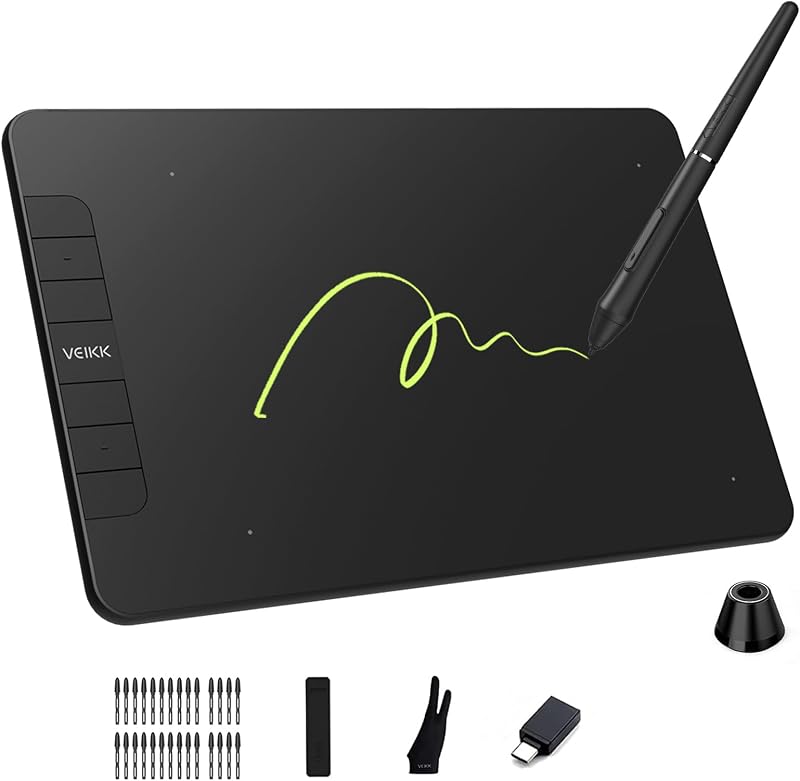
Product description 6 Custom Shortcut Keys & 2 Scroll Wheels for Faster Workflow Customize shortcut keys for zooming, brush sizing, undo, scrolling, and more to speed up digital drawing and photo editing workflows. Ideal for Photoshop, Illustrator, Krita, Clip Studio Paint, online teaching, and OSU gameplay. Large 10x6 Inch Active Area for Drawing, Editing & Teaching The large 10x6-inch active area provides more workspace for digital drawing, photo editing, online teaching, and note-taking. Ideal for beginners, students, and artists who want smoother pen movement and a more natural creative experience during long work sessions. Previous page Compatible with Windows, macOS, Linux & Android Compatible with Windows 7 or later, macOS X 10.12 or later, Linux, and Android 6.0 or above. Easily connect to your laptop, desktop, or Android phone for digital art, online teaching, remote learning. Muti-Software Support Compatible with most software,such as Adobe Creative Software, Sai, Corel Painter, MediBang Paint, Clip Studio, Krita, ibisPaint, Autodesk Sketchbook, Zbrush, Zoom, Chrome Notes and more. Start Your Drawing Journey Instead of drawing on paper, using a VK1060Pro drawing tablet to help you start your art creation easier, simply and environmently. Come join us to build a digital art world! Learn More 16384 Pressure Levels for Precise Photo Editing The 16384 levels pressure pen provides smoother and more accurate control than a mouse for photo editing, retouching, masking, and digital illustration. Ideal for Photoshop, Lightroom, Illustrator. 16384 Levels Natural Pen Control for 3D Modeling Design The 13684 pressure-sensitive pen provides smoother and more natural control for 3D modeling, sculpting, animation, and digital design. Ideal for Blender, ZBrush, Maya, and other creative software. 3D Sculpting Learn or Work From Home Whether your learning or job requires a lot of annotations or video conference presentations, VK1060Pro will make it easier to interact with and engage your students, teachers or colleagues. Learn More Next page VEIKK Creator Series Drawing Tablet VK1060PRO Graphic Tablet Add to Cart A30 Drawing Tablet Add to Cart VK430 OSU Tablet Add to Cart VK640 Signature Pad Add to Cart A15PRO Tablet Buying Options Customer Reviews 4.3 out of 5 stars 1,689 4.3 out of 5 stars 4,696 4.3 out of 5 stars 1,689 4.4 out of 5 stars 891 4.2 out of 5 stars 160 Price $45.89$45.89 $43.62$43.62 $18.99$18.99 $28.99$28.99 — Work Area (Inch) 10 x 6 Inch 10 x 6 Inch 4 x 3 Inch 6 x 4 Inch 10 x 6 Inch Express Keys 6 Express Keys&2 Scroll Wheels 4 Touch Keys&Gesture Touch Pad 4 Shortcut Keys 6 Express Keys 12 Express Keys&1 Scroll Wheel Interface USB-C USB-C USB-C USB-C USB-C Pen Pressure 16384 Levels 16384 Levels 16384 Levels 16384 Levels 16384 Levels Tilt ✔ ✔ ✘ ✔ ✔ Report Rate 290PPS 290PPS 290PPS 290PPS 290PPS Phone OS Support Android 6.0 above,Harmony OS Android 6.0 above,Harmony OS Android 6.0 above,Harmony OS Android 6.0 above,Harmony OS Android 6.0 above,Harmony OS PC OS Support Windows/Mac/Linux OS Windows/Mac/Linux OS Windows/Mac/Linux OS Windows/Mac/Linux OS Windows/Mac/Linux OS Is this drawing tablet good for beginners? Yes. The VEIKK VK1060Pro is beginner-friendly. The large 10x6-inch active area, customizable shortcut keys, and 16384 pressure-sensitive battery-free pen make it suitable for first-time drawing tablet users. Does it work with Photoshop? Yes. The tablet is compatible with Photoshop and other popular creative software including Illustrator, Krita, Clip Studio Paint, Medibang, ibisPaint, and more. Pen pressure support works after installing the VEIKK driver. Can it connect to Android? Yes. The VK1060Pro supports Android 6.0 or later devices through OTG connection. OTG adapters are included in the package for compatible Android phones and tablets. Compatibility may vary depending on the phone model. Is the pen battery-free? Yes. The stylus is battery-free and does not require charging or battery replacement, allowing uninterrupted drawing and longer creative sessions. Does it support left-handed mode? Yes. The VK1060Pro supports both right-handed and left-handed users through driver settings and tablet orientation adjustment.
Agregás al carrito
Sumás este y otros productos que querés traer.
Cotizás el envío
Calculamos flete aéreo y aranceles a Argentina.
Confirmás y pagás
Un asesor te contacta con el link de pago.
Lo recibís en casa
Tracking en tiempo real. Aduana incluida.
De la misma marca, empezando por lo más reseñado
Los mejor puntuados del mismo tipo de producto
Mismo tipo de producto y precio parecido