Cargando el producto…
Precio desde
$ 372.379
+ flete e impuestos
Color
Compra protegida
Puerta a puerta
Gestión aduanera
Tu compra, acompañada de principio a fin
Todo esto está en los Términos y Condiciones. Leerlos
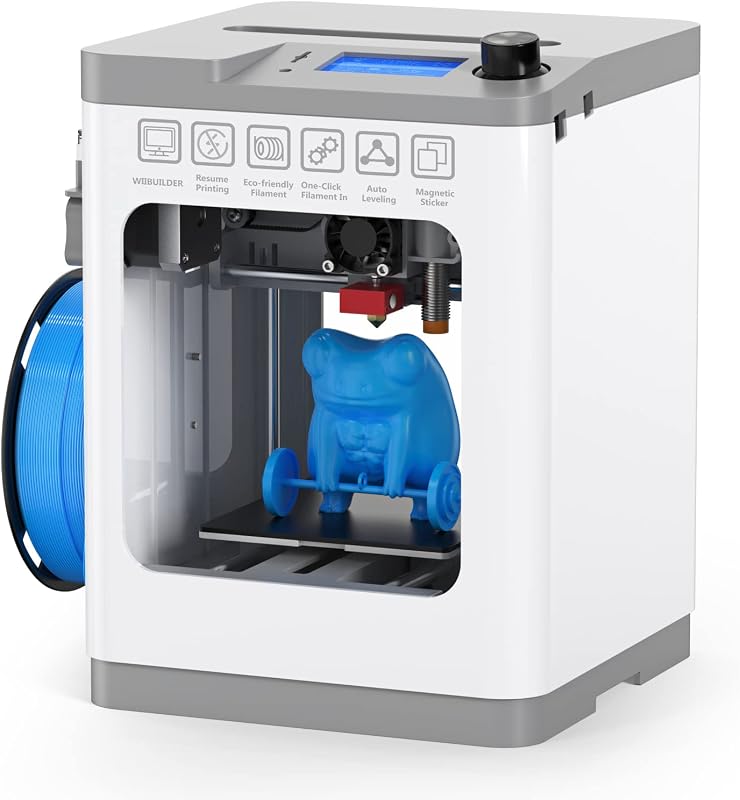
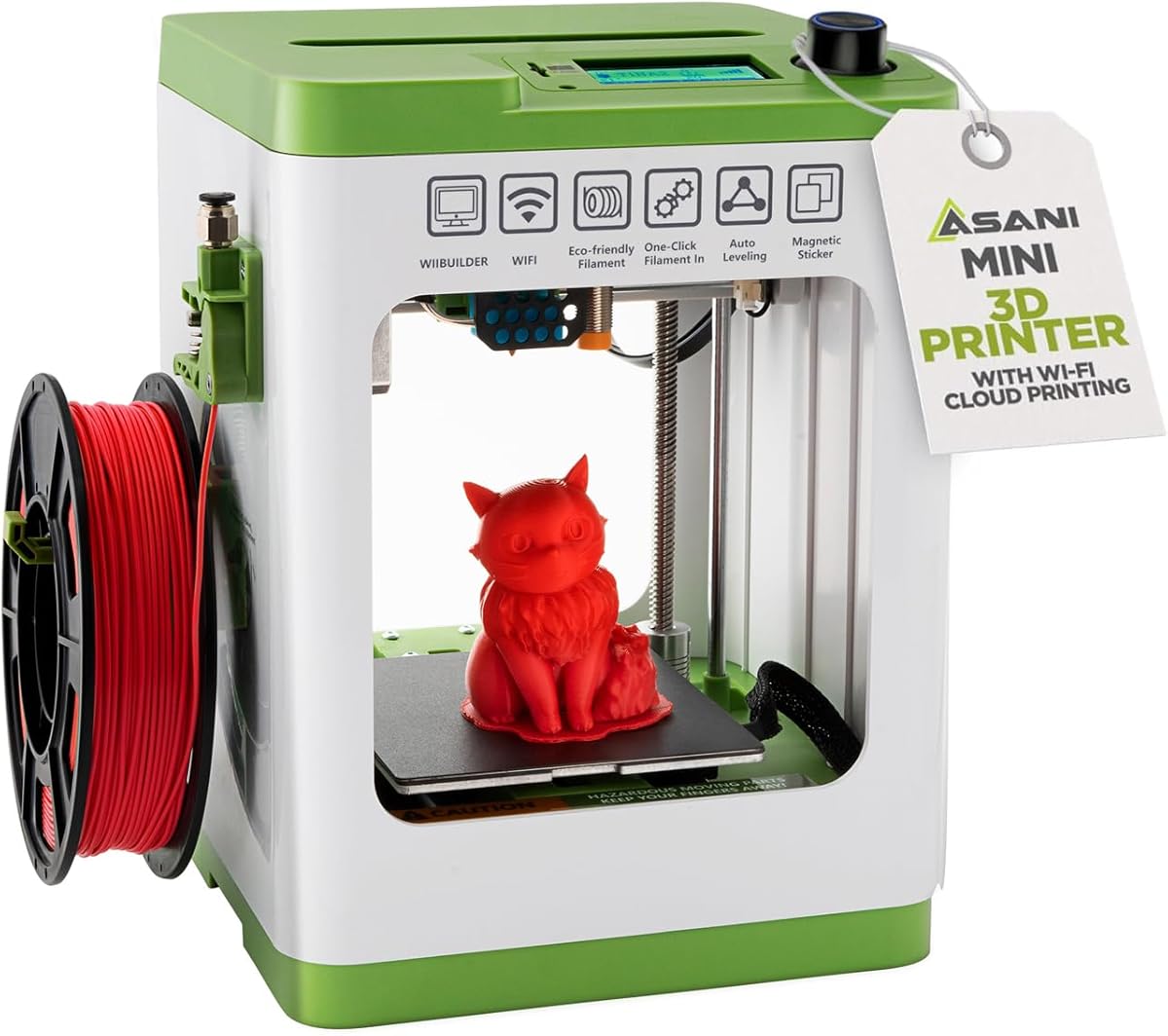
Descripción del producto LA IMPRESIÓN 3D ES MUY FÁCIL Comenzar a utilizar la impresión 3D no tiene por qué significar una configuración compleja ni controles alucinantes. No tiene por qué significar realizar microajustes constantes y lidiar con hardware voluminoso. Conozca nuestra mini impresora doméstica 3D: ¡la forma más fácil de explorar esta nueva y emocionante frontera! - Completamente ensamblado: listo para salir de la caja. - Riel de doble eje Z: Estabilidad extra para impresión de alta precisión. - Pausa activa: Más control durante el proceso de impresión. - Compacto y liviano: ideal para uso doméstico, aulas y dormitorios. - Carga de filamento con una sola tecla: alimente y retraiga el filamento con solo presionar un botón. - Reanudar impresión: Ahorra tiempo y material en caso de un corte de energía inesperado. - Código totalmente abierto: funciona con los principales sistemas operativos y software de empalme. - Pantalla LCD de 2,4": acceda a la configuración y muestre el estado de la máquina. - Nivelación automática: un sensor de proximidad garantiza una distancia uniforme entre la boquilla y la base de impresión. - Placa de construcción flexible magnética y extraíble: se separa fácilmente y se puede doblar para retirar la impresión sin complicaciones. Preguntas frecuentes/solución de problemas: ¿Se requiere WiFI para imprimir? - No. Solo se necesita WiFi si va a imprimir desde la aplicación móvil. La impresora también se puede conectar mediante USB directamente a su computadora o computadora portátil. También puede copiar archivos de impresión 3D a la tarjeta MicroSD y luego inserte la tarjeta en la impresora para imprimir directamente. ¿Por qué la impresora crea un desorden parecido a espagueti al COMIENZO de la impresión? - Esta es una señal reveladora de que es necesario calibrar la configuración de desplazamiento z para que el espacio entre la boquilla y la base de impresión esté a la distancia óptima para que la primera capa se adhiera a la base. Aunque esto se ajusta en fábrica, es posible que sea necesario ajustarlo ocasionalmente debido a fuerzas de envío o cambios de temperatura que causan que las piezas se expandan o contraigan. Aquí se explica cómo: Vaya a > Menú > Control > Compensación Z de la sonda y espere a que finalice el breve procedimiento de calibración y a que la boquilla baje justo encima de la base. Utilice un trozo de papel de copia, doblado por la mitad (para producir 2 capas de papel), para colocarlo entre la boquilla y la base para medir el espacio (~0,2 mm es el espacio óptimo). Utilice la perilla de control para ajustar el espacio de modo que el papel tenga cierta resistencia pero aún pueda deslizar el papel. Luego presione la perilla de control para configurar el Desplazamiento Z. Ahora estás listo para imprimir ¿Qué filamento utiliza esta impresora? ¿Dónde puedo comprar más? Esta impresora utiliza filamentos PLA, PLA pro y TPU de 1,75 mm de tamaño estándar. El portacarretes integrado puede contener tamaños de carretes de hasta 250 gramos. Si utiliza carretes más grandes, necesitará utilizar un portacarretes externo (no incluido). Las bobinas de filamento PLA están disponibles en Amazon y en cualquier tienda que venda impresoras 3D. Hacer una búsqueda en Amazon de "filamento PLA de 250 g" arrojará muchos resultados que se adaptarán a esta impresora. Mi proyecto está atascado en la placa y no puedo quitarlo. Si su proyecto terminó de imprimirse y tiene dificultades para quitarlo, retire la placa de base magnética de la impresora y doble la placa de base hacia adelante y hacia atrás hasta que se suelte la impresión. Calentar primero manualmente el plato también hará que sea más fácil soltarlo y despegarlo. Recibo un error de descarga al imprimir desde la aplicación. Verifique que la tarjeta MicroSD esté completamente insertada en la impresora. En la mayoría de los casos, la tarjeta ya está instalada en la ranura de la impresora. Si no lo ves preinstalado, compruébalo en la bolsa de accesorios. Especificaciones del producto: Peso: 6,6 libras Precisión de impresión: 0,01 mm Tamaño: 8,3" x 8,3" x 11,4" pulgadas Volumen de impresión: 3,9" 3,9" x 4,7" pulgadas Conectividad: WiFi, USB, tarjeta Micro SD (cable y tarjeta incluidos) Compatibilidad del sistema operativo: Windows, MAC, LinuxFilamentos compatibles: 1,75 mm PLA, PLA pro, TPUCompatibilidad de software: Cura, Simplify3d, Slicr3d, WiiBuilder y más. También se incluye con este producto: Tarjeta MicroSD con lector de tarjetas USB Boquilla de repuesto para filamento PLA de 10 M con llave Adaptador de CA Guía de instalación rápida Placa de base magnética Barra de pegamento Lleno de funciones Pantalla multilínea de 2,4" La combinación de la pantalla LCD retroiluminada de 2,4" y el control de perilla de lanzadera permite una selección rápida de elementos y acciones del menú. La pantalla de inicio muestra una amplia gama de información, como la temperatura de la boquilla, la posición actual, x/y/z, el tiempo estimado restante para completarla, el progreso de la impresión, así como la dirección IP de la red y la intensidad de la señal WIFI. Con un par de movimientos del mando, también puedes pausar y reanudar rápidamente la impresión. Capacidad Wifi con control de aplicación móvil El TINA2S está diseñado para funcionar con PoloPrint Cloud, que ofrece control directo de la impresora con su teléfono. Descargue archivos de impresión 3D en línea y comience el trabajo de impresión directamente desde su teléfono. Y si su impresora está conectada a la red, incluso puede acceder a ella de forma remota fuera de casa mientras está en el trabajo o en la escuela para comprobar el progreso, pausar o reanudar. Precisión y velocidad No se deje engañar por el pequeño tamaño y el precio del TINA2S. Esta pequeña impresora 3D es totalmente capaz de imprimir rápidamente (~200 m/seg) con un alto nivel de detalle.
Agregás al carrito
Sumás este y otros productos que querés traer.
Cotizás el envío
Calculamos flete aéreo y aranceles a Argentina.
Confirmás y pagás
Online con tarjeta, o por transferencia, con el total final a la vista.
Lo recibís en casa
Seguimiento en tiempo real. El despacho lo hacemos nosotros.
De la misma marca, empezando por lo más reseñado
Los mejor puntuados del mismo tipo de producto
Mismo tipo de producto y precio parecido